
What the university has stated
Osaka Metropolitan University (OMU) is a public university with five campuses in Osaka Prefecture. It was formed in 2022 by merging Osaka City University and Osaka Prefecture University.
Its systems began failing around 00:30 JST on Friday 2 October 2026. OMU entrance page. The university issued two notices that day, then explained the cause at a press conference on Monday 5 October.
The two notices of 2 October said:
- Scope. The whole information infrastructure was down on every campus: the network, university email, the portal and the academic systems. First notice (Japanese).
- How it was found. The university learned of it through a call from a vendor. Its systems department and its operations contractor were investigating.
- What still worked. The university hospital and the Veterinary Clinical Center reported no impact on their systems. The online application and enrolment sites run on outside servers and kept working. Second notice (Japanese).
- Classes. All classes cancelled until Thursday 8 October. Face-to-face teaching resumes from Friday 9 October. Online teaching resumes when the systems allow.
At the press conference of 5 October, as reported by MBS, Kyodo and Jiji:
- Cause. The university judged that it had been hit by ransomware. MBS (Japanese).
- Where. The attacker got into the virtualisation platform that the university's information systems run on. About 500 servers stopped. Kyodo reports that traces of altered data were also found. Kyodo (Japanese).
- Backups. Much of the backup data was encrypted and cannot be used. There is no estimate for recovery.
- Personal data. The systems hold data on at least 130,000 students and graduates: names, addresses, email addresses and mobile numbers (MBS), and student ID photos (Kyodo). Whether it left the network is still being investigated. Jiji (Japanese).
- How far back. The 130,000 include students of the two predecessor universities: Osaka City University from 1995 and Osaka Prefecture University from 2005 (MBS).
- Reports. The university reported to the Osaka Prefectural Police and the education ministry, and on 5 October contacted the Personal Information Protection Commission (Kyodo).
- Ransom. Asked about a ransom demand, the university declined to comment because the investigation is under way. Asahi (Japanese).
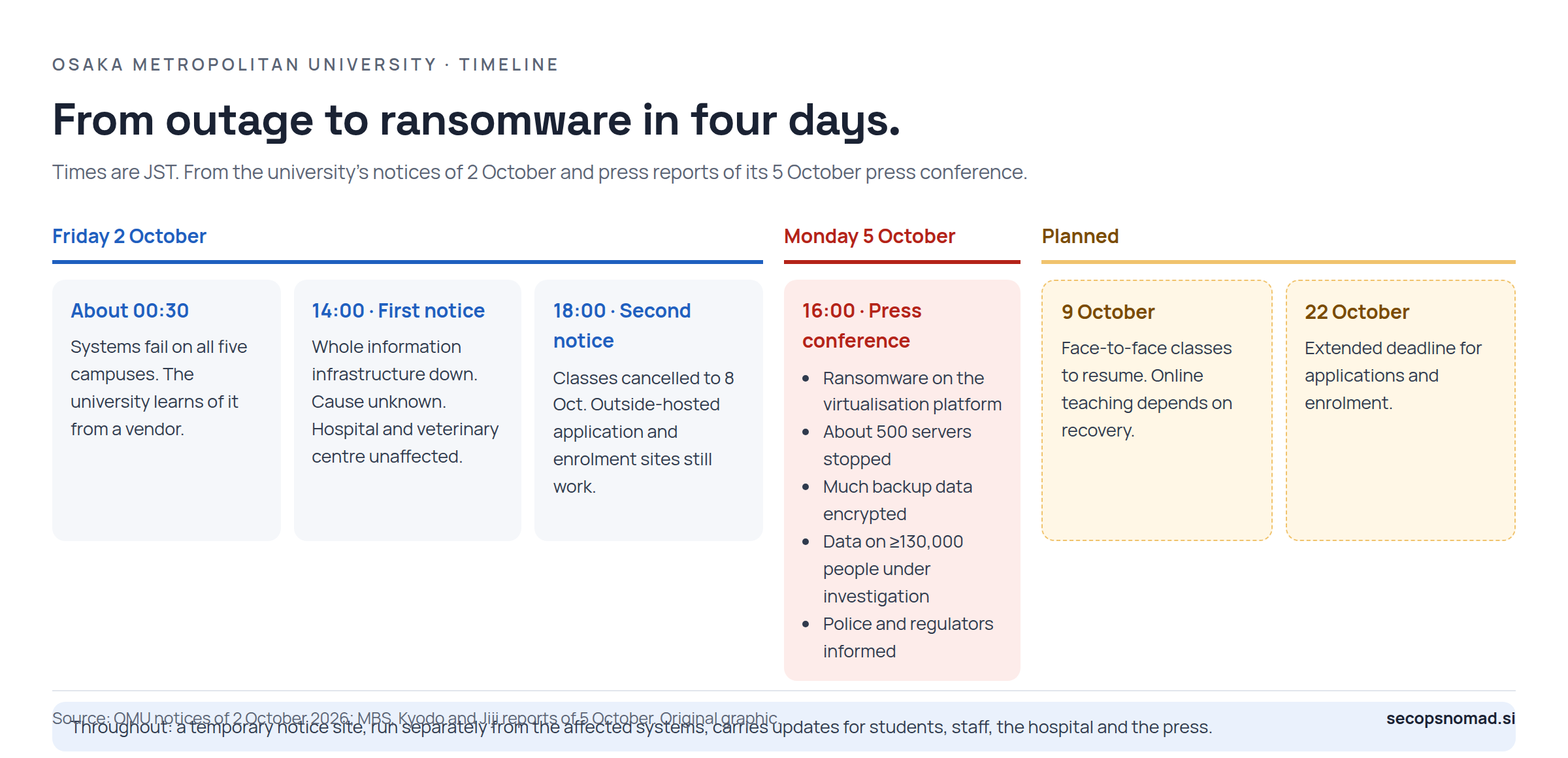
Figure 1. From outage to ransomware in four days. Original graphic.
The university has not named the attacker, the ransomware, the virtualisation product or how the attacker got in. Its official website is still down. Updates go to a temporary notice site, omu.moe, which the university's own entrance page links to. MBS reports that this site runs separately from the affected systems.
What changes in the security review
One platform, one blast radius
Editorial assessment. About 500 servers went down together because they shared one virtualisation platform. Email, the portal, academic systems and student records ran as guests on the same hosts. An attacker who controls the platform's management layer does not need to break into each server. They can stop or encrypt the virtual machines from underneath.
So the management layer is the asset to defend, not each server one by one. Check four things:
- Separate admin identities. Accounts that manage hypervisors and their management server should not be ordinary directory accounts. Ideally they do not depend on the directory that an intruder is most likely to control.
- MFA and a management network. Management interfaces should be reachable only from dedicated admin hosts on an isolated network, never from the campus or office network.
- Patch the platform as a priority. Hypervisors are often patched last because maintenance means downtime for everything on them. That is the reason to patch them first.
- Watch the management layer. Log sign-ins, role changes, mass power-offs and datastore changes, and send those logs somewhere the platform's own admins cannot erase.
Backups the attacker could reach
Editorial assessment. Encrypted servers can be rebuilt. Encrypted backups are what turn an outage of days into an outage of weeks. If much of OMU's backup data was encrypted, then at least that part of the backup system could be reached and written to from the environment that was compromised.
The checks for any organisation:
- At least one copy the production side cannot change. Offline, or immutable storage with a retention lock that production admins cannot shorten.
- Separate credentials. The backup console should not trust the same directory or admin accounts as production.
- Restore tests that measure time, not just success. "How long to restore the virtualisation platform itself, then 500 servers?" is the question this incident answers in the worst way.
- Know what is in scope. Make sure the identity, mail and student record systems are included, not only file shares.
A notice channel that does not share the fault
OMU had its first public notice out by 14:00 on the day. The application and enrolment sites, hosted outside, kept running. A temporary notice site, separate from the core systems, carried updates for students, staff, the hospital and the press.
Editorial assessment. This part worked, and it is worth copying. Prepare a status page and a contact route that share nothing with the main platform: different hosting, different DNS management, different admin accounts. Decide in advance who can post to it when university email is down.
Fallbacks create openings
With university email down, OMU asked students applying for financial support to register a personal address, such as Gmail. Scholarship notice (Japanese). That was a practical choice. It also means students are now used to official requests arriving outside the usual channel, during a crisis, while their contact details may have leaked.
Editorial assessment. Expect phishing in the university's name: "re-register your account", "confirm your scholarship", "reset your password after the incident". Tell students and graduates which channels the university will use and what it will never ask for. Bring them back to the official address once mail is restored.
Thirty-one years of records
The data at risk goes back to 1995 for one predecessor university. Graduates who left decades ago are among the 130,000.
Editorial assessment. Merged institutions inherit old systems and old records. Every record kept past its purpose is one more record to report when the system holding it is breached. Retention rules should cover graduates and former staff, not only current members.
Which teams should act
| Team | Practical next step |
|---|---|
| IT operations | Move hypervisor and backup administration onto separate admin accounts with MFA, reachable only from an isolated admin network. Confirm one immutable or offline backup copy exists, and time a full restore. |
| SIEM / SOC | Forward hypervisor, management server and backup console logs to a store their admins cannot alter. Alert on new admin roles, mass power-offs, backup job deletions and retention changes. Run the hunts below. |
| EDR | Make sure tampering with recovery points and backups on Windows servers raises an alert, and that response actions can isolate hosts. Hypervisors usually run no EDR agent, so management-layer logs are the substitute. |
| Legal / privacy | Check retention for graduates and former staff. If you share data with a university, such as joint research or student placements, ask what of yours sat on the affected systems. |
| Email security | Expect phishing that uses OMU's name, its incident and its fallback channels. If your staff include OMU students or graduates, warn them. |
| Third-party risk | For outsourced infrastructure operations, ask who holds the hypervisor and backup admin credentials, how they are protected, and who would notice misuse. OMU learned of its incident through a vendor. |
IOCs and hunting
No indicators are published. The university has not named the ransomware or the attacker, or released hashes, file names, IP addresses or domains. None should be inferred, and nothing in this article links OMU to a particular group or product.
The hunts below look for behaviour that commonly comes before mass encryption in ransomware cases. They are for your own environment. All are illustrative and were not run against live data. Table and field names were checked against Microsoft Learn and Splunk documentation on 5 October 2026.
1. Deleting Windows recovery points and backup catalogues. Microsoft Defender XDR advanced hunting, DeviceProcessEvents (Defender for Endpoint). Backup software and administrators can legitimately run some of these commands. Check the account, the parent process and whether a change was planned.
// Illustrative; not run against live data. Microsoft Defender XDR advanced hunting.
// Commands that delete shadow copies or backup catalogues, or disable Windows recovery.
DeviceProcessEvents
| where Timestamp > ago(7d)
| where (FileName =~ "vssadmin.exe" and ProcessCommandLine has "delete" and ProcessCommandLine has "shadows")
    or (FileName =~ "wmic.exe" and ProcessCommandLine has "shadowcopy" and ProcessCommandLine has "delete")
    or (FileName =~ "wbadmin.exe" and ProcessCommandLine has "delete")
    or (FileName =~ "bcdedit.exe" and ProcessCommandLine has "recoveryenabled")
    or (FileName in~ ("powershell.exe", "pwsh.exe") and ProcessCommandLine contains "Win32_ShadowCopy")
| project Timestamp, DeviceName, AccountDomain, AccountName, FileName, ProcessCommandLine,
    InitiatingProcessFileName, InitiatingProcessCommandLine
| order by Timestamp desc
| take 200
2. The same check in Splunk. Sysmon process creation events (Event ID 1) collected with the Splunk Add-on for Sysmon, with the fields Image, CommandLine, ParentImage, User and Computer. Replace the index.
index="REPLACE_WITH_WINDOWS_INDEX" source="XmlWinEventLog:Microsoft-Windows-Sysmon/Operational" EventCode=1 earliest=-7d latest=now
| eval image=lower(mvindex(split(Image, "\\"), -1)), cmd=lower(CommandLine)
| where (image="vssadmin.exe" AND like(cmd, "%delete%shadows%"))
    OR (image="wmic.exe" AND like(cmd, "%shadowcopy%delete%"))
    OR (image="wbadmin.exe" AND like(cmd, "%delete%"))
    OR (image="bcdedit.exe" AND like(cmd, "%recoveryenabled%"))
    OR (image IN ("powershell.exe", "pwsh.exe") AND like(cmd, "%win32_shadowcopy%"))
| table _time Computer User ParentImage Image CommandLine
| sort 0 - _time
| head 200
3. A directory group that grants hypervisor admin rights. Relevant only if you run VMware ESXi hosts joined to Active Directory. OMU has not said which virtualisation product it uses. In 2024 Microsoft reported that ransomware operators created a domain group named "ESX Admins", because unpatched domain-joined ESXi hosts give that group full admin rights (CVE-2024-37085). Microsoft Security blog. Broadcom's advisory names the default group "ESXi Admins", so the query checks both. Microsoft Sentinel, SecurityEvent table, with domain controller Security logs collected (group management auditing on).
// Illustrative; not run against live data. Microsoft Sentinel, SecurityEvent (domain controller Security log).
// Creation of, or membership changes to, a group that ESXi may treat as administrators.
SecurityEvent
| where TimeGenerated > ago(30d)
| where EventID in (4727, 4728, 4731, 4732, 4737, 4754, 4755, 4756)
| where TargetUserName in~ ("ESX Admins", "ESXi Admins")
| project TimeGenerated, Computer, EventID, Activity, SubjectAccount, MemberName, TargetUserName
| order by TimeGenerated desc
| take 100
If the group exists and you did not create it on purpose, treat that as an incident. If you rely on it, patch the hosts and check who its members are. Beyond this, the most useful evidence is in the hypervisor management logs themselves. Few organisations forward them to a SIEM, and that is the gap to close first.
Read the results with these limits in mind:
- A match is a lead, not proof. Confirm it with the account owner and the change record.
- No match is not proof of safety. Logs may be missing, out of retention, or deleted by the attacker.
- None of these queries sees inside a hypervisor or a backup appliance. Use those products' own logs.
- DeviceProcessEvents; SecurityEvent.
What remains unknown
- How the attacker got in, and how long they were inside before 2 October.
- Which virtualisation and backup products were involved, and why some backups survived and others did not.
- Whether data was taken. The 130,000 figure is what the systems held, not a confirmed leak.
- Whether there is a ransom demand or a claim of responsibility.
- What "altered data" means in Kyodo's report.
- How long recovery will take. No estimate has been given.
- Why the hospital systems were unaffected. The university has not described its architecture.
Sources and updates
- OMU: 本学情報基盤システムにおける障害の発生について【第1報】 (Japanese), 2 October 2026, 14:00 JST
- OMU: 本学情報基盤システムにおける障害の発生について【第2報】 (Japanese), 2 October 2026, 18:00 JST
- OMU: scholarship application notice (Japanese), 2 October 2026
- OMU entrance page, incident and status notices
- MBS News: press conference report (Japanese), 5 October 2026, 16:10 JST
- Kyodo via 47NEWS: 大阪公立大にランサム攻撃 (Japanese), 5 October 2026, 19:11 JST
- Jiji: 13万人分流出恐れ (Japanese), 5 October 2026
- Asahi Shimbun: press conference report (Japanese), 5 October 2026
- Microsoft Security blog: ransomware operators exploit ESXi hypervisor vulnerability, 29 July 2024
All sources were read on 5 October 2026, up to about 19:30 JST. As of then, the university had not posted a written statement of the 5 October press conference on its temporary site; the press conference details above come from the news reports cited. A HackRisk.io summary was the prompt for this article but was not used as a source of facts. This article will be updated when the university publishes its own statement or investigation results. No corrections so far.