The servers answered. Between August and October 2026, at least ten Japanese companies said customer data left through their own apps, APIs or lookup pages: the mechanism that shows members their own data, a booking page that needed no login, a member-information API, a parcel lookup. On 8 October JPCERT/CC warned of API abuse behind that autumn’s large leaks, and on 13 October Japan’s National Institute of Information and Communications Technology (NICT) named the pattern: read a company’s app, then attack the servers behind it.
This guide is the work to do before that happens to you, in the order it pays off: find every API you run, test each one for the failures in those notices, fix what fails and watch for abuse. It is written for companies that publish an app or a member site, and for the system integrators who build them. If data has already left, use our API data exposure playbook instead; it covers containment, scoping and the report to the regulator.
What went wrong, in the companies’ own words
Most notices describe the route in a sentence. Read together, they describe a short list of weaknesses. The mapping in the last two columns is ours: no company below has published a root cause beyond the words quoted.
| Company (disclosed) | What the notice says | Records | Consistent with (OWASP API Top 10 2023) | Tests below |
|---|---|---|---|---|
| Lawson ID (8 October) | Data came out through the mechanism meant to show users their own information in the app; access on 12–14 and 17 September | 2,155,345 accounts | API1 Broken object level authorization | 2, 3 |
| Skyticket, one of three routes (9 October) | A bus booking completion page could be viewed without logging in and was read by machine from 3 August to 1 October | About 12,000 bookings | API2 Broken authentication; API1 | 1, 3 |
| SourceNext (15 October) | A member-information API was misused from about 10:00 on 9 October until it was shut off at 13:36 on 13 October | Up to 22,519,960 | Not stated. Four days of reading is consistent with API4 Unrestricted resource consumption | 7 |
| Sagawa Express (1 October) | A third party gained unauthorized access to the parcel-tracking service on its website on 30 September; sender and recipient data covering about 100 days may have leaked | No count given | API6 Unrestricted access to sensitive business flows | 3, 7 |
| Unni | An API that returns consultation history was abused | About 48,000 users in Japan | API1 | 2 |
| Seicomart app | The member server was reached through the app server | 572,022 people | Not stated; the app-server-to-member-server path is the one NICT describes | 6, 11, 12 |
| StudySapuri | A specification flaw let a third party confirm that email addresses were registered | 3,687 addresses | API2 (account enumeration) | 8 |
| JPCERT/CC, case B (no names) | Endpoints and keys taken from public apps; internal APIs the app’s screens never call used to change privileges and create accounts; responses compared with and without headers or with malformed tokens; NoSQL injection; API keys stolen elsewhere | n/a | API5 Broken function level authorization; API9 Improper inventory management; API2; API8 | 6, 9, 10, 11, 13 |
| NICT, A2B attack (13 October) | Attackers analyse a published app to learn its servers and APIs, then attack those servers: SSRF, remote code execution, SQL injection and IDOR | n/a | API7 Server side request forgery; API8 Security misconfiguration; API1 | 2, 11, 12 |
Sources for each row are in our analyses of Lawson, Skyticket and the A2B alert, SourceNext and Sagawa, and in our 60-day review, which lists every notice. JPCERT/CC, JPCERT-AT-2026-0030 (Japanese) · NICT (Japanese) · NICT alert, PDF (Japanese) · OWASP API Security Top 10 2023
Some of the largest app notices say nothing about the route: Yakiniku King (10,788,963 records) and Burger King Japan (about 11.18 million, our analysis). Do not read them as API cases. Do read the list above as the tests your own APIs have to pass.
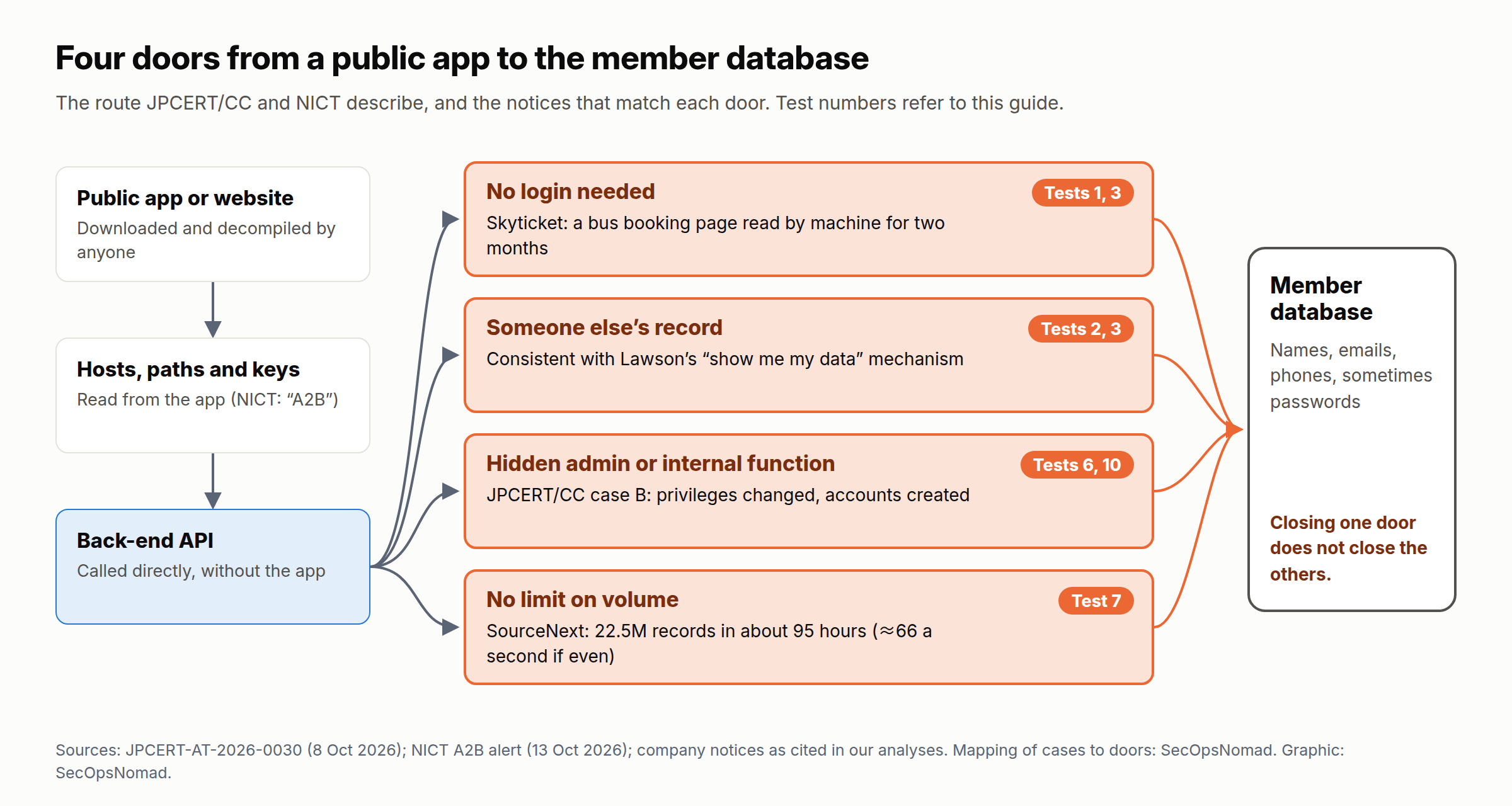
Figure 1. Four doors from a public app to the member database, and the tests that find each one. Original graphic for this article.
The attacker’s playbook
How a red team would run this pattern against you. A model mapped to MITRE ATT&CK, built from the JPCERT/CC and NICT descriptions, not a reconstruction of any one company’s breach.
| Stage | What it looks like | ATT&CK |
|---|---|---|
| Read the app | Download the public Android or iOS app, decompile it, list every host, path, parameter and string that looks like a key; open the web front end and read its JavaScript | T1594 Search Victim-Owned Websites; T1592 Gather Victim Host Information |
| Use what the app carries | Call the API with keys found in the app, or keys stolen in other breaches | T1552.001 Credentials In Files; T1078 Valid Accounts |
| Find the open door | Call each endpoint with no login, with the attacker’s own account and someone else’s ID, with headers removed or tokens malformed; call admin and internal paths the screens never use | T1190 Exploit Public-Facing Application |
| Change what it can | Use internal or management APIs to raise privileges, create accounts or rewrite data, as JPCERT/CC reports in some cases | T1136 Create Account; T1565.001 Stored Data Manipulation |
| Take it all | Script the calls, walk the IDs, keep going for days below any alert | T1119 Automated Collection; T1213 Data from Information Repositories |
| Use the data | Phishing in the company’s name, credential stuffing with email and password pairs | T1566 Phishing; T1110.004 Credential Stuffing |
The attacker needs no flaw in the app itself. Everything that decides who may read what has to happen on the server, because the app, its code and its keys are in the attacker’s hands.
Step 1. Find every API you run
You cannot test what you have not listed, and attackers start from the same place you should: your published app. Work through all six sources; each finds APIs the others miss.
| Source | How | What it finds |
|---|---|---|
| Your own release apps | Decompile your own Android and iOS release builds with jadx or MobSF; list every host, path and key-like string | Back-end hosts, hidden and admin paths, test hosts, keys shipped to every phone |
| Web front ends | Walk every screen with the browser’s developer tools open on the Network tab; search the JavaScript bundles and source maps | Routes the website calls, GraphQL endpoints and schemas |
| Gateways and clouds | aws apigateway get-rest-apis, aws apigatewayv2 get-apis, az apim api list, load balancer listeners |
The APIs you published on purpose |
| Traffic | Query 1 below: every route that answered in the last 30 days | Routes nobody listed: old versions, debug routes, partner endpoints |
| Certificates and DNS | Certificate-transparency logs (for example crt.sh) for api., stg., dev. and admin. names under your domains |
Forgotten hosts and environments |
| Contracts | Ask each system integrator and app vendor for the OpenAPI definition and a list of every endpoint, including admin, batch and partner ones | APIs built for you that you never documented |
The output is an API register: one row per endpoint, with host, path and method; who calls it (app, web, partner, staff); how it authenticates; which object IDs it takes; what personal data it returns; the owner and the vendor; its rate limit; whether its logs record the object ID; when it was last tested; and its status. A template is at the end of this guide.
Decision rule: an endpoint with no owner, or no reason to exist, is switched off. NICT’s interim advice is the same: stop unneeded APIs, admin functions and test environments.
Step 2. Test each endpoint: 13 tests
Test only systems you own, or that you have written permission to test. Testing someone else’s API without permission can be an offence under Japan’s Unauthorized Computer Access Act. Use a staging environment configured like production, two test customers (A and B) and a log of every request and response.
| # | Test | How | Pass | OWASP API 2023 | Seen in |
|---|---|---|---|---|---|
| 1 | No login | Repeat each request with the token or cookie removed | 401 from every endpoint that returns customer data | API2 | Skyticket’s bus booking page |
| 2 | Someone else’s record | Signed in as A, request B’s record by B’s ID | 403 or 404; never B’s data | API1 | Consistent with Lawson; Unni |
| 3 | Guessable IDs | Are IDs sequential, short or meaningful (member, booking, tracking or phone numbers)? | Random IDs, and test 2 still passes; randomness never replaces test 2 | API1, API6 | Sagawa; Skyticket |
| 4 | Extra fields | Compare every response with what the screen shows | No field the screen does not use; never passwords, hashes, tokens or internal flags | API3 | SourceNext (passwords in scope) |
| 5 | Writing fields you should not | Send role, points, email or owner fields in an update | Ignored or rejected | API3 | JPCERT/CC case B (privileges changed) |
| 6 | Hidden functions | With A’s token, call the admin and internal paths found in step 1 | 403; better, not reachable from the internet at all | API5, API9 | JPCERT/CC case B |
| 7 | Volume | Script 1,000 lookups in one minute from one account and one address | Throttled (429) long before 1,000, and an alert raised | API4, API6 | SourceNext; Sagawa |
| 8 | “Is this email registered?” | Sign-in, sign-up and password reset with a registered and an unregistered address | Same response and same timing | API2 | StudySapuri |
| 9 | Broken tokens | Expired, malformed, another user’s and missing-header variants | All refused the same way, with no extra detail in the error | API2 | JPCERT/CC case B (responses compared) |
| 10 | Old versions and test hosts | Call /v1/, /old/ and staging hosts with the same requests |
Switched off, or the same controls and no production data | API9 | NICT (old APIs, test environments) |
| 11 | Injection | SQL and NoSQL operators in search and filter parameters, with a scanner | Rejected; parameterised queries | API8 | NICT (SQL injection); JPCERT/CC (NoSQL injection) |
| 12 | URL fetching | Any parameter that takes a URL: image import, webhook, preview | Only allow-listed destinations; no internal addresses or cloud metadata endpoint | API7 | NICT (SSRF) |
| 13 | Keys in the app | Strings in the app package that look like keys or tokens | None that grant data access; any found is rotated | API2, API8 | NICT; JPCERT/CC (keys from apps) |
Tools. OWASP ZAP imports an OpenAPI definition and scans a staging API. Burp Suite’s Autorize extension replays customer A’s requests with customer B’s session, which automates test 2 across a whole app. Keep tests 1, 2, 4 and 6 as automated tests in the build pipeline: one “A cannot read B” test for every endpoint, so a new release cannot reopen a fixed door.
Step 3. Fix what fails
In order of how much data each fix protects.
- Authorize every object on the server (tests 1–3). Take the caller from the verified token, never from a parameter. Load the record with the owner in the condition, for example
WHERE id = :id AND owner_id = :caller. Deny by default, put the check in one shared layer rather than in each handler, and give each endpoint a unit test. - Return only what the screen needs (tests 4 and 5). Build each response from an explicit list of fields; never serialise the database row. No API needs to return a password or its hash. Ignore or reject fields a caller may not write.
- Harden lookup and confirmation pages (Sagawa, Skyticket). Require something only the customer knows, such as a postcode or the last digits of a phone number, as well as the tracking or booking number. Expire confirmation links, show partial data and limit lookups per number and per caller.
- Limit each function separately (tests 7 and 8). JPCERT/CC asks for separate per-time limits for login, password reset, SMS and search. Limit per account, per device and per address, add daily quotas, cap page sizes and return identical errors. In Azure API Management,
rate-limit-by-keycan count by the token’s subject andquota-by-keyadds a daily ceiling (neither is available in the Consumption tier). On AWS, use API Gateway throttling and usage plans, and AWS WAF rate-based rules. rate-limit-by-key · API Gateway throttling · AWS WAF rate-based rules - Take admin and internal APIs off the internet (test 6). Put them on a separate host, reachable only from admin networks or a private connection, behind multi-factor sign-in; API Management’s
ip-filterpolicy can restrict callers. Remove what nobody uses. ip-filter - Make tokens short-lived and keys worthless in an app (tests 9 and 13). Tokens should be scoped, short-lived and quick to revoke, as JPCERT/CC recommends. Validate them at the gateway (
validate-jwtin API Management) and again in the service. Ship no long-lived secrets in apps, and rotate any key you found in one. App attestation, such as Google Play Integrity or Apple App Attest, raises an attacker’s cost but is not authorization. validate-jwt - Retire old versions and test environments (test 10), or give them the same controls as production. Keep production personal data out of test.
- Handle input defensively (tests 11 and 12). Parameterised queries, NoSQL operators stripped from input, an allow-list for any URL the server fetches, and no route to internal addresses or the cloud metadata endpoint.
- Keep less. JPCERT/CC advises not keeping data past its retention period or purpose. SourceNext’s records in scope (22.5 million) outnumbered its cumulative members (over 20 million). A record you deleted cannot leak.
Step 4. Watch for abuse
Log what an investigation will need. For every request: time, caller (the user ID from the verified token), client address, app version or user agent, the route template (such as /members/{id}), the object ID requested, the response code, the response size and the number of records returned. Gateway logs usually stop at the route and the size; the object ID and the record count have to come from the application. The response playbook defines a per-object event for exactly this.
Alert on the shapes in the notices:
- One caller, many different records. The response playbook’s query 2 counts distinct objects per caller; schedule it before you need it.
- Probing. Many denials across many routes, then a success: query 2 below.
- Hidden routes answering the internet. Query 3 below; an empty result is the goal.
- Routes nobody listed. Query 1 below reconciles traffic with the register.
- Volume against the caller’s own normal. Our SourceNext analysis has a per-caller baseline query; four days at about 66 records a second should not need a person to notice it.
- Canary records. Create fake members whose email addresses and phone numbers alert when anything is sent to them. They tell you your list is in someone else’s hands, even when the logs do not.
Hunting and monitoring queries
Downloads: route inventory (KQL) · auth probing (KQL) · hidden routes (KQL) · auth probing (SPL)
The KQL queries use the resource-specific ApiManagementGatewayLogs table from Azure API Management; the column names are from Microsoft’s table reference. Replace every REPLACE_WITH_ value before running them.
1. KQL: every route that answered in 30 days
// Illustrative; not executed against a live workspace. Azure Monitor Logs, resource-specific ApiManagementGatewayLogs.
// Every route that answered in the last 30 days, to reconcile with your API register (step 1 of the guide).
// Numbers and long IDs in paths become {id}, so one route is one row. UserId and ApimSubscriptionId are
// API Management identities only; an empty value does not prove the application accepted an anonymous caller.
let Start = ago(30d);
let TargetResource = "REPLACE_WITH_APIM_RESOURCE_ID";
let RiskyRoute = @"(?i)/(v0|v1|old|legacy|test|stg|debug|internal|admin|mgmt|batch)(/|$)";
ApiManagementGatewayLogs
| where TimeGenerated >= Start
| where _ResourceId =~ TargetResource
| extend Host = tostring(parse_url(Url).Host), Path = tostring(parse_url(Url).Path)
| extend Route = replace_regex(Path, @"/[0-9A-Fa-f-]{8,}|/\d+", "/{id}")
| summarize Requests = count(), Succeeded = countif(ResponseCode between (200 .. 299)),
    NoApimIdentity = countif(isempty(UserId) and isempty(ApimSubscriptionId)),
    Callers = dcount(CallerIpAddress), FirstSeen = min(TimeGenerated), LastSeen = max(TimeGenerated)
    by Host, Method, Route, ApiId, OperationId
| extend MatchedNoApi = isempty(ApiId), RiskyName = Route matches regex RiskyRoute
| order by MatchedNoApi desc, RiskyName desc, Requests desc
2. KQL: probing, then success
// Illustrative; not executed against a live workspace. Azure Monitor Logs, resource-specific ApiManagementGatewayLogs.
// Callers that collect many denials across many routes in an hour, and whether they then succeed: the token,
// header and route probing JPCERT/CC describes in JPCERT-AT-2026-0030 (case B). Review candidates, not verdicts.
let Start = ago(7d);
let TargetResource = "REPLACE_WITH_APIM_RESOURCE_ID";
let TrustedEgress = dynamic(["REPLACE_WITH_CORPORATE_EGRESS_IP"]);
ApiManagementGatewayLogs
| where TimeGenerated >= Start
| where _ResourceId =~ TargetResource
| where not(CallerIpAddress in (TrustedEgress))
| extend Route = replace_regex(tostring(parse_url(Url).Path), @"/[0-9A-Fa-f-]{8,}|/\d+", "/{id}")
| summarize Denied = countif(ResponseCode in (401, 403)), NotFound = countif(ResponseCode == 404),
    Succeeded = countif(ResponseCode between (200 .. 299)), Routes = dcount(Route),
    DeniedRoutes = make_set_if(Route, ResponseCode in (401, 403), 20),
    FirstSeen = min(TimeGenerated), LastSeen = max(TimeGenerated)
    by CallerIpAddress, Hour = bin(TimeGenerated, 1h)
| where Denied + NotFound >= 50 and Routes >= 10
| extend ThenSucceeded = Succeeded > 0
| order by ThenSucceeded desc, Denied desc
3. KQL: hidden routes answering the internet
// Illustrative; not executed against a live workspace. Azure Monitor Logs, resource-specific ApiManagementGatewayLogs.
// Admin, internal and old-version routes that answered callers outside the networks meant to use them.
// Replace the pattern with the hidden routes in your register. An empty result is the goal.
let Start = ago(30d);
let TargetResource = "REPLACE_WITH_APIM_RESOURCE_ID";
let AdminEgress = dynamic(["REPLACE_WITH_ADMIN_EGRESS_IP"]);
let HiddenRoute = @"(?i)/(admin|internal|mgmt|manage|debug|batch|v0|v1)(/|$)";
ApiManagementGatewayLogs
| where TimeGenerated >= Start
| where _ResourceId =~ TargetResource
| extend Path = tostring(parse_url(Url).Path)
| where Path matches regex HiddenRoute
| where not(CallerIpAddress in (AdminEgress))
| summarize Requests = count(), Succeeded = countif(ResponseCode between (200 .. 299)),
    Methods = make_set(Method, 10), Paths = make_set(Path, 20),
    FirstSeen = min(TimeGenerated), LastSeen = max(TimeGenerated)
    by CallerIpAddress, ApiId, OperationId
| order by Succeeded desc, Requests desc
4. Splunk: probing, then success
This uses the Web data model of Splunk’s Common Information Model (src, status, uri_path), so it works for any web or API log source mapped to it. Splunk CIM: Web
| tstats summariesonly=true count FROM datamodel=Web WHERE earliest=-7d BY Web.src Web.status Web.uri_path _time span=1h
| rename Web.* AS *
| search NOT src IN ("REPLACE_WITH_CORPORATE_EGRESS_IP")
| eval denied=if(in(status, "401", "403"), count, 0), not_found=if(status="404", count, 0), succeeded=if(match(status, "^2"), count, 0)
| stats sum(denied) AS denied sum(not_found) AS not_found sum(succeeded) AS succeeded dc(uri_path) AS routes BY _time src
| where denied + not_found >= 50 AND routes >= 10
| eval then_succeeded=if(succeeded > 0, "yes", "no")
| sort 0 - denied
5. Sumo Logic: probing on AWS API Gateway
For an HTTP API, set the access log format to JSON with these keys; the variables are from AWS’s list of HTTP API access log variables. sub needs a JWT authorizer.
{"requestId":"$context.requestId","ip":"$context.identity.sourceIp","requestTime":"$context.requestTime","httpMethod":"$context.httpMethod","routeKey":"$context.routeKey","status":"$context.status","responseLength":"$context.responseLength","sub":"$context.authorizer.claims.sub"}
_sourceCategory=REPLACE_WITH_APIGW_ACCESS_LOG_CATEGORY
| json field=_raw "ip", "routeKey", "status" as ip, route, status
| if(status = "401" or status = "403", 1, 0) as denied
| if(status = "404", 1, 0) as not_found
| if(status matches "2*", 1, 0) as succeeded
| timeslice 1h
| sum(denied) as denied, sum(not_found) as not_found, sum(succeeded) as succeeded, count_distinct(route) as routes by _timeslice, ip
| where denied + not_found >= 50 and routes >= 10
| sort by denied
Step 5. Make it stick
Many Japanese apps and member sites are built and run by system integrators. The register, the tests and the logs only last if the contract asks for them.
- Put it in the contract. An OpenAPI definition for every endpoint, including admin, batch and partner ones; “A cannot read B” tests in acceptance and in the build pipeline; logs with the caller and object ID; per-function rate limits; no long-lived secrets in apps; and notice of suspected unauthorized access within 24 hours, so that you can meet the regulator’s deadlines below.
- Give every endpoint an owner. The register names a person, not a team, for each row; review it every quarter and whenever an app is released.
- Test before every release that changes an API, not once a year. Skyticket shows why one test of the main site is not enough: its three routes needed three different fixes.
If data has already left
Switch to the API data exposure playbook. In Japan, a leak of personal data through unauthorized access starts a reporting clock with the Personal Information Protection Commission (PPC): a preliminary report promptly, which the PPC’s guidelines put at about three to five days from when the company becomes aware; and a final report within 30 days, or 60 days where the leak may have been caused for an improper purpose, which covers unauthorized access. Affected individuals must also be notified. PPC guidelines (Japanese) · BUSINESS LAWYERS (Japanese)
A 30/60/90-day plan
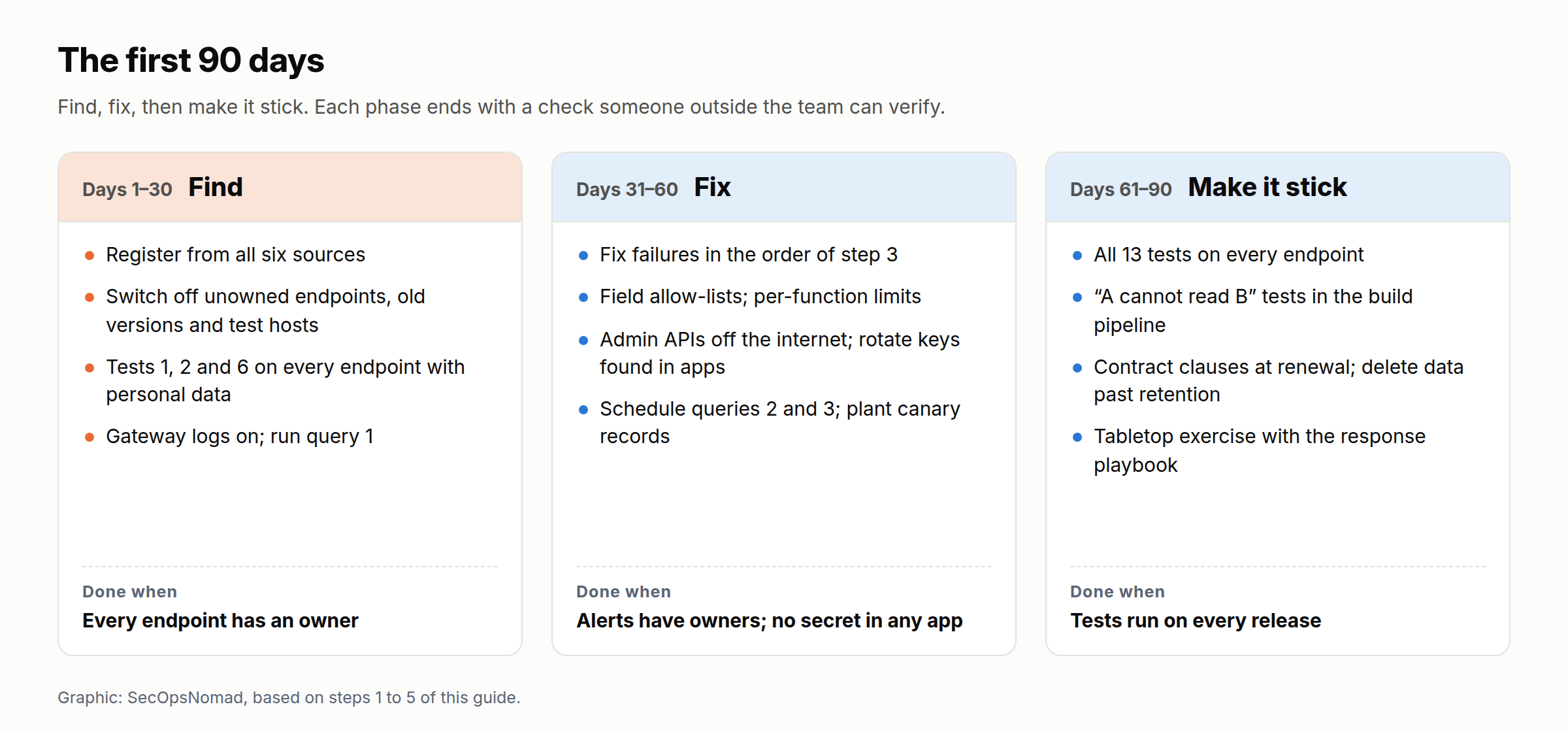
Figure 2. The first 90 days. Original graphic for this article.
| Days | Do | Done when |
|---|---|---|
| 1–30 | Build the register from all six sources; switch off what has no owner; run tests 1, 2 and 6 on every endpoint that returns personal data; turn on gateway logs; run query 1 | Every endpoint has an owner; no endpoint fails tests 1, 2 or 6 without a fix date |
| 31–60 | Fix failures in the order of step 3; field allow-lists; per-function limits; admin APIs off the internet; rotate keys found in apps; schedule queries 2 and 3; plant canary records | Queries scheduled with owners; canaries live; no long-lived secret in any app |
| 61–90 | All 13 tests on every endpoint; “A cannot read B” tests in the pipeline; contract clauses at renewal; delete data past retention; tabletop with the response playbook | Tests run on every release; contracts updated; exercise held |
The defender’s playbook: which teams should act
| Team | Scope | Next step | Evidence needed |
|---|---|---|---|
| IT Operations | Every API, app back end, gateway and test host | Build the register; run tests 1, 2 and 6; switch off what has no owner | Register, test results |
| SIEM / SOC | Gateway, application and WAF logs | Schedule queries 1–3 and the per-caller baseline; plant canaries | Query schedule, alert owners |
| Legal / Privacy | Personal data each API returns | Map data to APIs; know the PPC clock before an incident | Data map, reporting runbook |
| Third-party Risk | System integrators and app vendors | Send the request below; add the contract clauses | Written answers, contract changes |
Copy-paste templates
API register (one row per endpoint)
host,path,method,called_by,authentication,object_ids_taken,personal_data_returned,owner,vendor,rate_limit,logs_object_id,last_tested,tests_failed,status
api.example.co.jp,/v2/members/{id},GET,app,JWT (15 min),member_id,"name, email, phone",[name],[vendor],60/min per user,yes,[date],none,live
Request to your system integrator or app vendor
Subject: [Company] – API inventory and access-control checks following JPCERT/CC's alert of 8 October and NICT's A2B alert of 13 October 2026

JPCERT/CC and NICT have warned that attackers analyse published apps to find and abuse the APIs behind them. Please answer the following in writing by [date].

1. Please send the OpenAPI definition, or a complete list, of every endpoint you built or run for us, including admin, batch, partner, old-version and test endpoints, with the hosts they run on.
2. For each endpoint that returns personal data: how does the server check that the caller may read the specific record requested? Please send the automated tests that show customer A cannot read customer B's data.
3. Which fields does each endpoint return, and are any not shown on a screen? Does any response contain a password, a password hash or a token?
4. What rate limits apply to login, password reset, SMS sending, search and lookups, per account and per address?
5. Are admin and internal APIs reachable from the internet? If so, from where, and with what sign-in?
6. Does any app release contain an API key or secret? If so, what can it access, and when will it be rotated?
7. Do the logs record the caller and the object ID for each request? How long are they kept?
8. Within how many hours will you tell us about suspected unauthorized access?

Thank you,
[Name, role, contact]
Five-line briefing for management
1. What happened elsewhere: at least ten Japanese companies said customer data left through their apps, APIs or lookup pages between August and October 2026; JPCERT/CC (8 Oct) and NICT (13 Oct) warned of the same pattern.
2. Our exposure: we run [number] APIs that return personal data, [number] built by vendors. [Number] have an owner; [number] passed the "customer A cannot read customer B" test.
3. Done so far: register built [yes/date]; unowned endpoints switched off [number]; tests 1, 2 and 6 run [date]; monitoring queries scheduled [yes/date].
4. Open risks: [e.g. admin API reachable from the internet; key embedded in app version X; no per-function rate limits].
5. Decisions needed: [e.g. budget for fixes by vendor X; contract clauses at renewal; release freeze until test 2 passes]. Next report: [date].
What this guide does not settle
- The causes of the cases above. Most companies have not said exactly how their API was misused; the weakness each case is mapped to is our reading of their own words.
- Your thresholds. The numbers in the queries (50 denials, 10 routes, 1,000 lookups) are starting points; set them from your own traffic.
- GraphQL and batch exports. One request can return thousands of records; count records returned, not only requests.
- Third-party APIs you call (OWASP API10). This guide covers the APIs you publish; the supplier breach playbook covers suppliers.
Sources and updates
- JPCERT/CC: JPCERT-AT-2026-0030 (Japanese), 8 October 2026
- NICT: A2B attack alert (Japanese), 13 October 2026
- NICT LETTICE: alert (Japanese, PDF)
- OWASP API Security Top 10 2023
- Microsoft Learn: ApiManagementGatewayLogs table
- Microsoft Learn: rate-limit-by-key · validate-jwt · ip-filter
- AWS: HTTP API access log variables · API Gateway throttling · AWS WAF rate-based rules
- Splunk CIM: Web data model
- PPC: general guidelines (Japanese)
Related on this site: API data exposure playbook · SourceNext · Skyticket and NICT’s A2B alert · Lawson ID · Sagawa Express · 60-day review · Leaked cloud keys playbook
18 October 2026: first published. Incident facts come from the companies’ notices and the JPCERT/CC and NICT alerts as cited in our earlier analyses. The column names for API Management were checked against Microsoft’s table reference; the AWS and Splunk field names were checked through search results of their documentation pages, which we could not open directly from our research environment. The queries have not been run against a live workspace.