Their breach can become your incident
Many of the breaches analysed on this site happened at a supplier rather than at the company that announced them: an inquiry-handling contractor, a hosting provider’s sales system, a storage service’s administrator access. The customer of the supplier usually learns about it from an email, and has to decide quickly what that email means for its own data, accounts and integrations.
This reusable supplier-breach playbook has 36 decisions, with yes/no actions, evidence checks and named owners. It is an original SecOpsNomad workflow, not a report of a new breach. Use it when a supplier, SaaS provider, processor, managed service provider or contractor reports, or is reported to have, a security incident. If the supplier’s access was used to reach your systems directly, run the account compromise playbook in parallel.
Two timelines run at once. The supplier investigates its environment; you investigate yours. Their findings decide what to ask for. Your own logs decide whether their access, their data about you or their credentials were used against you. Do not wait for their final report before containing what you control.
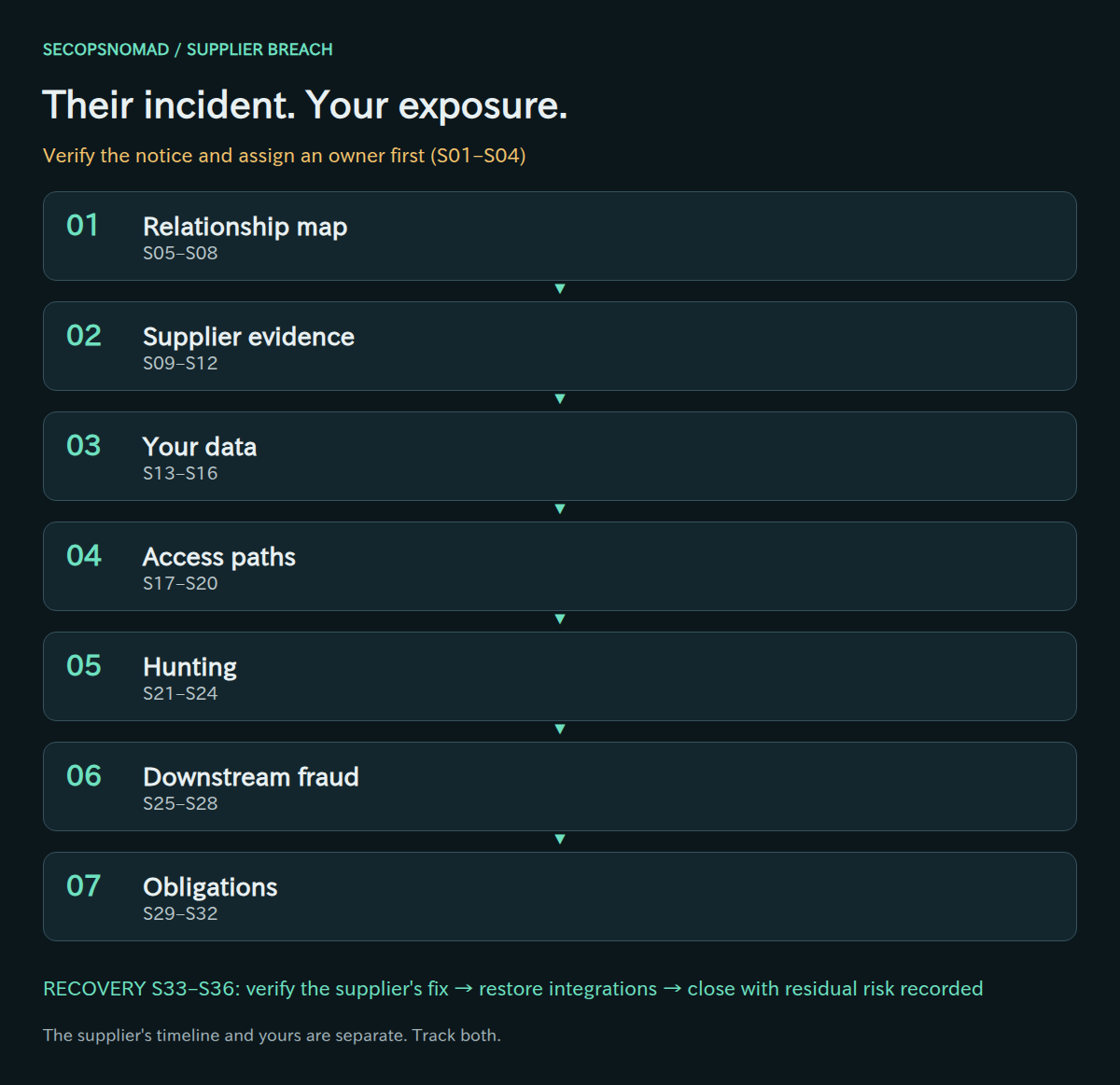
Overview. Relationship map → supplier evidence → your data → access paths → hunting → downstream fraud → obligations. Triage comes first and recovery is gated. Every visual decision has an equivalent table below.
Start here: the first hour
New to this? Work down this list in order, then use the stages below for the full response. Nothing here requires you to know yet what the attacker did at the supplier.
- Minute 0–10: confirm the notice is real. Call the supplier on a number you already have (the contract, an old invoice, your vendor system), not the one in the notice. Ask: "Did you send this? Who is your incident contact?" Fake breach notices are a known phishing trick.
- Minute 10: record the time you learned. Write down when your organisation first had credible knowledge of the incident. Regulatory and contract deadlines count from moments like this.
- Minute 10–15: open a case and name an incident lead, the person who owns the supplier relationship, and a Legal/Privacy contact.
- Minute 15–25: list what the supplier holds and reaches. Your data at the supplier; their accounts, admin rights and tools in your systems; shared keys and passwords. A rough list now beats a perfect one tomorrow. Stage 1 shows where to look.
- Minute 25: decide on temporary restrictions. If the incident may be ongoing, or the supplier has administrator access or remote tools in your environment, suspend that access now (stage 4). Disable, do not delete: deleted accounts take their history with them.
- Minute 30: send the evidence request using the template near the end of this page.
- Minute 35: warn accounts payable. No change to this supplier's bank details, and no urgent payment, without a call-back on a known number.
- Minute 40: start the log search for the supplier's accounts and domain over their stated window plus a margin before it (stage 5).
- Minute 50: brief Legal/Privacy on what data the supplier holds. In Japan, the business that entrusted the data usually owes the regulator report even when the leak happened at the supplier.
- Minute 60: send the first internal status update and agree the next update time.
Do not: reply to the contact details inside the notice before verifying them; comment publicly before aligning with the supplier; read "no evidence of access" as "no access"; or wait for the supplier's full report before restricting their access to you.
Preparation and decision rules
Before an incident, keep an inventory per critical supplier: data shared (types, volumes, sub-processors), identities they hold in your environment, integrations and credentials in both directions, software or updates they deliver, contract clauses for notification, cooperation and audit, and a verified security contact. Exercise the workflow with a tabletop that starts from a supplier email.
- Yes: perform the action and continue every other relevant check.
- No: record the evidence, scope and time window supporting the answer. No alert alone is not enough.
- Unknown: keep an open task with an assigned owner and next review time. Use proportionate containment while investigating.
- Not applicable: state why and name the reviewer. Do not use it for missing logs.
Record case ID, supplier and service, contract reference, the supplier’s stated exposure window, your UTC review window, answer/rationale, evidence location, action/result, assigned owner and review time. Keep supplier correspondence and your notes in a restricted case workspace. Do not paste credentials, personal data or supplier-confidential reports into public tools.
Download the English decision register (CSV). The blank working columns are for your private case records; treat text added to a spreadsheet as untrusted input.
Owners: Third-party Risk runs the supplier relationship and evidence requests; Procurement or the contract owner tracks contractual duties; Legal/Privacy decides notification; IAM and Cloud/IT contain identities and integrations; SOC/SIEM hunts in your telemetry; Email Security handles impersonation and payment-change mail; Finance verifies payment changes; Communications aligns statements; the incident lead approves restoration and closure.
Words used in this playbook
| Term | Plain meaning |
|---|---|
| Supplier / vendor | Any outside company that holds your data, connects to your systems or delivers software or services to you. |
| Entrusting business / processor | Under Japan's APPI, the company that hands personal data to another (you) and the company that handles it on its behalf (the supplier). |
| Sub-processor / fourth party | A company your supplier uses in turn, such as its cloud host or call-centre partner. |
| Guest account | An account in your Microsoft Entra tenant for someone from another organisation. It signs in with their home account. |
| Partner relationship | In Microsoft 365, a link that can give a reseller or managed service provider administrator rights in your tenant. |
| Remote management tool (RMM) | Software a supplier uses to operate your computers remotely. Powerful and often abused. |
| API key / webhook / OAuth app | Ways two systems connect automatically. Each relies on a secret or permission that can be stolen. |
| Indicator (IOC) | A clue about the attacker, such as an IP address, domain or file hash, that you can search for in your own logs. |
| Exposure window | The period during which the attacker could have reached your data or access. It often starts earlier than first announced. |
| PPC | Japan's Personal Information Protection Commission, which receives data-leak reports under the APPI. |
| Prompt report / final report | The two reports the PPC expects: a first one within about 3–5 days of learning, and a complete one within 30 days (60 days if the leak was caused by a wrongful act such as an attack). |
| Residual risk | What you still cannot rule out when you close the case, accepted in writing by someone with the authority to do so. |
No security team? Who does what
The owners named in the tables are roles, not job titles. In a small company one person often holds several. Keep one rule: the person who restricts the supplier's access should not be the only one who checks that it worked.
| Role in this playbook | In a small company, usually | What they need ready |
|---|---|---|
| Incident lead | The managing director or general manager | Authority to pause a supplier service and to approve outside help |
| Contract / vendor owner | Whoever signed or manages the supplier contract | The contract, data processing terms and supplier contacts |
| IAM / IT administrator | The in-house IT person or your IT provider | Admin access to Microsoft 365 / Entra, VPN, firewall and remote tools |
| SOC / SIEM | The IT administrator, or a managed security provider | Access to sign-in, audit and mail logs |
| Finance / accounts payable | The accounting team | A rule that bank detail changes need a call-back |
| Legal / Privacy | Outside counsel, or the personal-information manager | The data inventory and confirmed facts |
| Communications | The managing director or sales lead | Agreed wording with the supplier before anything is published |
| Outside help | Your IT provider, an incident response firm; in Japan, JPCERT/CC for incident coordination and the police cybercrime consultation window | The case summary and timeline |
0. Triage: verify the notice and take ownership
- Verify the notice through a contact you already hold, not the reply address or phone number in the message. Attackers send fake breach notices too.
- Open a case, assign a lead, and record the supplier, the service, the contract and the time your organisation first learned of the incident. That time matters for notification deadlines.
- Pull the supplier’s inventory record. If none exists, start one now: data, identities, integrations, credentials and software in both directions.
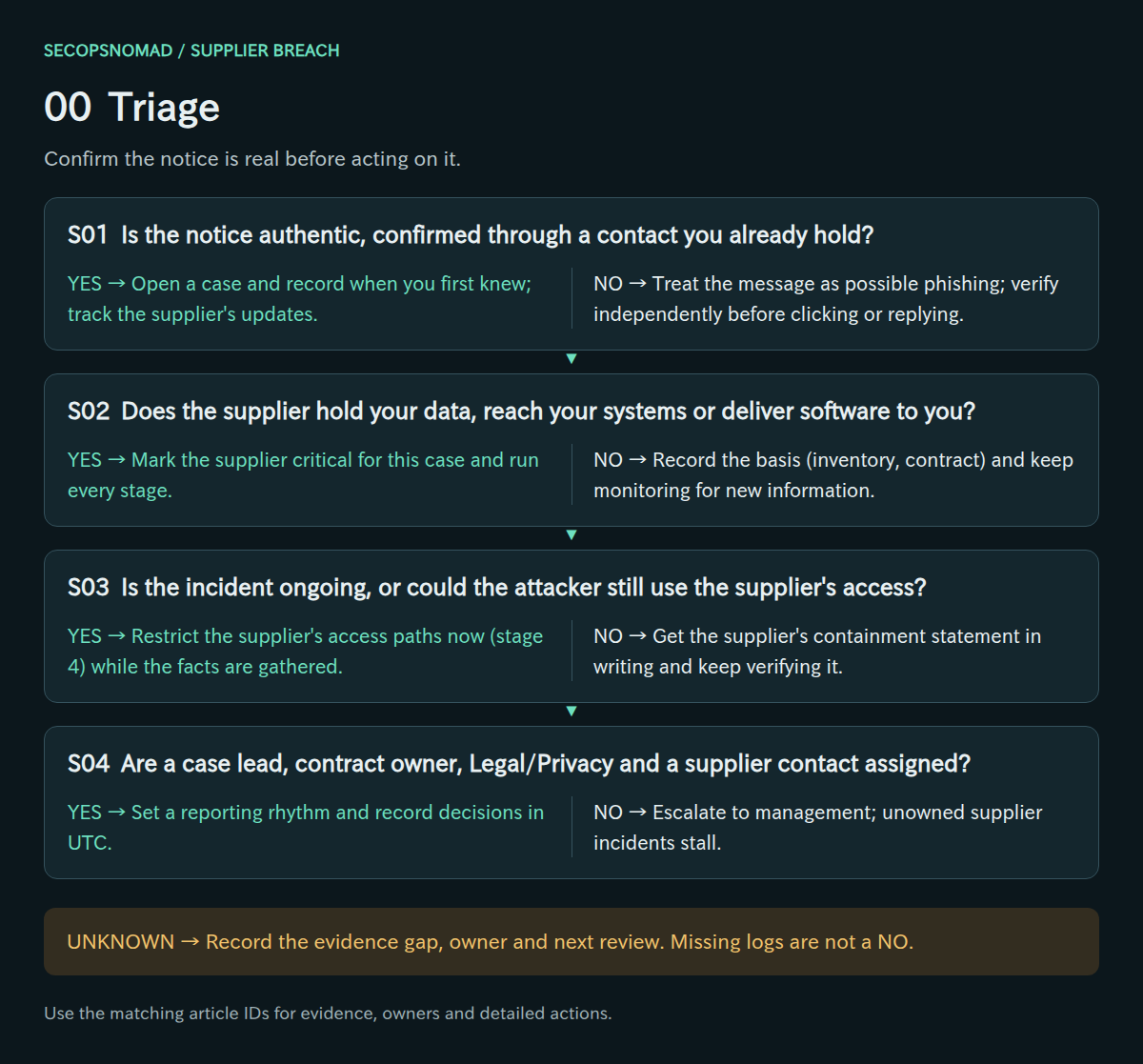
Original decision map. Check each branch independently; unknown answers remain open.
| Decision | Yes | No | Evidence / resolve unknowns | Lead owner |
|---|---|---|---|---|
| S01. Is the notice authentic, confirmed through a contact you already hold? | Open a case and record when you first knew; track the supplier’s updates. | Treat the message as possible phishing; verify independently before clicking or replying. | Original notice, header analysis, confirmation from a known contact, supplier status page. | Third-party Risk + Email Security |
| S02. Does the supplier hold your data, reach your systems or deliver software to you? | Mark the supplier critical for this case and run every stage. | Record the basis (inventory, contract) and keep monitoring for new information. | Supplier inventory, contract, data-flow records, integration list. | Third-party Risk + incident lead |
| S03. Is the incident ongoing, or could the attacker still use the supplier’s access? | Restrict the supplier’s access paths now (stage 4) while the facts are gathered. | Get the supplier’s containment statement in writing and keep verifying it. | Supplier statement, dates of containment, your sign-in and integration logs. | IAM + Third-party Risk |
| S04. Are a case lead, contract owner, Legal/Privacy and a supplier contact assigned? | Set a reporting rhythm and record decisions in UTC. | Escalate to management; unowned supplier incidents stall. | Case roster, supplier contact, contract owner, meeting cadence. | Incident lead |
How to do it: step by step
- Find a trusted contact: the phone number in the contract, the vendor management system or a past invoice. Do not use a number, link or address that appears only in the notice.
- Call and confirm: that the notice is genuine, the name of their incident contact, and how they will send updates. Agree a reference number for the incident.
- Check the supplier's own channels: their website, status page or press release. Note whether the public statement matches what you were told.
- Open the case record with these fields: supplier, service, contract ID, relationship owner, time first learned (UTC and local), how it was verified, supplier contact, next update time.
- Pull the contract and the data processing agreement; highlight notification, cooperation, audit and sub-processor clauses (you will need them in stage 2).
Check it worked: S01 is answered "yes" with the name of the person you called and the number you used.
1. Relationship map: what the supplier holds and reaches
- List the data you gave the supplier: types, volumes, retention, and any sub-processors it passed data to.
- List the supplier’s ways into your environment: guest accounts, partner administrator access, VPN, remote-management tools, API connections and service accounts.
- List the credentials in both directions: keys and passwords you issued to the supplier, and those it issued to you.
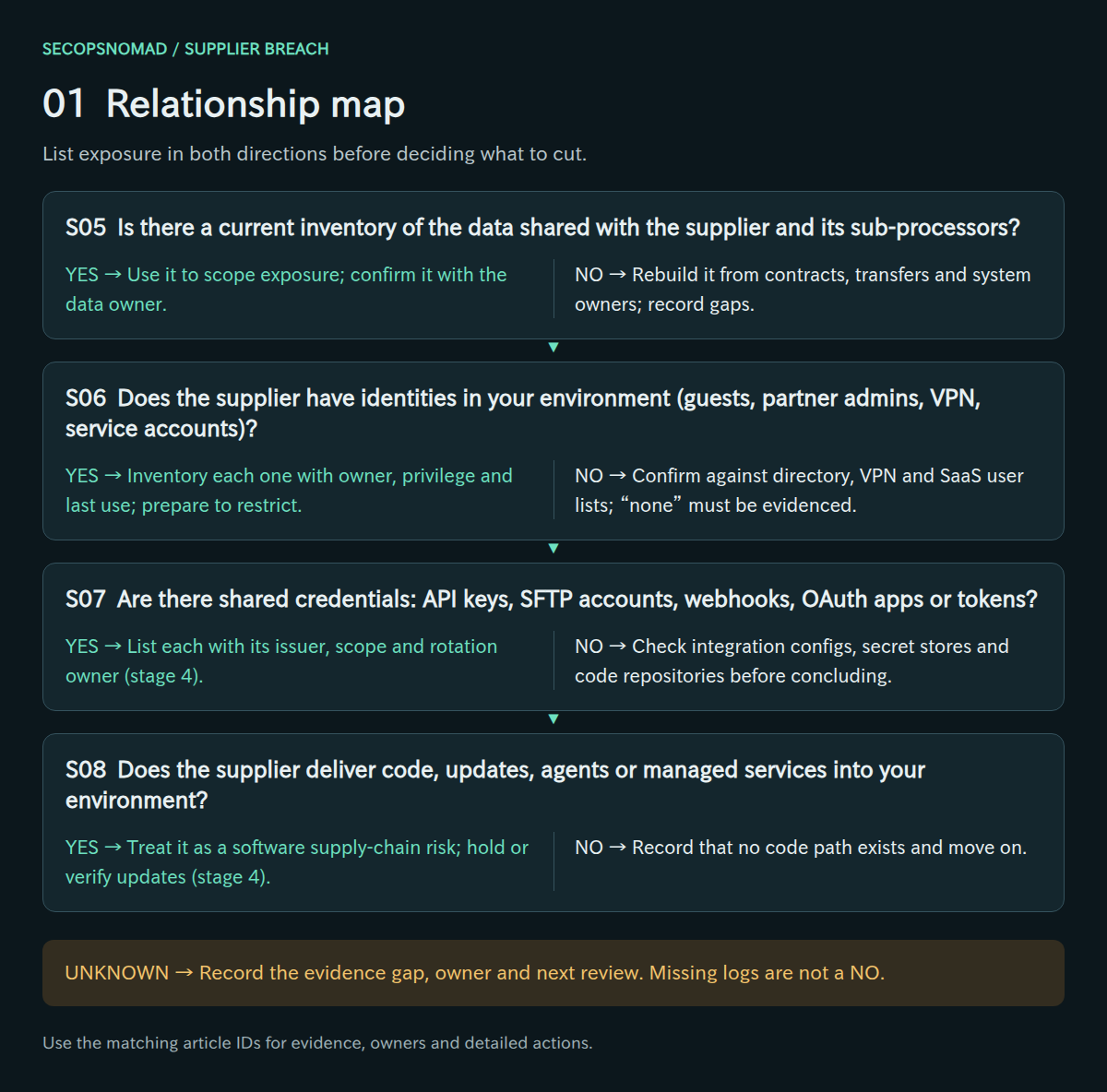
Original decision map. Check each branch independently; unknown answers remain open.
| Decision | Yes | No | Evidence / resolve unknowns | Lead owner |
|---|---|---|---|---|
| S05. Is there a current inventory of the data shared with the supplier and its sub-processors? | Use it to scope exposure; confirm it with the data owner. | Rebuild it from contracts, transfers and system owners; record gaps. | Data inventory, contract annexes, transfer logs, sub-processor list. | Third-party Risk + data owner |
| S06. Does the supplier have identities in your environment (guests, partner admins, VPN, service accounts)? | Inventory each one with owner, privilege and last use; prepare to restrict. | Confirm against directory, VPN and SaaS user lists; “none” must be evidenced. | Guest list, partner relationships page, VPN accounts, SaaS user exports. | IAM |
| S07. Are there shared credentials: API keys, SFTP accounts, webhooks, OAuth apps or tokens? | List each with its issuer, scope and rotation owner (stage 4). | Check integration configs, secret stores and code repositories before concluding. | Secret-store entries, integration settings, enterprise apps, repository scans. | Cloud / IT + application owner |
| S08. Does the supplier deliver code, updates, agents or managed services into your environment? | Treat it as a software supply-chain risk; hold or verify updates (stage 4). | Record that no code path exists and move on. | Software inventory, update channels, installed agents, MSP tooling. | IT Operations + EDR |
How to do it: step by step
Guest accounts in Microsoft Entra: Entra admin center → Entra ID → Users → All users → add a filter for user type Guest and search for the supplier's domain. Or with Microsoft Graph PowerShell (replace the domain):
Connect-MgGraph -Scopes "User.Read.All"
Get-MgUser -Filter "userType eq 'Guest'" -All -Property DisplayName,Mail,UserPrincipalName,Id,CreatedDateTime |
  Where-Object { $_.Mail -like '*@supplier.example' -or $_.UserPrincipalName -like '*_supplier.example#EXT#*' } |
  Select-Object DisplayName,Mail,Id,CreatedDateTime
Partner administrator rights: Microsoft 365 admin center → Settings → Partner relationships. Note any relationship with the supplier and the roles it holds.
Applications: Entra ID → Enterprise apps → All applications → search for the supplier's name or product. Open each and note its permissions.
Everything outside Microsoft: VPN and firewall accounts or allow-rules for the supplier, remote management tools, SFTP accounts, API keys and webhooks in your secret store, and any software or agent they install or update.
Data: ask the business owner and check the contract: which datasets, how many records, which fields, where they are stored and which sub-processors receive them.
Check it worked: one table listing every data set, identity, integration and credential, each with an owner (S05–S08).
2. Supplier evidence: what to ask and what to verify
- Send a written request: affected systems, data and customers, the exposure window, attacker actions, indicators, containment status and the investigator.
- Track each answer against its evidence. “We have no evidence of access” can mean the logs were not kept.
- Check your contract for notification, cooperation, audit and sub-processor clauses, and track their deadlines alongside regulatory ones.
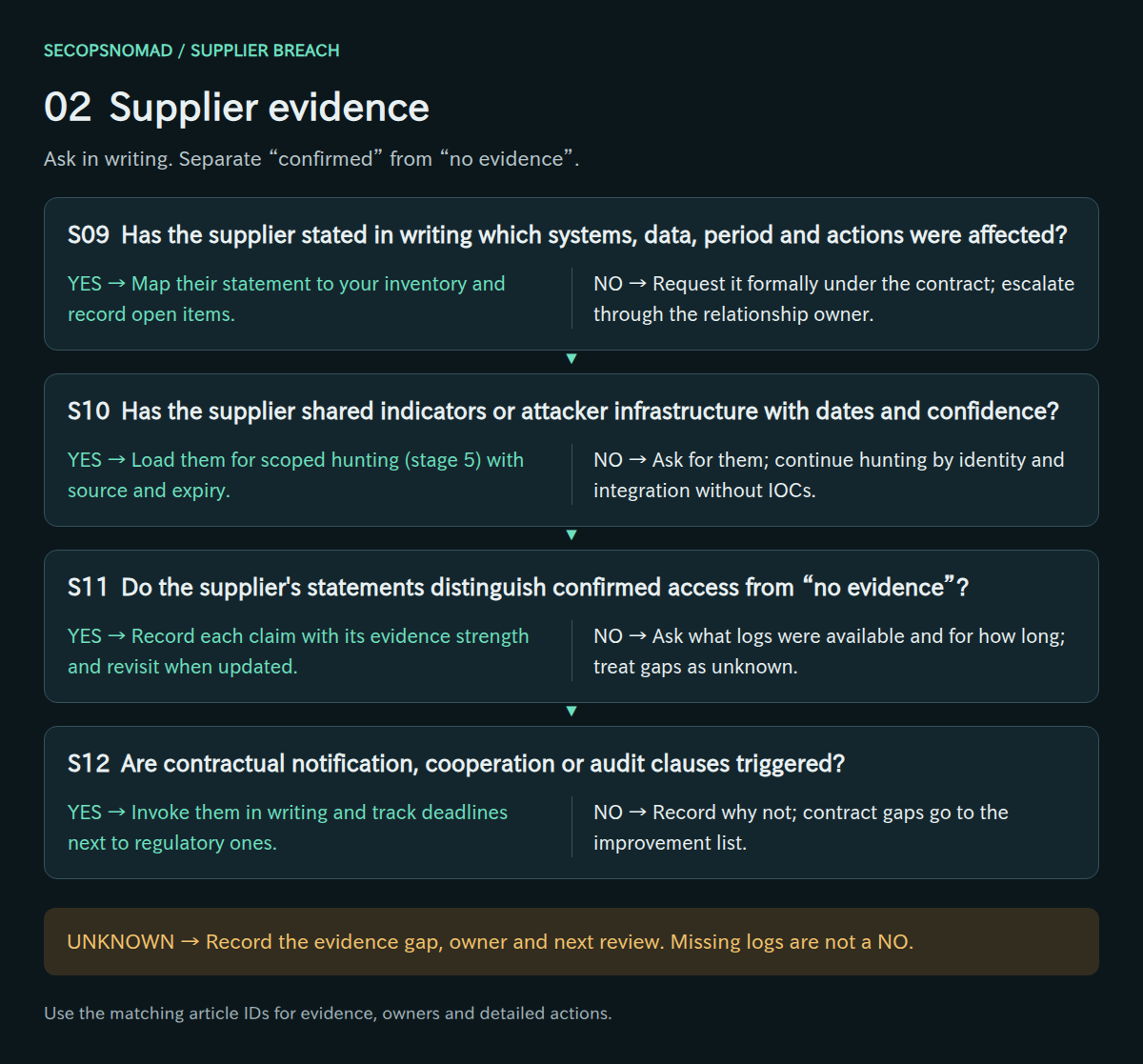
Original decision map. Check each branch independently; unknown answers remain open.
| Decision | Yes | No | Evidence / resolve unknowns | Lead owner |
|---|---|---|---|---|
| S09. Has the supplier stated in writing which systems, data, period and actions were affected? | Map their statement to your inventory and record open items. | Request it formally under the contract; escalate through the relationship owner. | Written statement, questionnaire responses, meeting notes with dates. | Third-party Risk |
| S10. Has the supplier shared indicators or attacker infrastructure with dates and confidence? | Load them for scoped hunting (stage 5) with source and expiry. | Ask for them; continue hunting by identity and integration without IOCs. | IOC list, observation period, confidence, sharing restrictions. | SOC + Threat Intelligence |
| S11. Do the supplier’s statements distinguish confirmed access from “no evidence”? | Record each claim with its evidence strength and revisit when updated. | Ask what logs were available and for how long; treat gaps as unknown. | Investigator findings, log retention statement, forensic scope. | Third-party Risk + DFIR |
| S12. Are contractual notification, cooperation or audit clauses triggered? | Invoke them in writing and track deadlines next to regulatory ones. | Record why not; contract gaps go to the improvement list. | Contract clauses, notice dates, correspondence log. | Procurement / contract owner + Legal / Privacy |
How to do it: step by step
- Send the evidence request (template below) by the verified channel. Ask for a written answer and a date for the next update.
- Track answers in a table: question, supplier's answer, evidence offered, date received, your confidence (confirmed / stated without evidence / unknown).
- Read "no evidence" carefully. Ask the follow-up: "Which logs were reviewed, for what period, and how long are they kept?" A short retention period means "we cannot tell".
- Ask for indicators in a usable form: IP addresses, domains, file hashes and account names, each with first and last seen dates and the supplier's confidence.
- Compare deadlines: contractual notice and cooperation duties next to regulatory ones, in one list with dates.
Check it worked: every key question from S09–S12 has a dated answer or an open follow-up with an owner.
3. Your data at the supplier: bound the exposure
- Match the supplier’s affected systems to the data you placed there. Record confirmed exposure, possible exposure and data that was not involved.
- Identify personal data, credentials, payment data and confidential business data separately. They lead to different duties and actions.
- Ask about old exports, backups and sub-processor copies. Data you thought was deleted is often still held.
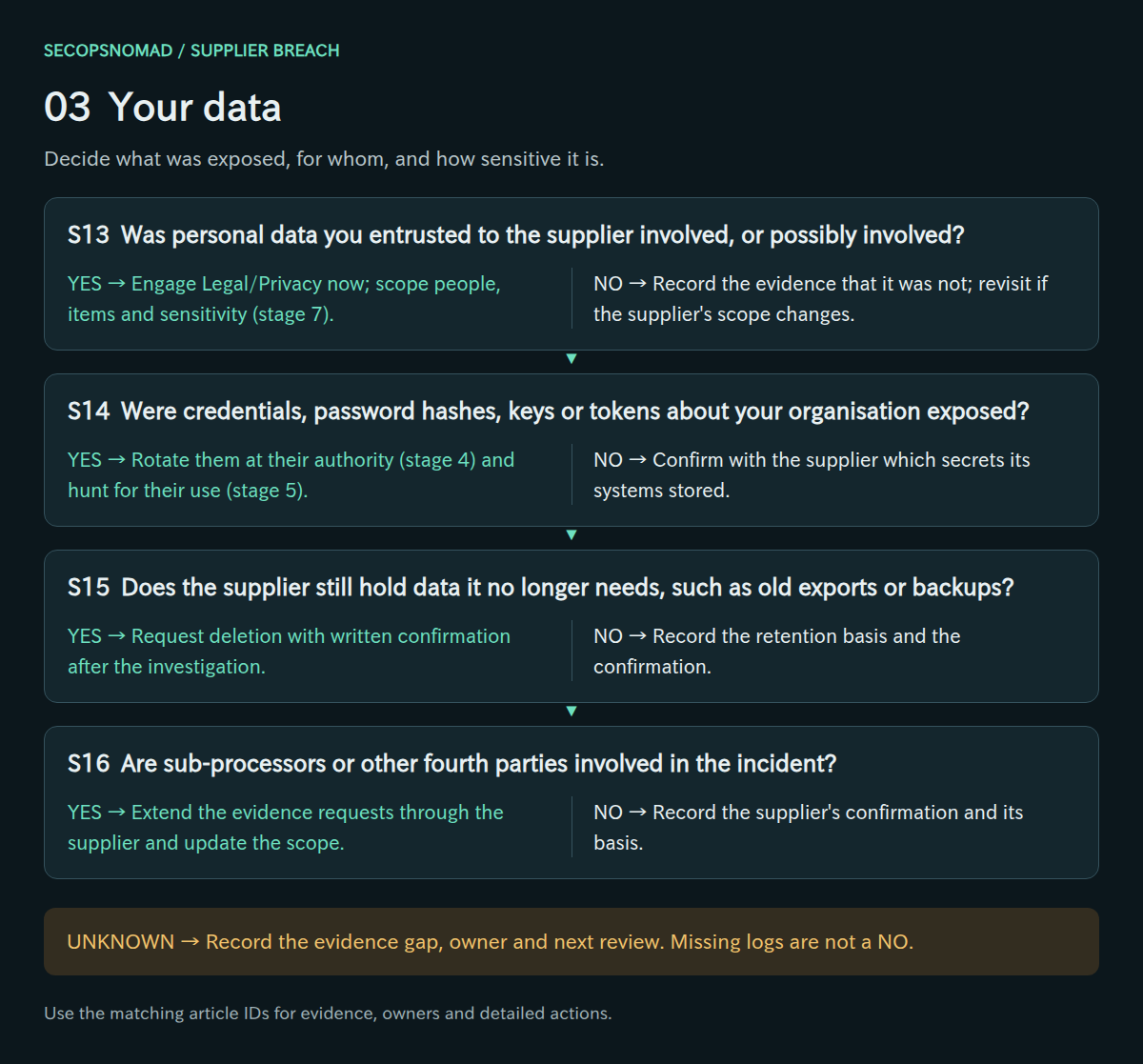
Original decision map. Check each branch independently; unknown answers remain open.
| Decision | Yes | No | Evidence / resolve unknowns | Lead owner |
|---|---|---|---|---|
| S13. Was personal data you entrusted to the supplier involved, or possibly involved? | Engage Legal/Privacy now; scope people, items and sensitivity (stage 7). | Record the evidence that it was not; revisit if the supplier’s scope changes. | Affected-record list, data items, number of people, sensitivity. | Legal / Privacy + data owner |
| S14. Were credentials, password hashes, keys or tokens about your organisation exposed? | Rotate them at their authority (stage 4) and hunt for their use (stage 5). | Confirm with the supplier which secrets its systems stored. | Supplier statement on stored secrets, your secret inventory. | IAM + Cloud / IT |
| S15. Does the supplier still hold data it no longer needs, such as old exports or backups? | Request deletion with written confirmation after the investigation. | Record the retention basis and the confirmation. | Retention schedule, deletion certificate, export history. | Third-party Risk + data owner |
| S16. Are sub-processors or other fourth parties involved in the incident? | Extend the evidence requests through the supplier and update the scope. | Record the supplier’s confirmation and its basis. | Sub-processor list, supplier confirmation, data-flow records. | Third-party Risk + Legal / Privacy |
How to do it: step by step
- Build the data table: dataset, fields, number of people or records, location at the supplier, and status (confirmed exposed / possibly exposed / not involved). Keep each status tied to the supplier's statement or evidence.
- Flag the categories that change duties: sensitive personal data, data that could cause financial loss if misused (for example login IDs with passwords for services that can make payments), credentials and keys, and confidential business data.
- Count people, not files: more than 1,000 affected people is itself a reporting threshold in Japan.
- Ask about leftovers: old exports, test copies, backups and copies at sub-processors. Request deletion of anything no longer needed once evidence is preserved.
Check it worked: Legal/Privacy can read the table and tell which rows trigger which duty (S13–S16).
4. Access paths: contain what connects to you
- Decide per path: suspend, restrict or monitor. Balance the business service against the risk; record who accepted the residual risk.
- Rotate credentials at their authority in both directions. Coordinate with the supplier so the new secret is not delivered to a compromised system.
- Review partner administrator relationships, remote-management tools and software update channels. These give the widest access.
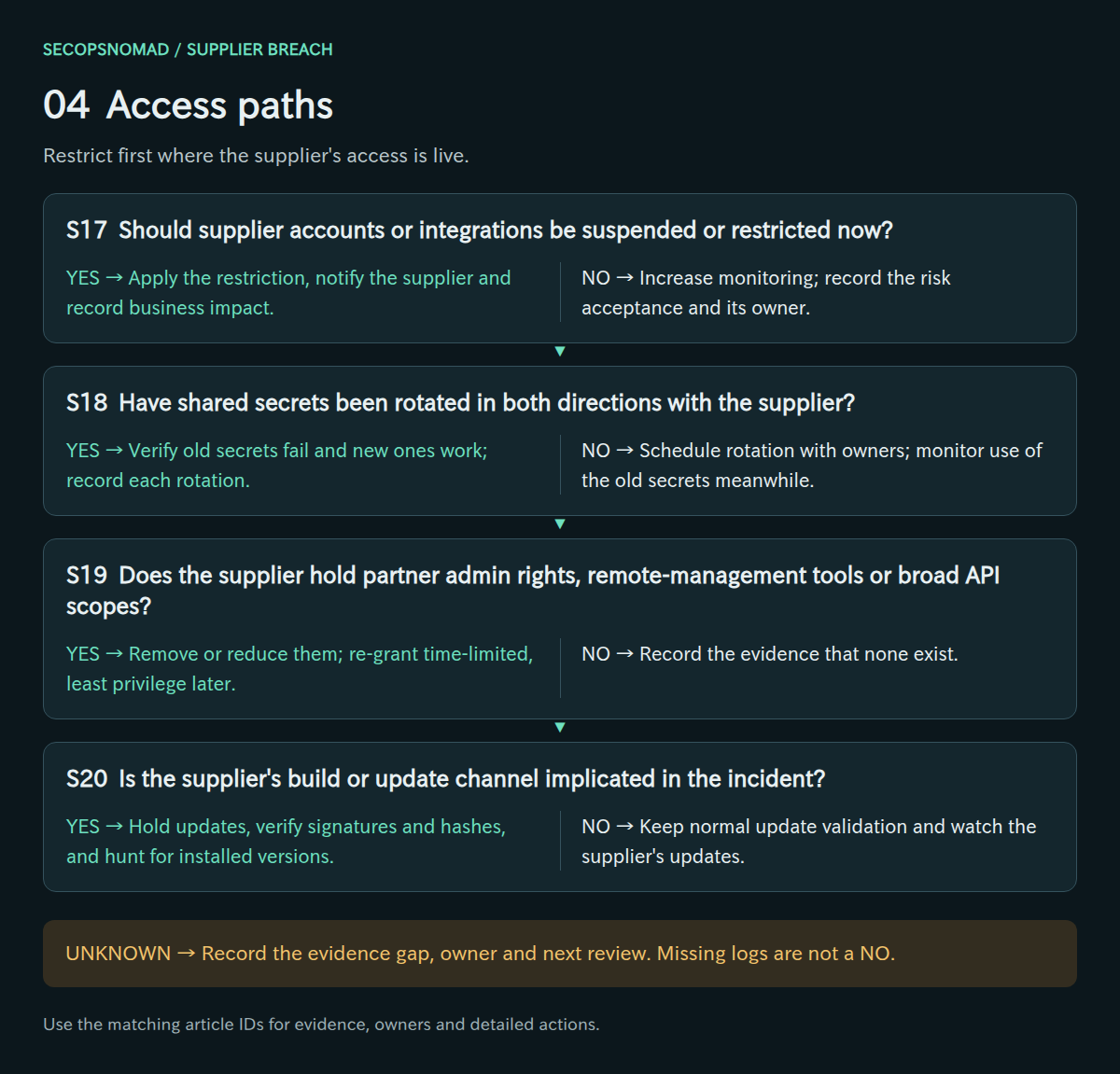
Original decision map. Check each branch independently; unknown answers remain open.
| Decision | Yes | No | Evidence / resolve unknowns | Lead owner |
|---|---|---|---|---|
| S17. Should supplier accounts or integrations be suspended or restricted now? | Apply the restriction, notify the supplier and record business impact. | Increase monitoring; record the risk acceptance and its owner. | Path inventory, risk decision, change record, supplier notice. | IAM + incident lead |
| S18. Have shared secrets been rotated in both directions with the supplier? | Verify old secrets fail and new ones work; record each rotation. | Schedule rotation with owners; monitor use of the old secrets meanwhile. | Rotation log, failed-auth tests, secret-store versions. | Cloud / IT + application owner |
| S19. Does the supplier hold partner admin rights, remote-management tools or broad API scopes? | Remove or reduce them; re-grant time-limited, least privilege later. | Record the evidence that none exist. | Partner relationships, GDAP roles, RMM inventory, app permissions. | IAM + IT Operations |
| S20. Is the supplier’s build or update channel implicated in the incident? | Hold updates, verify signatures and hashes, and hunt for installed versions. | Keep normal update validation and watch the supplier’s updates. | Supplier statement, update versions, signatures, EDR inventory. | IT Operations + EDR |
In Microsoft 365, partner administrator access is listed under Settings > Partner relationships in the admin center. Removing a partner’s roles there does not end the relationship, and the partner may still be able to make purchases on your behalf until it removes that ability. Microsoft: review partner administrative privileges.
How to do it: step by step
Guest accounts: Entra ID → Users → open the guest → Account status → Edit → clear Account enabled → Save, then on the Overview page select Revoke sessions. With PowerShell, for each guest ID from stage 1:
Connect-MgGraph -Scopes "User.ReadWrite.All","User.RevokeSessions.All"
Update-MgUser -UserId <guest-object-id> -AccountEnabled:$false
Revoke-MgUserSignInSession -UserId <guest-object-id>
Partner administrator roles: Microsoft 365 admin center → Settings → Partner relationships → select the partner → remove the roles.
Supplier applications: Entra ID → Enterprise apps → the app → Properties → Enabled for users to sign-in? → No → Save. This stops new tokens for the app in your tenant.
Shared secrets: rotate API keys, SFTP passwords and webhook secrets you issued; ask the supplier to rotate those it issued to you. Deliver new secrets by phone or a secure portal, never to a mailbox that may be compromised.
Network and tools: disable supplier VPN accounts, remove firewall allow-rules, and stop or uninstall the supplier's remote management agent. If their software update channel is implicated (S20), pause automatic updates from it.
Check it worked: a sign-in attempt by a disabled guest fails in the sign-in log; the partner relationship shows no roles; the old API key returns an authentication error (S17–S20). Microsoft: revoke user access.
5. Hunting: look for misuse in your environment
- Search your logs over the supplier’s stated exposure window, plus a margin before it. Their first date is often revised earlier.
- Hunt by the supplier’s identities, application IDs, IP ranges and domains, then by any indicators they shared.
- Keep negative results with their scope and retention limits. “Nothing found” is only as strong as the logs searched.
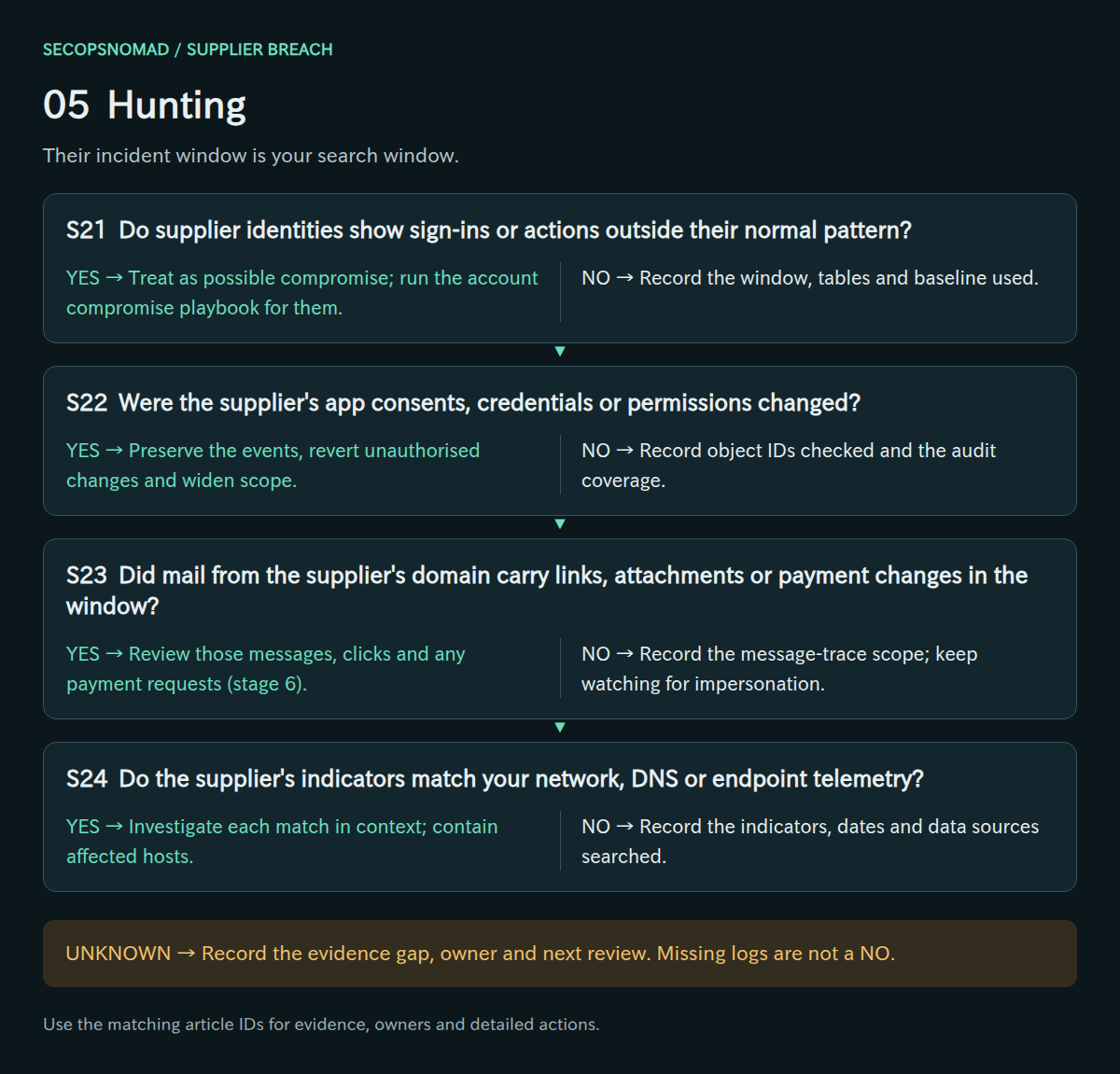
Original decision map. Check each branch independently; unknown answers remain open.
| Decision | Yes | No | Evidence / resolve unknowns | Lead owner |
|---|---|---|---|---|
| S21. Do supplier identities show sign-ins or actions outside their normal pattern? | Treat as possible compromise; run the account compromise playbook for them. | Record the window, tables and baseline used. | Sign-in logs, resource audit, baseline of supplier activity. | SOC / SIEM + IAM |
| S22. Were the supplier’s app consents, credentials or permissions changed? | Preserve the events, revert unauthorised changes and widen scope. | Record object IDs checked and the audit coverage. | AuditLogs events, change records, app permission history. | IAM + Cloud / IT |
| S23. Did mail from the supplier’s domain carry links, attachments or payment changes in the window? | Review those messages, clicks and any payment requests (stage 6). | Record the message-trace scope; keep watching for impersonation. | Message trace, click logs, payment-change requests. | Email Security + Finance |
| S24. Do the supplier’s indicators match your network, DNS or endpoint telemetry? | Investigate each match in context; contain affected hosts. | Record the indicators, dates and data sources searched. | IOC matches, DNS/proxy logs, EDR events, observation dates. | SOC + EDR |
How to do it: step by step
- Set the window: from the supplier's earliest stated date minus a margin (for example 30 days) to today. Supplier timelines are often revised earlier.
- Run the hunting queries below: in Microsoft Sentinel or Defender advanced hunting, paste the KQL, set the time range and replace the example tenant ID, domain and app IDs. In Splunk, open Search & Reporting, paste the SPL and set the time picker.
- Mail from the supplier: Exchange admin center → Mail flow → Message trace → Start a trace → Senders
*@supplier.example→ time range up to 90 days. Look for new links, attachments and payment instructions. - Indicators: search the supplier's IP addresses and domains in firewall, proxy, DNS and EDR logs.
- Write down negatives properly: "Searched sign-in logs for 14 guest accounts, 2026-08-01 to 2026-10-06; no sign-ins from outside the supplier's ranges" is useful. "Nothing found" is not.
Check it worked: every supplier identity and indicator has a result with its time range and data source (S21–S24).
6. Downstream fraud: expect your data to be used against you
- Assume attackers will use what they took: real names, order details, contract numbers and correspondence make phishing believable.
- Warn the teams most likely to be targeted: accounts payable, customer support and the staff named in the supplier’s data.
- Link the right playbook for each path: payment changes, customer account takeover, leaked keys or account compromise.
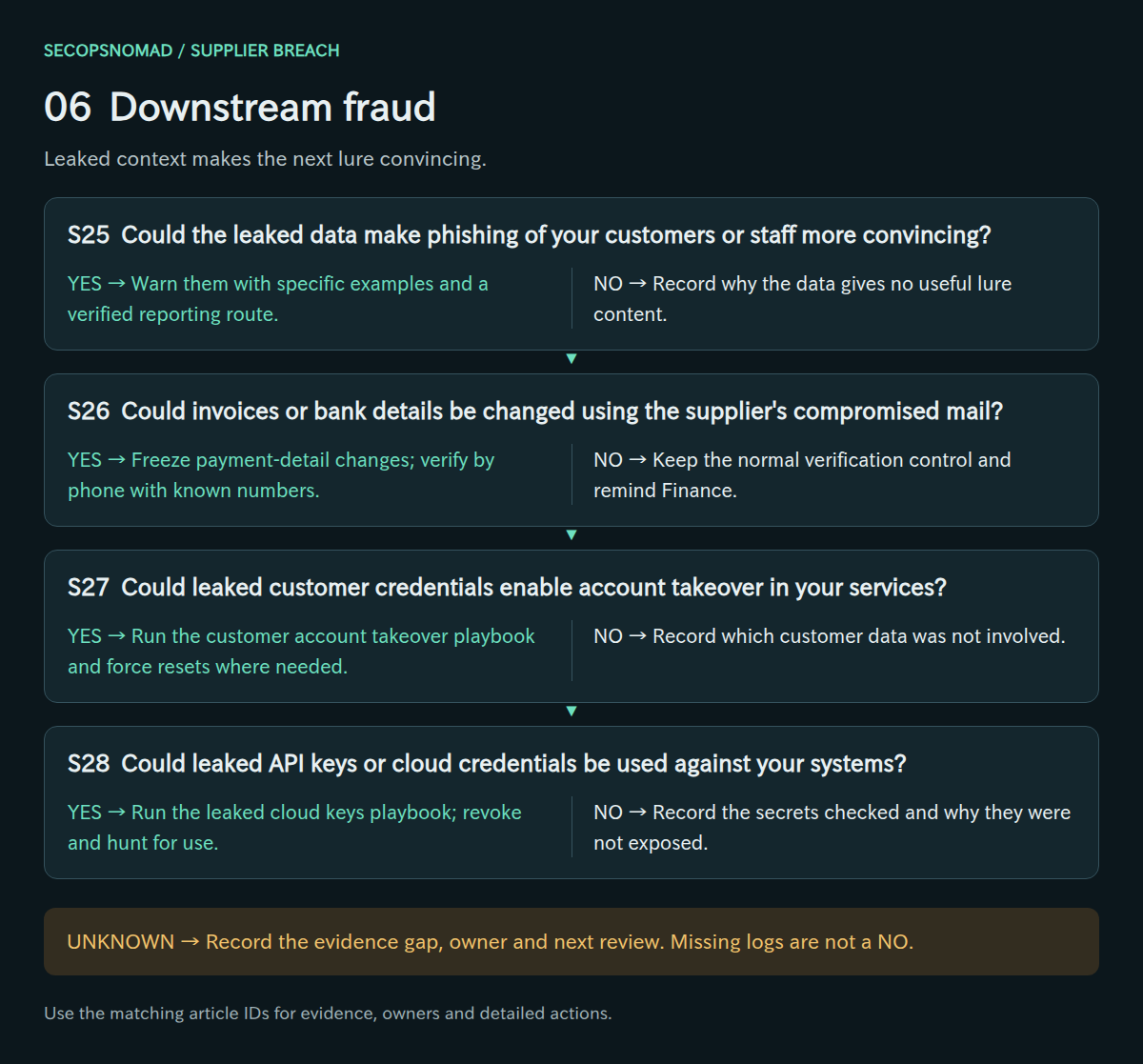
Original decision map. Check each branch independently; unknown answers remain open.
| Decision | Yes | No | Evidence / resolve unknowns | Lead owner |
|---|---|---|---|---|
| S25. Could the leaked data make phishing of your customers or staff more convincing? | Warn them with specific examples and a verified reporting route. | Record why the data gives no useful lure content. | Leaked data items, past lures, reporting channel. | Email Security + Communications |
| S26. Could invoices or bank details be changed using the supplier’s compromised mail? | Freeze payment-detail changes; verify by phone with known numbers. | Keep the normal verification control and remind Finance. | Payment-change requests, call-back records, vendor master changes. | Finance + Email Security |
| S27. Could leaked customer credentials enable account takeover in your services? | Run the customer account takeover playbook and force resets where needed. | Record which customer data was not involved. | Leaked fields, login logs, fraud alerts. | Product owner + Fraud team |
| S28. Could leaked API keys or cloud credentials be used against your systems? | Run the leaked cloud keys playbook; revoke and hunt for use. | Record the secrets checked and why they were not exposed. | Secret inventory, cloud audit logs, provider notices. | Cloud / IT + SOC |
How to do it: step by step
- Accounts payable: apply the call-back rule to this supplier immediately and tell the team why. Review bank detail changes and unusual invoices received in the window.
- Customer support and staff: warn them that phishing using real order details, names or contract numbers may follow. Give them a short script and an escalation route.
- Block lookalikes: if the attacker uses domains similar to the supplier's, add them in the Defender portal → Email & collaboration → Policies & rules → Threat policies → Tenant Allow/Block Lists. Blocks expire (30 days by default), so set a review date.
- Link the right playbook: payment change attempts → finance procedure; leaked customer passwords → customer account takeover; leaked keys → leaked cloud keys; suspicious staff sign-ins → account compromise.
Check it worked: each likely fraud path (S25–S28) has an owner and a dated action.
7. Obligations: reporting, notice and statements
- Have Legal/Privacy decide reporting duties for each jurisdiction. In Japan, an entrusting business usually reports personal-data incidents at its processor itself.
- Prepare notices to individuals, customers and regulators from the facts confirmed so far, and plan follow-up reports.
- Align your public statement with the supplier’s so the two do not contradict each other.
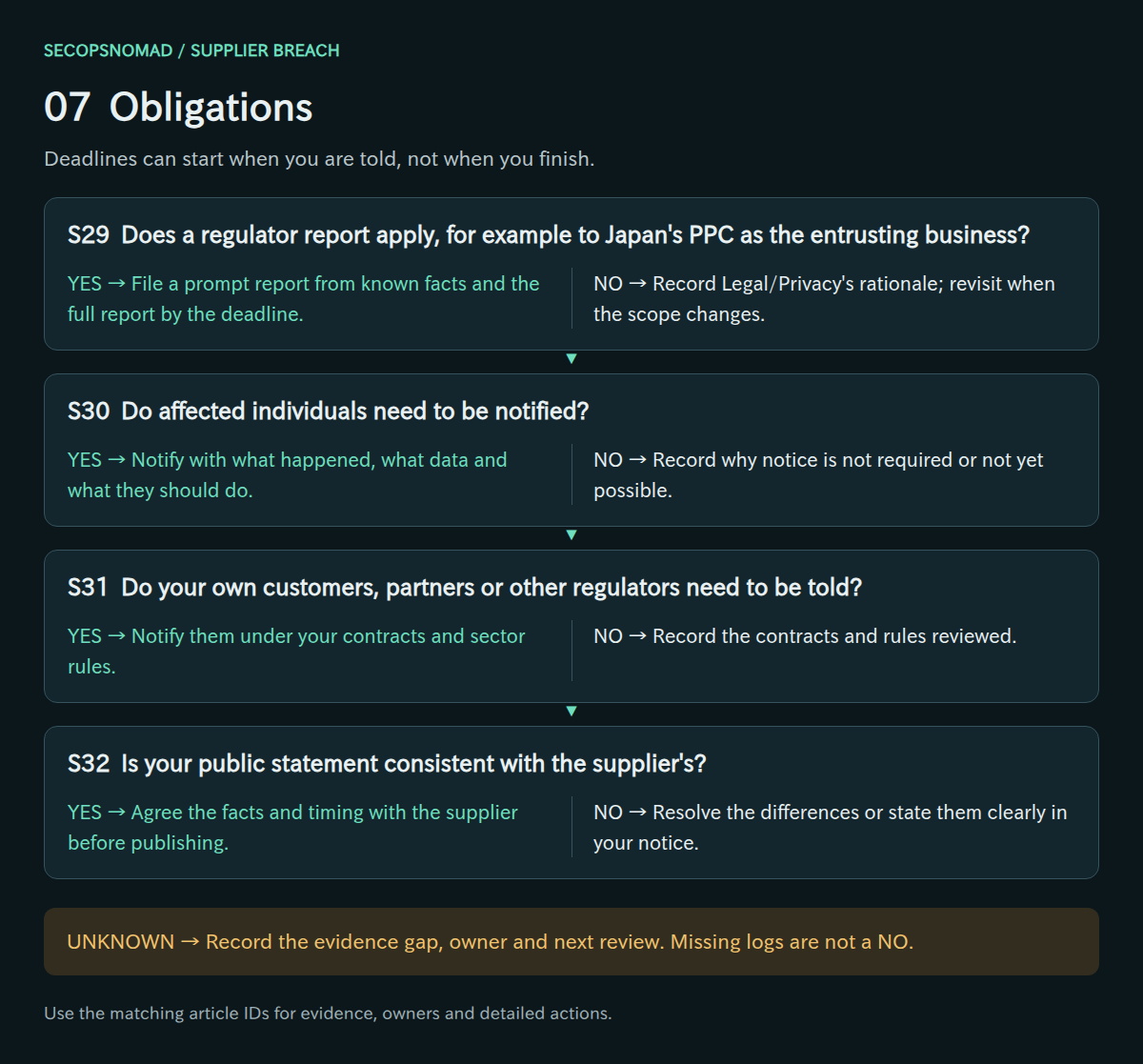
Original decision map. Check each branch independently; unknown answers remain open.
| Decision | Yes | No | Evidence / resolve unknowns | Lead owner |
|---|---|---|---|---|
| S29. Does a regulator report apply, for example to Japan’s PPC as the entrusting business? | File a prompt report from known facts and the full report by the deadline. | Record Legal/Privacy’s rationale; revisit when the scope changes. | Legal assessment, PPC report form, date first known. | Legal / Privacy |
| S30. Do affected individuals need to be notified? | Notify with what happened, what data and what they should do. | Record why notice is not required or not yet possible. | Notice text, contact list, delivery records. | Legal / Privacy + Communications |
| S31. Do your own customers, partners or other regulators need to be told? | Notify them under your contracts and sector rules. | Record the contracts and rules reviewed. | Customer contracts, sector regulations, notice log. | Legal / Privacy + account owners |
| S32. Is your public statement consistent with the supplier’s? | Agree the facts and timing with the supplier before publishing. | Resolve the differences or state them clearly in your notice. | Both statements, approval records, Q&A. | Communications + Legal / Privacy |
Japan (APPI), for orientation only. The PPC general guidelines list four reportable situations: sensitive personal data, data whose misuse could cause financial loss, a leak caused by an act with a wrongful purpose such as unauthorised access, and more than 1,000 people. The wrongful-purpose case expressly covers acts against your processor and against third-party services you use. A prompt report is due generally within about 3–5 days of knowing and a full report within 30 days, or 60 days for the wrongful-purpose case. A processor that promptly notifies you is exempt from reporting; you are then normally treated as knowing no later than when its notice arrives. Legal/Privacy decides how this applies; other jurisdictions and sector rules differ. PPC general guidelines, 3-5 (Japanese).
How to do it: step by step
- Japan (APPI): Legal/Privacy checks the four reportable situations: sensitive personal data; data whose misuse could cause financial damage; leaks caused by a wrongful act, including attacks on processors; and more than 1,000 people. If any applies, the entrusting business reports to the PPC: a prompt report within about 3–5 days of learning and a final report within 30 days, or 60 days for wrongful-act cases. Reports are filed through the PPC's leak-response page.
- Individuals: when a report is required, affected people must also be notified promptly as circumstances allow. Use the customer notice template below as a draft.
- Other places: sector regulators, business customers whose data you hold under contract, and other countries' rules (for example, the EU GDPR expects controllers to notify within 72 hours of becoming aware).
- One message: share your draft statement with the supplier before publishing and resolve any contradictions in facts or dates.
Check it worked: a dated list of each report or notice, who decided it, and when it was sent (S29–S32).
8. Recovery: restore trust on evidence
- Ask for evidence of remediation: root cause, fixes, independent investigation results and monitoring now in place.
- Restore integrations with new credentials and least privilege, in stages, and watch them closely at first.
- Update the contract, the inventory and onboarding checks so the next notice can be answered faster.
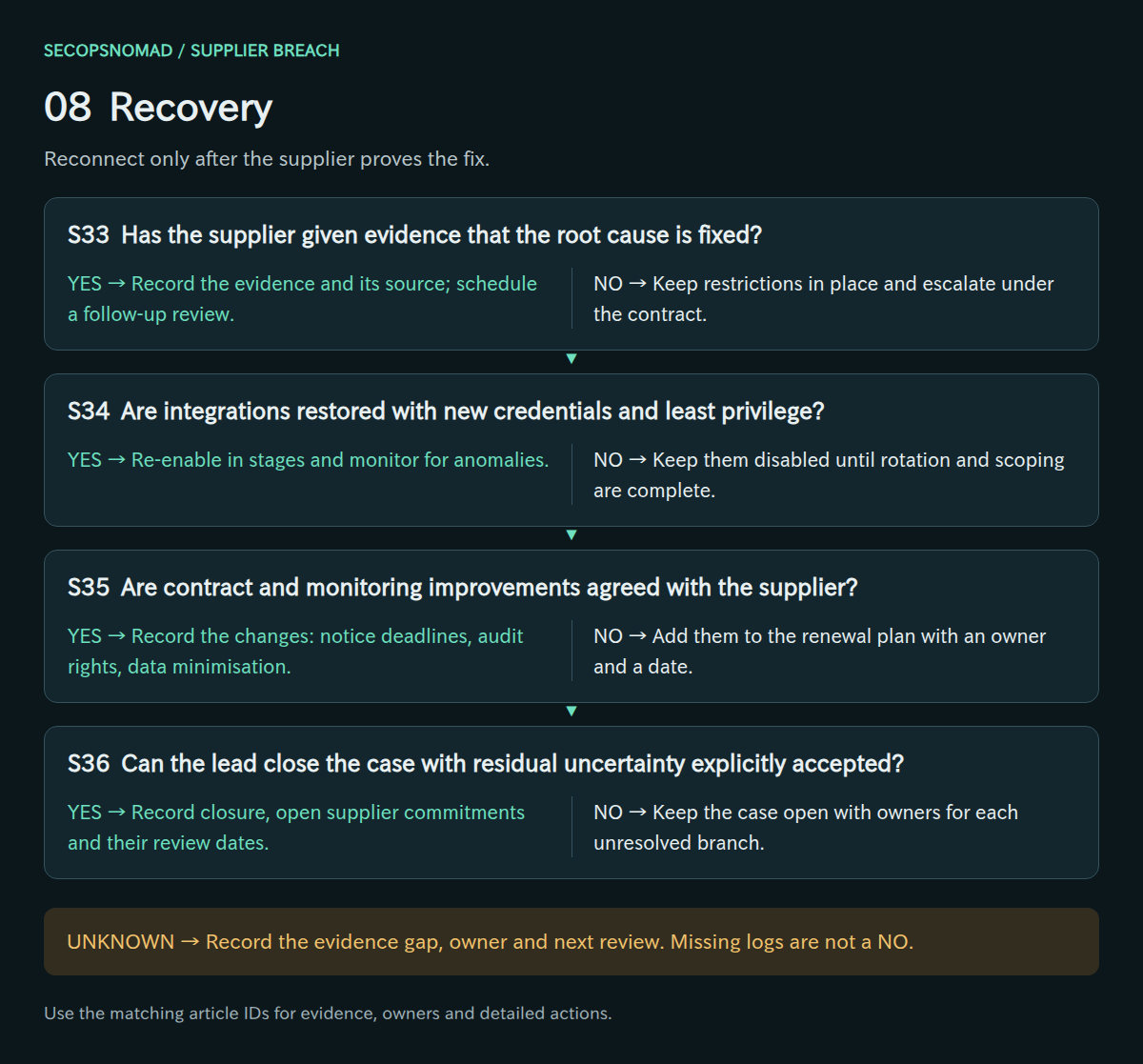
Original decision map. Check each branch independently; unknown answers remain open.
| Decision | Yes | No | Evidence / resolve unknowns | Lead owner |
|---|---|---|---|---|
| S33. Has the supplier given evidence that the root cause is fixed? | Record the evidence and its source; schedule a follow-up review. | Keep restrictions in place and escalate under the contract. | Remediation report, independent findings, attestation. | Third-party Risk + incident lead |
| S34. Are integrations restored with new credentials and least privilege? | Re-enable in stages and monitor for anomalies. | Keep them disabled until rotation and scoping are complete. | Restored config, new secrets, permission review, monitoring. | Cloud / IT + application owner |
| S35. Are contract and monitoring improvements agreed with the supplier? | Record the changes: notice deadlines, audit rights, data minimisation. | Add them to the renewal plan with an owner and a date. | Contract amendment, monitoring plan, supplier commitments. | Procurement / contract owner + Third-party Risk |
| S36. Can the lead close the case with residual uncertainty explicitly accepted? | Record closure, open supplier commitments and their review dates. | Keep the case open with owners for each unresolved branch. | Final timeline, scope, notices, supplier assurance, sign-off. | Incident lead + Legal / Privacy |
How to do it: step by step
- Ask for proof of remediation: root cause, what was fixed, the independent investigator's summary, and the monitoring now in place. "We have strengthened security" is not evidence.
- Restore in stages: new guest accounts with MFA, new API keys with the smallest scopes, partner roles only if still needed and time-limited. Watch the first two weeks of activity closely.
- Update the contract: notification within a fixed number of hours, log retention long enough to answer your questions, cooperation and audit rights, an up-to-date sub-processor list, and deletion of data at the end of the service.
- Update your inventory and onboarding checks so the next notice can be answered in minutes.
Check it worked: each restored integration has a named owner, new credentials and a review date; the contract changes are agreed in writing (S33–S36).
Hunting: supplier-scoped KQL and Splunk starters
No live IOC is supplied. This is a generic response guide. Use the supplier’s tenant ID, application IDs, domains and stated exposure window from your case record. All three examples are read-only, documentation/schema-reviewed and not executed in a live environment.
The KQL examples target Microsoft Sentinel / Azure Monitor Log Analytics with Microsoft Entra ID logs connected. Confirm the tables are populated, that retention reaches back to the supplier’s exposure start, and that you have read access. Each example caps displayed results at 500; split the window and keep every export if a cap is reached.
1. Supplier identities signing in to your tenant. Requires both SigninLogs and AADNonInteractiveUserSignInLogs. HomeTenantId identifies identities homed in the supplier’s Entra tenant, such as B2B guests and partner administrators; CrossTenantAccessType shows serviceProvider for partner admin access. Accounts you created for supplier staff inside your own tenant have your tenant as home: review those by object ID with the account-compromise sign-in query. VPN, SaaS-local and remote-management access do not appear in Entra logs.
2. Directory changes to the supplier’s applications. AuditLogs events naming the supplier’s enterprise applications or service principals as targets: consent, added credentials, role and permission changes. List the object IDs from your enterprise-application inventory. An event is not malicious by itself; compare it with your change records and the supplier’s statements.
3. Mail from the supplier’s domain in Splunk. Splunk Add-on for Microsoft Office 365, message trace input, sourcetype o365:reporting:messagetrace with SenderAddress, RecipientAddress and Subject. It shows who received mail from the supplier, not whether links were clicked. Set the time range to the exposure window. The newer Graph-based input (o365:graph:messagetrace) may name fields differently; check one event first.
KQL: sign-ins by identities homed in the supplier’s tenant
Download supplier-signin-review.kql
// Microsoft Sentinel / Log Analytics. Read-only; not live-tested.
// Sign-ins to your tenant by identities homed in the supplier's Entra tenant.
let SupplierTenantId = "REPLACE_WITH_SUPPLIER_TENANT_ID";
let WindowStart = datetime(2026-01-01T00:00:00Z);  // REPLACE: exposure start, UTC
union withsource=LogTable SigninLogs, AADNonInteractiveUserSignInLogs
| where TimeGenerated between (WindowStart .. now())
| where HomeTenantId =~ SupplierTenantId
| project TimeGenerated, LogTable, UserPrincipalName, UserId, CrossTenantAccessType,
    HomeTenantId, ResourceTenantId, IPAddress, AppDisplayName, ResourceDisplayName,
    ResultType, ConditionalAccessStatus, CorrelationId
| order by TimeGenerated asc
| take 500
KQL: directory changes to the supplier’s applications
Download supplier-app-changes.kql
// Microsoft Sentinel / Log Analytics. Read-only; not live-tested.
// Directory events that name the supplier's apps or service principals as targets.
let SupplierObjectIds = dynamic(["REPLACE_WITH_APP_OR_SERVICE_PRINCIPAL_OBJECT_ID"]);
let WindowStart = datetime(2026-01-01T00:00:00Z);  // REPLACE: exposure start, UTC
AuditLogs
| where TimeGenerated between (WindowStart .. now())
| mv-expand Target = TargetResources
| where tostring(Target.id) in~ (SupplierObjectIds)
| summarize arg_max(TimeGenerated, *) by Id
| project TimeGenerated, Id, OperationName, Result, InitiatedBy,
    TargetResources, CorrelationId
| order by TimeGenerated asc
| take 500
Splunk: mail received from the supplier’s domain
Download supplier-inbound-mail.spl
index="REPLACE_WITH_O365_INDEX" sourcetype="o365:reporting:messagetrace" earliest=-30d latest=now
| eval sender_domain=lower(mvindex(split(SenderAddress, "@"), 1))
| search sender_domain IN ("REPLACE_WITH_SUPPLIER_DOMAIN")
| stats count AS messages dc(RecipientAddress) AS recipients min(_time) AS first_seen max(_time) AS last_seen values(Subject) AS subjects BY SenderAddress
| convert ctime(first_seen) ctime(last_seen)
| sort - recipients
| head 500
Copy-paste templates
Replace everything in [square brackets]. Never include passwords or keys. Have Legal or Privacy review anything that leaves the company.
Evidence request to the supplier
Use in stage 2, sent through the verified channel.
Subject: [Your company] – information request regarding your security incident (your ref: [reference])

Dear [name],
Thank you for informing us on [date]. To meet our own obligations, please provide the following in writing by [date and time]:
1. Affected systems and services, and whether any system that stores or processes our data, or connects to our environment, is among them.
2. Our data involved: datasets, fields, number of records or people, and whether exposure is confirmed or only possible.
3. Time window: earliest known attacker activity, when it was contained, and how these were established.
4. Attacker actions: access, copying, encryption, deletion; and whether credentials, keys or tokens related to us were exposed.
5. Indicators: IP addresses, domains, file hashes and account names, with dates and confidence.
6. Sub-processors involved, and whether they hold copies of our data.
7. Containment status and the name of the investigating firm, if any.
8. Which logs were reviewed, for what period, and their retention.
9. Your notification plans to regulators and individuals, so our statements stay consistent.
Please keep all relevant evidence. Our incident contact is [name, phone, email]. We will send any new credentials only by [phone / secure portal].
Kind regards, [name, title]
Warning to accounts payable and support staff
Use in the first hour and again in stage 6.
Subject: Action needed: [Supplier] security incident – verify payments and requests

[Supplier] has reported a security incident. Criminals may use real details from it (names, order numbers, invoices) to make fraudulent requests look genuine.
Until further notice:
- Do not change bank details for [Supplier] or pay an urgent invoice without calling them back on the number in [contract / vendor system].
- Treat emails "from" [Supplier] that ask for passwords, payments or file downloads as suspicious, even if they continue an existing thread.
- If a customer mentions a strange message that uses their order details, record it and pass it to [contact].
Report anything suspicious to [contact / channel]. Thank you.
Notice to affected individuals (draft for Legal review)
Use in stage 7. Adjust to the confirmed facts; do not include links.
Subject: Notice about a security incident at our service provider

Dear [customer name],
On [date], [Supplier], which handles [service] for us, informed us that it had suffered a security incident. We are writing because your information [was / may have been] affected.
Information involved: [e.g. name, address, phone number, order history]. [Payment card numbers and passwords were not involved / were involved: details].
What we have done: [e.g. suspended the provider's access to our systems, required them to investigate, reported to the Personal Information Protection Commission].
What you can do: be careful with messages that mention your orders and ask for payment or personal details. We will never ask for your password by email or phone.
Contact: [dedicated phone number and hours]. Please type our website address yourself or use our app rather than following links in messages.
We sincerely apologise for the concern this causes.
[Company name]
Management briefing (five lines)
1. What happened: [Supplier], which [holds our customer data / has access to our systems], reported a security incident on [date].
2. Our exposure: [number] records of [data type] [confirmed / possibly] involved; supplier access to our systems [suspended at time / still active because...].
3. Our own environment: [no misuse found in searches covering ... / one suspicious sign-in under investigation].
4. Decisions needed: [e.g. approve PPC report by date; approve customer notice; keep the service suspended until evidence of remediation].
5. Next update: [time]. Lead: [name].
Worked example: a support outsourcer is hit by ransomware
Fictional scenario. The companies, people, times and numbers are invented to show how the decisions connect.
The situation: a 120-person online retailer outsources customer support. The support company's staff have guest accounts in the retailer's Microsoft 365, use its CRM through an API key, and receive a weekly customer file by SFTP. On a Friday at 17:40 JST an email arrives from the support company's general address: they were attacked by ransomware.
- Fri 17:55 – verify. The incident lead calls the account manager on the number in the contract; the notice is genuine and attackers were active from Wednesday (S01, S03). The lead records 17:55 as the time the retailer learned.
- Fri 18:10 – map. The inventory shows 12 guest accounts, the CRM API key, the SFTP account and a weekly file with 48,000 customers' names, addresses and phone numbers (S02, S05–S07).
- Fri 18:30 – restrict. Because the attack may be ongoing, all 12 guests are disabled and their sessions revoked, the CRM key is revoked and the SFTP account locked. Weekend support moves to in-house staff (S17, S18).
- Fri 19:00 – ask and warn. The evidence request goes out; accounts payable gets the call-back warning (S09, S26).
- Sat 10:00 – hunt. Sign-in logs show one guest account signing in at 02:14 on Thursday from a hosting provider, not the supplier's network, and exporting three CRM reports (S21). That account becomes its own case under the account compromise playbook.
- Mon – scope. The supplier confirms the folder holding the weekly customer files was copied before encryption (S13). With 48,000 people and a criminal attack, Legal files the PPC prompt report on Tuesday and prepares individual notices with wording agreed with the supplier (S29, S30, S32).
- Day 10 – recover. The supplier shares its investigator's summary and fixes (S33). Access returns in stages: new guest accounts with MFA, a read-only CRM key, and a secure transfer service instead of SFTP (S34). The contract gains a 24-hour notice clause and log retention terms (S35).
- Day 45 – close. The final report is filed within the 60-day window that applies to attacks. The lead closes the case, accepting that the supplier's logs before Wednesday were incomplete (S36).
What made the difference: the notice was verified by phone within 15 minutes; access was cut the same evening despite the inconvenience; and the retailer searched its own logs, finding a misuse the supplier could not have seen.
Open questions and post-incident improvement
A supplier incident leaves uncertainty you cannot remove yourself: you rarely see the supplier’s logs, the full list of sub-processors or the attacker’s complete actions. Record what the supplier confirmed in writing, what it could not establish, and what your own logs cannot cover. Completing every row is not a guarantee of exhaustive coverage.
At closure, review how quickly you could answer “what does this supplier hold and reach?”, whether the contract gave you the information and cooperation you needed, and which credentials or integrations should not have existed. Feed the result into supplier onboarding, contract templates and the inventory for your other critical suppliers.
References and revision history
References checked on 2026-10-06. Product capabilities, licensing and telemetry configuration can change; confirm your environment before using the operational examples.
- Personal Information Protection Commission: APPI general guidelines, 3-5 data breach reporting (Japanese)
- Microsoft: review partner administrative privileges
- Microsoft: sign-in log details, cross-tenant access type
- SigninLogs schema
- AADNonInteractiveUserSignInLogs schema
- AuditLogs schema
- Splunk: Office 365 message trace data source
2026-10-06: first edition. Published with matching decision IDs and query text in English and Japanese.