
Update, 6 October 2026, 10:50 JST. Added what Daiwa's public help pages show about the supplier service, and how Daiwa's online-trading sign-in now works. See "Update: the help pages and the sign-in" below. Neither Scala Communications nor its listed parent, Scala Inc., had published an incident notice by this time.
What the announcement establishes
This is an inquiry-data incident at a supplier, with potential downstream fraud implications. The distinction matters when deciding which systems to investigate and what customers need to do.
Daiwa Securities’ 5 October 2026 disclosure says supplier Scala Communications reported evidence of unauthorized access to, and acquisition of, customer information on its server. Daiwa used the service to manage internet inquiries. The notice describes approximately 110,000 customers whose names, email addresses, account numbers and other information may have leaked; the 220,000-record total also includes inquiries without identifying information. Records and people are different units. Daiwa disclosure, pages 1–2
The reported access window was approximately 2 October, 20:33 to 3 October, 08:01; Daiwa was notified on 3 October. These are the times in the Japanese notice, not a complete forensic timeline. The supplier reported emergency security measures and no additional access or leakage identified at that point.
Daiwa says it has not identified unauthorized access to its own systems, related unauthorized trading, or public dissemination of the information. It says the affected information alone cannot access accounts or execute trades. Individual customer notifications and supplier-management review are planned. Those are time-bounded company statements, not an independent assurance that all downstream risk has ended. Original announcement
Research cutoff: 5 October 2026, 13:50 JST. This analysis separates the disclosure from SecOpsNomad’s recommendations. It does not claim access to Daiwa’s or the supplier’s investigation evidence.
What remains unknown
The reviewed announcement does not identify an initial-access method, exploited vulnerability, malware family, threat actor, ransomware demand, or incident-specific malicious IP, domain or hash. It does not provide a complete field inventory, retention range, tenant-level forensic report or exact confirmed exfiltration volume. We have not found a separate supplier incident statement in the public pages reviewed by the cutoff.
Evidence of acquisition is more serious than a hypothetical vulnerability, but the complete affected population and records still require reconciliation. Do not rewrite the uncertainty as either “nothing was taken” or “220,000 trading accounts were breached.” Likewise, a supplier incident does not establish that a software update was poisoned or that every customer of that supplier was affected.
Questions for subsequent disclosures include the entry path, affected service and tenant boundaries, access versus download evidence, the age and contents of retained inquiries, corrective measures, and how affected customers are identified. Lack of public answers is not evidence that a particular control was absent.
Update: the help pages and the sign-in
Daiwa's help pages run on a Scala Communications product
Daiwa's notice does not name the Scala Communications service. Its public FAQ gives a clue. The FAQ is served from daiwa.dga.jp, and every page carries a "Powered by i-ask" badge that links to the product page of i-ask, Scala Communications' FAQ system. Daiwa FAQ (Japanese); i-ask product page (Japanese).
Editorial assessment. This shows that Daiwa's help pages run on a Scala Communications product. It does not show which system held the inquiry history or was accessed. i-ask is a FAQ system; Daiwa's notice describes a service for managing inquiries received over the internet, which may be a different product or module. Nor does it show that any other i-ask customer is affected. The product page lists other customers, and none had said it was affected by the time of this update.
For third-party risk teams, the useful step is concrete: check whether your own help, FAQ or inquiry pages carry a supplier badge or a supplier-hosted subdomain such as this one, and ask that supplier directly whether your tenant is in scope. Do not wait for a public notice.
An account number alone does not sign in
Daiwa made passkey sign-in mandatory for online trading in stages from April to June 2026. Daiwa phishing guidance (Japanese); Daiwa passkey page (Japanese). A name, an email address and an account number are not a credential. That is consistent with Daiwa's statement that the leaked information alone cannot be used to access accounts or trade.
The risk moves to the customer. Daiwa's own FAQ explains why phone authentication is weaker than a passkey. In a real-time phishing attack, the victim enters their branch code, account number and login password on a fake page. The attacker relays them to the real site at the same moment, then shows the victim the genuine authentication phone number to call. When the victim calls, the attacker's session is approved. Daiwa says passkeys stop this. Daiwa FAQ: why phone authentication is weaker (Japanese).
Editorial assessment. Two points follow for this incident.
- The leaked records make that relay easier to start. A message that quotes a customer's real name, account number and the subject of their recent inquiry is far more convincing than generic phishing. Daiwa's FAQ currently shows passkey registration and login passwords among its most-viewed questions. That does not tell us what the leaked inquiries contain, but a lure such as "Regarding your inquiry about passkey registration, please complete the setup here" would plausibly reach customers who did ask.
- Account linking is the step to watch. Linking an existing securities account to a new passkey account uses the branch code, account number, login password and a phone-authentication call. Daiwa passkey page, steps 3-4 and 3-5 (Japanese). Daiwa has not said whether, or how, that step is protected against the same relay. It is a reasonable question for any firm that bootstraps a passkey from a weaker factor: the passkey is only as strong as the step that registered it.
For fraud and identity teams at any firm with a similar design: alert on a new passkey or new device being linked to an account shortly after an inbound contact, notify the customer on every link through a separate channel, and treat a link followed quickly by a withdrawal or a change of contact details as high risk.
What Daiwa customers can do now
- Set up or change a passkey only from the official app or a bookmarked login page, never from a link in a message. Daiwa says its online-trading login page starts with
https://www.daiwa.co.jp/. - Check the sender. Daiwa lists its sending addresses as
@daiwa.co.jp,ddfx@fxmail.daiwa.co.jp,dd365fx@365fx.daiwa.co.jp,daiwa_info@mail.daiwa.co.jpandnoreply@accounts.daiwa.co.jp, and shows a brand logo on its mail from 11 January 2026 in mail services that support it. Daiwa phishing guidance (Japanese). - Turn on operation notifications (操作通知) for sign-ins and transactions, and a one-time password for withdrawals and other important procedures, as Daiwa recommends.
- Never call an authentication number shown on a page you reached from a message. That call is what approves the attacker in the relay Daiwa describes.
Why inquiry history changes the security picture
The operational concern is the relationship between data confidentiality, convincing impersonation and account protection. These require different controls and evidence.
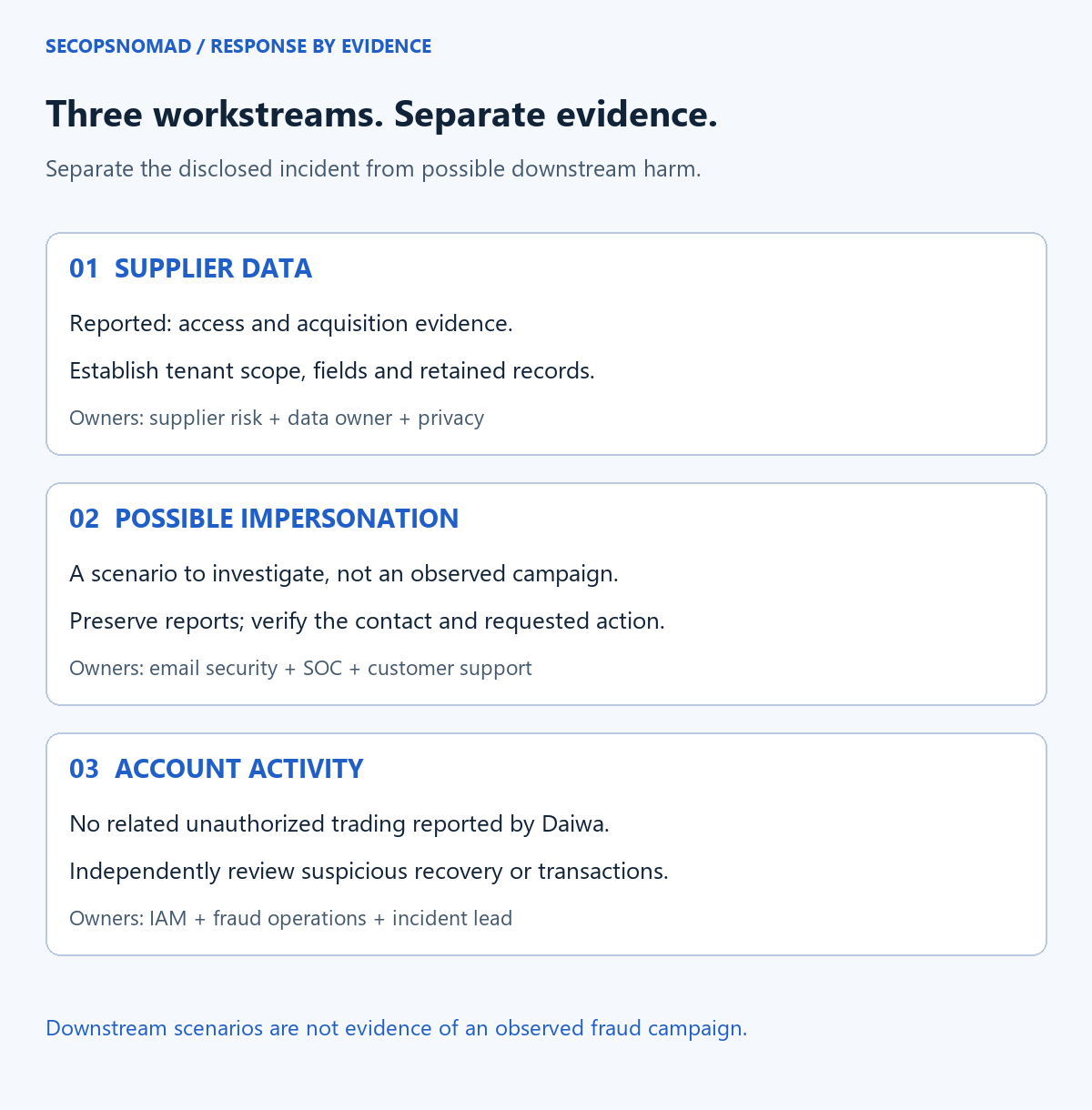
Original analytical diagram. The downstream paths are scenarios to investigate, not confirmed events in this incident.
1. Supporting systems can hold high-value customer context
An inquiry platform may sit outside the core transaction system while retaining a customer's identity, relationship with the firm and support history. Review what is actually stored, including free-text fields, exported reports, backups and any attachments. The presence or exposure of attachments is a review question here, not a reported fact.
Our recommendation is to classify suppliers by the data and privileges they hold, not only whether they process trades. Minimize unnecessary account identifiers, avoid copying authentication secrets into tickets, restrict bulk exports, and define retention for both active records and recoverable copies. Preserve evidence under an appropriate hold before changing retention or deleting records.
2. Accurate personal details can make a fraudulent contact credible
A caller who knows a real inquiry can sound more convincing than a generic scam. Nevertheless, knowledge of an inquiry or an account number should not be accepted as proof of identity. Review service-desk recovery, changes to contact details and exceptional approvals against independent verification requirements.
For defensive planning, consider impersonation of support, breach-notification teams or compensation services. These are plausible scenarios, not observed campaigns attributed to this case. Prepare staff to verify the contact route and requested action without coaching an attacker through account recovery.
3. Account monitoring remains a separate workstream
A confidentiality incident and an unauthorized trade are different findings. Monitor sign-ins, recovery attempts, new devices, MFA changes and sensitive account actions according to the financial institution’s actual capabilities. Correlate events with customer reports, using narrowly authorized access to personal data.
Japan’s Financial Services Agency advises customers to use trusted bookmarks or official applications, enable available security features and notifications, and watch for suspicious activity. Its warning concerns the broader securities-account threat environment; it is not evidence that this Daiwa incident caused those other cases. FSA customer guidance
Which teams should notice this?
| Team | Immediate question | Evidence or action |
|---|---|---|
| Third-party Risk / procurement | Do we use the affected service, directly or through a subcontractor? | Confirm the exact service, tenant, data categories, contractual contacts and investigation access; do not assume all supplier products are affected |
| Application owner / data protection engineering | What did we send, retain and export? | Map fields and retention; distinguish record counts from unique people; inspect authorized export history and integration permissions |
| SOC / SIEM | Can we connect supplier events to our own identities and reports? | Preserve available audit logs, event times, source time zones, collection gaps and correlation IDs; request scoped supplier evidence |
| Email Security | Are staff receiving related impersonation messages? | Preserve original messages and headers; review delivery, URLs and recipient reports; validate before blocking legitimate notification traffic |
| EDR / DFIR | Did a reported message lead to a download or execution? | Review the implicated managed device and timeline when evidence supports it; a supplier disclosure alone does not justify isolating every workstation |
| IAM / fraud operations / service desk | Are recovery or account changes exploiting known personal details? | Verify identity independently; escalate unexplained changes and suspicious transactions through the established fraud process |
| Legal / Privacy | What obligations apply to each organization and data set? | Establish the awareness timeline, reporting route, notification scope, evidence hold and responsibility for follow-up |
| Communications / customer support | Can customers authenticate genuine notices? | Use a consistent official update page, verified contact routes and staff scripts that do not request secrets |
For organizations with no exposure to this service, use the incident to review comparable inquiry and CRM suppliers. Do not search employees’ personal financial records to manufacture an exposure list.
An evidence-led response sequence
Establish scope and preserve the supplier boundary
- Assign an incident owner and confirm the supplier/service relationship through known contacts. Request a written scope statement and its confidence level.
- Preserve relevant application, identity, API, export and support-access records. Record source time zones, retention and known gaps; the public access window is a starting point, not proof that earlier activity did not occur.
- Ask for tenant-specific access and acquisition evidence: affected objects, access principal, timestamps, actions and export or transfer records where available. “No new alert” is different from “no further access.”
- Review integrations and service credentials. Revoke or rotate implicated credentials through an approved change process; avoid assuming that every customer credential was exposed.
Follow the right branch
| Decision | If yes | If no or unknown |
|---|---|---|
| Does the supplier confirm our tenant or data is in scope? | Reconcile records and individuals, engage privacy owners and plan required communications | Obtain a scoped answer, document uncertainty and set a follow-up owner |
| Has a suspicious message or call been reported? | Preserve evidence, verify the claimed sender independently and assess requested actions | Maintain a clear reporting route; lack of reports is not proof of no targeting |
| Did someone enter credentials, approve MFA or install software? | Start identity or endpoint response based on the action taken; verify session containment and investigate the device where relevant | Review interaction evidence before taking disruptive action |
| Is an account change or transaction unexplained? | Escalate immediately to the legitimate financial institution’s fraud process | Continue proportionate monitoring and document what has actually been checked |
| Is recovery proposed? | Require evidence that access paths are addressed, logging works and the accountable owner accepts remaining uncertainty | Keep the affected service or integration within the agreed containment plan |
Use the phishing-response playbook for suspicious communications and the account-compromise playbook when identity misuse is supported by evidence. Restoring a supplier service and closing a customer-fraud investigation are separate decisions.
Hunting queries: prepare for evidence, do not invent IOCs
No incident-specific IOC set was published in the reviewed disclosure. Daiwa’s and Scala’s legitimate domains are not malicious indicators. The examples below are read-only triage templates for systems you are authorized to investigate, not detections proving involvement in this breach. Do not upload customer inquiry histories or account numbers into a public hunting service or LLM.
KQL 1 — Review related mail for one reported recipient
Target: Microsoft Defender XDR Advanced Hunting, with Defender for Office 365 and access to email metadata. Replace the recipient placeholder and confirm the available time range. This uses Timestamp, not Sentinel’s TimeGenerated. Brand wording in the subject or display name is a review aid; genuine notifications, newsletters and news coverage will match, while messages using other wording or only body text can be missed. Review sender authentication and URLs separately. The result is not an automatic block list. Microsoft EmailEvents schema
Download the recipient mail query
// Defender XDR Advanced Hunting. Read-only; not live-tested.
let TargetRecipient = "REPLACE_WITH_REPORTED_RECIPIENT";
EmailEvents
| where Timestamp between (ago(7d) .. now())
| where EmailDirection == "Inbound"
| where RecipientEmailAddress =~ TargetRecipient
| where Subject contains "大和証券" or Subject contains "Daiwa"
    or SenderDisplayName contains "大和証券" or SenderDisplayName contains "Daiwa"
| project Timestamp, NetworkMessageId, RecipientEmailAddress,
    SenderFromAddress, SenderDisplayName, Subject, DeliveryAction,
    DeliveryLocation, ThreatTypes, AuthenticationDetails
| order by Timestamp desc
| take 500
KQL 2 — Examine Safe Links clicks for a selected message
Use an exact, reviewed NetworkMessageId from the previous results or the investigation. Requires UrlClickEvents telemetry. An allowed click is not proof of credential entry, and no result can reflect missing coverage, retention, a different channel or no click. This query does not observe telephone calls or private mail outside the managed environment. Microsoft UrlClickEvents schema
Download the message-click query
// Defender XDR Advanced Hunting. Read-only; not live-tested.
let TargetMessageId = "REPLACE_WITH_REVIEWED_NETWORK_MESSAGE_ID";
UrlClickEvents
| where Timestamp between (ago(7d) .. now())
| where NetworkMessageId == TargetMessageId
| project Timestamp, NetworkMessageId, AccountUpn, Url,
    ActionType, ThreatTypes, Workload
| order by Timestamp desc
| take 500
Splunk — Review inquiry-data activity for one application tenant
This is a custom audit-schema template, not a built-in supplier log format. Map app_id, tenant_id, actor_id, action, object_id, result, src and event_id to your authorized application or provider logs. Normalize action to the listed values before filtering; missing mappings can silently omit events. Restrict the index and sourcetype as well as the tenant. Successful authorized exports, routine support access and failed actions can all appear; investigate against approvals and original records. Do not interpret rows returned as a count of customers or exfiltrated records. Splunk where reference
Download the supplier audit query
index="REPLACE_WITH_AUDIT_INDEX" sourcetype="REPLACE_WITH_AUDIT_SOURCETYPE" earliest=-7d latest=now
| where app_id="REPLACE_WITH_EXACT_APP_ID" AND tenant_id="REPLACE_WITH_EXACT_TENANT_ID"
| where action IN ("read", "download", "export", "permission_change")
| sort 500 + _time
| table _time app_id tenant_id actor_id action object_id result src event_id
The rolling seven-day window is for initial review on publication; replace it with an evidence-based interval for later investigations, allowing for earlier activity and ingestion delay. The 500-row caps limit output, not scan cost. If the cap is reached, split the time window and preserve complete relevant records separately. Execution status: documentation/schema review only; not run against a live tenant. Both editions and downloads use identical query text.
Privacy and customer communication
Legal teams should determine which reporting and individual-notification duties apply, who is responsible, and when the organization became aware of the relevant facts. The public announcement time is not automatically the start of a statutory clock. The PPC provides reporting guidance, including prompt initial reporting and subsequent reports; it also identifies sector-specific reporting routes. Do not defer a report solely because the final record count is unresolved. PPC response guidance
The PPC’s general guidelines address the respective duties of the commissioning organization and processor, including conditions under which a processor’s notification to the commissioning party affects its reporting obligation. Legal owners must assess the actual arrangement; a contract or supplier press release does not establish that every organization’s obligations have been fulfilled. PPC general guidelines
For customers, the practical steps are to open the known official app or a trusted bookmark, inspect notifications and unfamiliar activity, and contact the institution through independently verified details. Enable the security features it provides. If a suspicious interaction involved credentials, an MFA approval or a download, report that action promptly rather than waiting for a confirmed fraudulent transaction. Do not provide a password, PIN or one-time code to an unsolicited caller. FSA guidance, Daiwa official contact page
What would materially change this analysis?
A confirmed attack technique or vulnerable product would change remediation priorities. A verified IOC set could support narrowly scoped retrospective searches. Revised customer or data-field scope would change notifications and fraud precautions. Evidence of credential compromise, unauthorized account activity or a wider supplier impact would create additional response workstreams.
For now, the practical lesson is to make supplier-held customer context visible to data owners, security operations and fraud teams, with evidence available across organizational boundaries. This is SecOpsNomad’s analysis, not a conclusion about the adequacy of Daiwa’s existing controls or a prediction of financial loss.
6 October 2026 — Update. Added the "Update: the help pages and the sign-in" section: the i-ask badge on Daiwa's FAQ, the mandatory passkey sign-in, Daiwa's own description of real-time phishing against phone authentication, the account-linking question, and customer steps with Daiwa's listed sending addresses. Sources rechecked at 10:50 JST; no supplier notice had been published. Earlier text is unchanged.
5 October 2026 — First publication. Original bilingual analysis and diagrams based on the linked primary disclosure and official guidance. No leaked data, confidential incident material or fabricated IOCs are included.