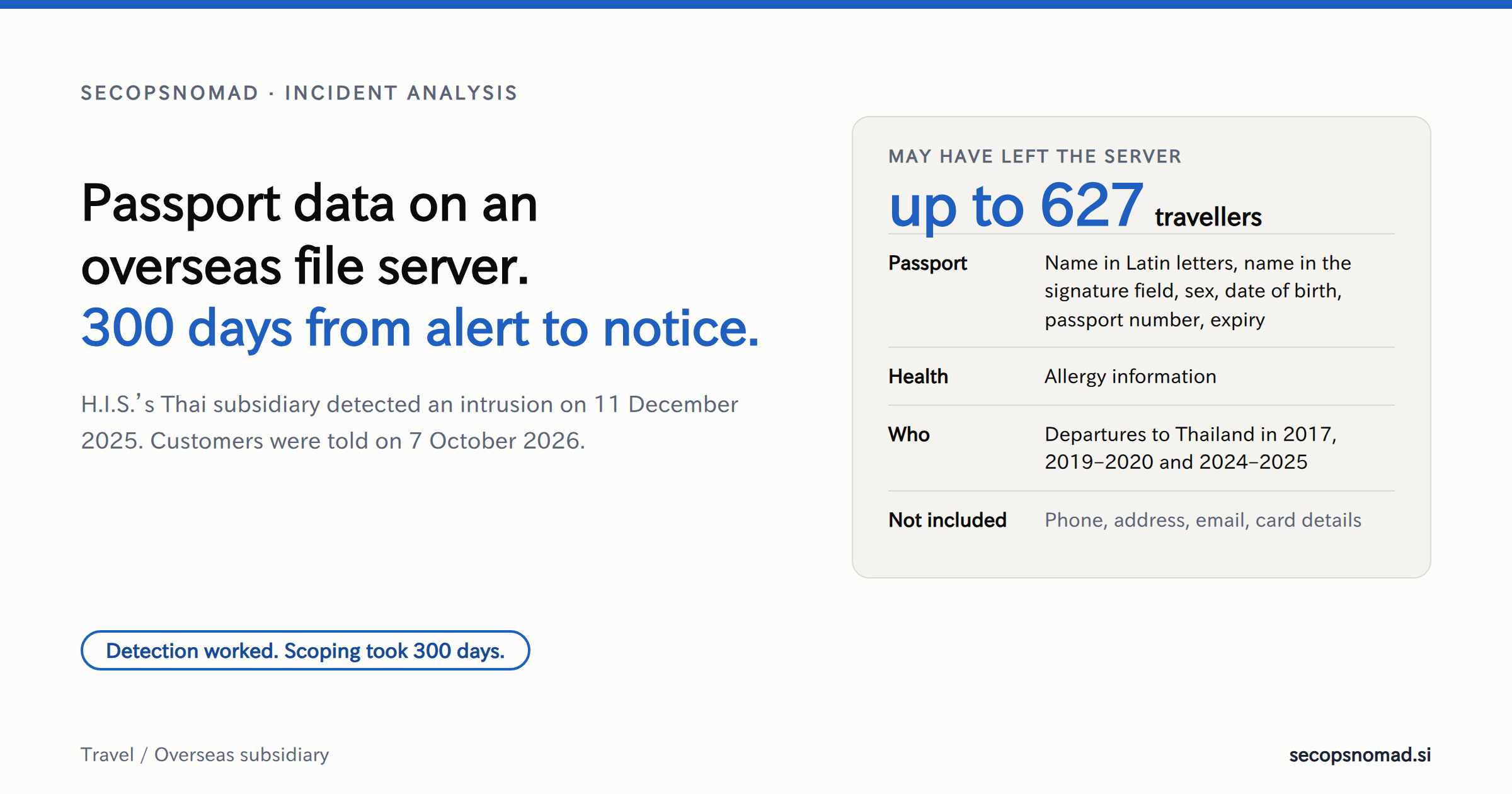
The intrusion-detection software did its job. Everything after the alert took 300 days, because nobody knew what was on the server. The data at risk is small in number but hard to change: passport details that stay valid for years, sitting in a file server at an overseas subsidiary, mixed in with accounting records, some of them from trips taken in 2017.
What H.I.S. has disclosed
On 7 October 2026, the Japanese travel company H.I.S. (エイチ・アイ・エス) published a notice about unauthorized access to a file server at its Thai subsidiary, H.I.S. TOURS CO., LTD. H.I.S. notice (Japanese, PDF)
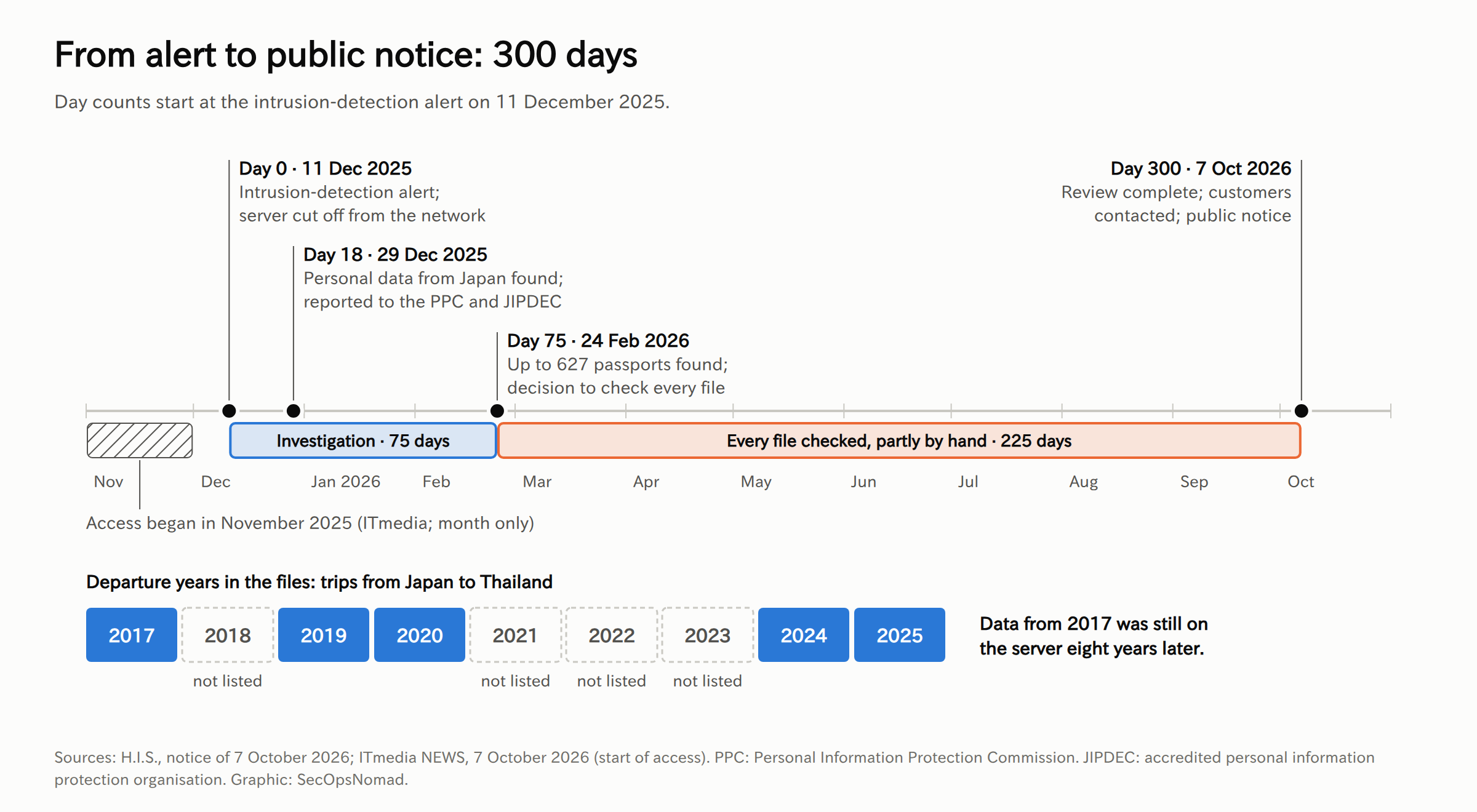
- 11 December 2025. Intrusion-detection software installed on the file server raised an alert. The subsidiary disconnected the server from the network and restricted outside access. An investigation with external specialists found that some of the server's data may have been taken.
- 29 December 2025. H.I.S. confirmed the server held personal data obtained in Japan and reported to Japan's Personal Information Protection Commission (PPC) and to JIPDEC, an accredited personal information protection organisation.
- 24 February 2026. The external specialists found passport information for up to 627 people. H.I.S. decided to check every file on the server.
- 7 October 2026. The check is complete. Customers with known contact details are being contacted individually, and the public notice covers those who cannot be reached.
ITmedia reports that the server was accessed in November 2025, about a month before the alert. ITmedia NEWS (Japanese) The notice itself does not say when access began.
| What the notice says | |
|---|---|
| People | Up to 627 customers who travelled from Japan to Thailand with H.I.S. in 2017, 2019–2020 and 2024–2025 |
| Passport data | Name in Latin letters, name in the signature field, sex, date of birth, passport number, expiry date |
| Other data | Allergy information |
| Not included | Phone number, address, email address, credit card details |
| Misuse | None reported; H.I.S. says it will take appropriate measures if misuse occurs |
| Customer desk | 0120-945-146, weekdays 11:00–18:00 JST; support-desk@his-world.com |
The notice does not mention ransomware, encryption of files or an extortion demand.
Why it took 300 days
H.I.S. gives its own reason. The server held a large volume of data unrelated to personal information, such as accounting records, in many file formats and storage states. Files could not be processed or searched automatically, so staff checked and cross-matched them one by one, partly by hand, to get the list of people and their contact details right.
That explanation is the most useful part of the notice, because it describes a common condition rather than a rare attack:
- No map of personal data. Nobody could say which folders held customer data, so the scope had to be rebuilt after the incident, file by file. The time between the alert and the 627 figure (75 days) and between that figure and the notice (225 days) was spent on this.
- Unstructured copies. Passenger details most likely reached the subsidiary as working files: rooming lists, manifests and meal requests for tours on the ground. The notice does not describe the files, but the mix of passport fields and allergy notes fits that use. Such files are saved, forwarded and archived, and they rarely show up in a database inventory.
- No deletion after the trip. Records from 2017 were still there in December 2025, eight years after the travel ended. Data that had been deleted could not have been taken.
- Distance from head office. H.I.S. now promises stronger security overseas and stricter system monitoring by head office. That implies the subsidiary's servers were not fully inside head-office monitoring before.
This is the second time in two weeks that retention, not the attack, is the core of a Japanese breach. Times Car kept identity documents for seven years. Times Car: ID documents kept for seven years
Japan's rules also shaped the timeline. Under the Act on the Protection of Personal Information (APPI), a leak caused by unauthorized access must be reported to the PPC, and the people affected must be notified promptly in a way that suits the situation. Where they cannot be reached, a public notice is an accepted substitute, which is what the web notice does. PPC: leak response and reporting (Japanese) The data subjects are in Japan, but the server and the company are in Thailand, where the Personal Data Protection Act expects a controller to notify the regulator within 72 hours of becoming aware of a breach, unless it is unlikely to cause risk. Thailand Personal Data Protection Committee The H.I.S. notice does not mention a Thai report.
Why passport details and allergy notes matter
- The fields are the passport's machine-readable zone. Name, sex, date of birth, passport number and expiry, plus the issuing country (JPN for a Japanese passport), are essentially everything encoded in the two lines of code at the bottom of the photo page. Anyone can compute the check digits. That makes forged copies and photographed "passport images" for online identity checks more convincing.
- Most of those passports are probably still valid. Japanese passports last five or ten years, and the number changes only when a new passport is issued. Passports used in 2024 and 2025 can stay valid into the 2030s, and a ten-year passport used in 2017 may still be valid until 2027.
- The same three fields unlock the chip. Passport number, date of birth and expiry are what a reader uses to open an e-passport chip. Reading the chip still needs the physical passport, so this does not allow remote cloning. It is one more reason to treat the number as more than a reference code.
- A strong key for joining leaks. Name in Latin letters plus date of birth links this file to other breach data that does contain email addresses and phone numbers. The notice is right that no contact details leaked from this server; attackers can often get them elsewhere.
- Allergy notes are health information. Under the APPI, medical history is special-care-required personal information. Whether an allergy note counts depends on what it says, and the notice does not classify it. Treat it as sensitive either way. For a phisher, "your meal request for your trip" is a convincing hook.
- Domestic misuse is harder than it used to be. Japanese passports applied for since February 2020 no longer have an address field, so many domestic identity checks do not accept them alone. The larger risk is overseas services and online platforms that accept a passport number or a passport image.
The attacker's playbook: what this case enables
No attacker has been named, and the route in has not been disclosed. This is the analysis a red team would run against a typical overseas branch network, mapped to MITRE ATT&CK.
| Step | What it would look like here | ATT&CK |
|---|---|---|
| Way in | Not disclosed. Common routes into an overseas office: an unpatched VPN or firewall, remote desktop exposed to the internet, or valid credentials from phishing or infostealer logs | T1133 External Remote Services; T1190 Exploit Public-Facing Application; T1078 Valid Accounts |
| Find the data | Browse shares and search file names for "passport", "rooming list", "manifest" or their Thai and Japanese equivalents | T1135 Network Share Discovery; T1083 File and Directory Discovery |
| Collect | Copy folders from the file server, then compress and split them into archives | T1039 Data from Network Shared Drive; T1074 Data Staged; T1560.001 Archive via Utility |
| Take it out | Upload with rclone or a sync client to cloud storage, or pull it back over the remote-access session | T1567.002 Exfiltration to Cloud Storage; T1041 Exfiltration Over C2 Channel |
| Stay quiet | Use built-in admin tools and legitimate remote-access software; work outside local office hours | T1219 Remote Access Tools; T1078 Valid Accounts |
| Use the data | Sell the files; use passport details in forged documents and identity checks abroad; contact travellers as "H.I.S. support" once other leaks supply their email or phone | T1566 Phishing; T1656 Impersonation |
Two points shape the defence. Theft from a file share looks like ordinary file access until the archive or the upload, so the useful signals are on the server and at the network edge. And the damage is set by what the server holds, which the defender controls long before any attack.
The defender's playbook
1. Know where passport data lands
- Map the flow, not just the systems. Follow a booking from the reservation system to operations staff, to the overseas branch or ground handler, and into hotel, restaurant and tour partners. Record each copy: spreadsheet, PDF, scan, email attachment or shared folder.
- Scan file servers for passport numbers. Microsoft Purview has a built-in sensitive information type for Japanese passport numbers (two letters followed by seven digits, near words such as "passport" or 旅券番号). Microsoft Learn: Japan passport number Add Thai keywords such as หนังสือเดินทาง for a Thai office. The scan must cover spreadsheets, PDFs, images and archives, which are exactly the formats H.I.S. could not search.
- Test how fast you can scope. Pick one file server at a subsidiary and ask: whose personal data is on it, and how many people? If the answer takes more than a few days, the scoping gap is the risk to fix first.
2. Delete it after the trip
- Set a retention period for passenger files that ends shortly after return, unless a law requires longer, and apply it at subsidiaries and partners too.
- Keep personal data out of accounting archives: invoices and settlement records rarely need passport numbers.
- Send partners only what they need, through a channel that expires, such as a portal link, rather than attachments that end up on file servers.
- Ask partners to confirm deletion in writing, and check it during audits.
3. Bring overseas file servers into head-office monitoring
- EDR on every server at every subsidiary, with the same policy as head office and alerts going to the head-office SOC around the clock.
- Central logs. Forward Windows security logs, VPN and firewall logs. Enable detailed file-share auditing (event 5145) on shares that hold personal data; it is high-volume on busy servers, so scope it. Microsoft Learn: advanced audit policy
- Remote access. Multi-factor authentication on every VPN and remote desktop gateway, patched edge devices, and no remote desktop exposed directly to the internet.
- Egress. File servers rarely need the internet. Allow only reviewed update and backup destinations, and block consumer cloud-storage and file-transfer services.
- Include subsidiaries in attack-surface management, so their internet-facing devices are on the same patch and exposure reports as head office. The supplier breach playbook covers the same steps for partners outside the group.
4. If your staff or customers may be among the travellers
- Business travel. If your company booked trips to Thailand through H.I.S. in the listed years, ask your travel manager or agency which employees travelled, and point them to the H.I.S. customer desk.
- Advice to individuals. Contact H.I.S. only through the numbers and address in its official notice. Be wary of messages about "compensation", "passport verification" or a past trip that ask for a link click, a login or a payment. A new passport changes the number; anyone considering one should ask H.I.S. whether it will cover the cost.
- Report misuse to H.I.S. and to the police, and keep any suspicious messages.
5. Which teams should act
| Team | Exposure to review | Next step | Evidence needed |
|---|---|---|---|
| IT Operations | File servers at subsidiaries and branches | Inventory them; enrol each in EDR and central logging; restrict internet egress | Server list with EDR status and log destination |
| EDR | Archive and transfer tools on servers | Turn the hunting queries below into detections for file servers | Rule IDs and test results |
| SIEM / SOC | Bulk share reads and uploads from file servers | Enable detailed file-share auditing on sensitive shares; schedule the SPL and Sumo Logic searches | Event volume, search schedule, alert routing |
| Legal / Privacy | Personal data sent to overseas group companies | Map transfers; set retention; check reporting paths under the APPI and local law | Transfer register, retention schedule |
| Third-party Risk | Ground handlers, agencies and other partners abroad | Send the questions below | Written answers, deletion confirmations |
| HR and travel management | Staff passport data held by travel agencies | Ask the agency what it holds and where; brief affected staff | Agency response, staff notice |
Hunting: has a file server been emptied?
No indicators have been published. H.I.S. has not released attacker IP addresses, domains, file names or tools. The queries below look for the generic steps of a share theft on your own file servers: archive and transfer tools, connections to the internet and bulk reads.
All queries are illustrative and were not run against live data. Table and field names were checked against vendor documentation on 7 October 2026 (JST). Tune thresholds to your environment; backups and migrations will match.
1. Archive, sync and transfer tools started on file servers. Microsoft Defender XDR advanced hunting; needs Defender for Endpoint on the servers.
// Illustrative; not run against live data. Microsoft Defender XDR advanced hunting.
// Archive, sync and file-transfer tools started on file servers: the staging and exfiltration steps of a share theft.
// List your file servers, including those at overseas subsidiaries, in FileServers.
let Since = ago(30d);
let FileServers = dynamic(["REPLACE_WITH_FILE_SERVER_1", "REPLACE_WITH_FILE_SERVER_2"]);
let Tools = dynamic(["7z.exe", "7za.exe", "7zg.exe", "rar.exe", "winrar.exe", "makecab.exe", "rclone.exe",
    "megasync.exe", "megacmd.exe", "winscp.exe", "filezilla.exe", "pscp.exe", "restic.exe"]);
DeviceProcessEvents
| where Timestamp > Since
| where DeviceName has_any (FileServers)
| where FileName in~ (Tools) or ProcessVersionInfoOriginalFileName in~ (Tools)
| project Timestamp, DeviceName, AccountDomain, AccountName, FileName, ProcessCommandLine,
    InitiatingProcessFileName, InitiatingProcessCommandLine, SHA256
| order by Timestamp asc
| take 1000
2. File servers connecting to the internet. Microsoft Defender XDR advanced hunting.
// Illustrative; not run against live data. Microsoft Defender XDR advanced hunting.
// File servers rarely need to open connections to the internet. List every public destination they reached.
// Expect update, Defender and backup traffic at first; add reviewed destinations to Expected.
let Since = ago(30d);
let FileServers = dynamic(["REPLACE_WITH_FILE_SERVER_1", "REPLACE_WITH_FILE_SERVER_2"]);
let Expected = dynamic(["REPLACE_WITH_REVIEWED_DOMAIN"]);
DeviceNetworkEvents
| where Timestamp > Since
| where DeviceName has_any (FileServers)
| where ActionType == "ConnectionSuccess" and RemoteIPType == "Public"
| where not(RemoteUrl has_any (Expected))
| summarize Connections = count(), Ports = make_set(RemotePort, 10),
    FirstSeen = min(Timestamp), LastSeen = max(Timestamp)
    by DeviceName, InitiatingProcessFileName, RemoteIP, RemoteUrl
| order by Connections desc
| take 500
3. One account reading hundreds of files on a share in an hour. Splunk, Windows Security event 5145 collected with the Splunk Add-on for Microsoft Windows in XML format. Needs detailed file-share auditing on the server. Machine accounts are excluded.
index="REPLACE_WITH_WINDOWS_INDEX" source="XmlWinEventLog:Security" EventCode=5145 host="REPLACE_WITH_FILE_SERVER" earliest=-30d
| eval mask=tonumber(replace(AccessMask, "0x", ""), 16)
| where mask % 2 == 1 AND NOT like(SubjectUserName, "%$")
| bin _time span=1h
| stats dc(RelativeTargetName) AS distinct_files values(ShareName) AS shares values(IpAddress) AS sources BY _time SubjectUserName
| where distinct_files > 500
| sort 0 - distinct_files
Download the examples: tools KQL · egress KQL · share reads SPL.
Other platforms. Sumo Logic, firewall logs: data sent from a file server to public addresses. Field names assume field extraction rules that produce src_ip, dest_ip and bytes_out; replace the source category and address.
_sourceCategory="REPLACE_WITH_FIREWALL_SOURCE_CATEGORY" "REPLACE_WITH_FILE_SERVER_IP"
| where src_ip = "REPLACE_WITH_FILE_SERVER_IP" and !isPrivateIP(dest_ip)
| sum(bytes_out) as bytes_out by src_ip, dest_ip
| bytes_out / 1048576 as mb_out
| sort by mb_out
| limit 50
CrowdStrike Falcon (LogScale / Next-Gen SIEM), the same tools on named hosts. Replace the agent IDs with those of your file servers.
#event_simpleName=ProcessRollup2
| in(field="aid", values=["REPLACE_WITH_FILE_SERVER_AID_1", "REPLACE_WITH_FILE_SERVER_AID_2"])
| ImageFileName=/\\(7z|7za|7zg|rar|winrar|makecab|rclone|megasync|megacmd|winscp|filezilla|pscp|restic)\.exe$/i
| groupBy([aid, UserName, ImageFileName, CommandLine], function=count())
No result does not prove nothing was taken: servers without EDR or auditing produce no data, logs age out, and an attacker can read files through a remote session without any archive tool. DeviceProcessEvents · DeviceNetworkEvents
Copy-paste templates
Replace everything in [square brackets]. Have Legal or Privacy review anything that leaves the company.
Questions for an overseas subsidiary or partner that receives personal data
Subject: [Company] – personal data held at [subsidiary or partner]

Dear [contact],
Following recent incidents involving personal data stored on overseas file servers, please answer the following in writing by [date].
1. Which personal data about our customers or staff do you receive from us (for example passport details, dates of birth, health or dietary notes), and for what purpose?
2. Where is it stored: which systems, file servers, shared folders and mailboxes, and in which formats (spreadsheet, PDF, scanned image, archive)?
3. How long do you keep it, and how is it deleted? Please confirm the oldest record you still hold.
4. Is personal data kept apart from accounting or other business records?
5. Which servers holding this data have endpoint detection and response installed, and who receives its alerts outside office hours?
6. Which logs do you keep for file-share access, remote access and outbound traffic, and for how long?
7. How do staff and administrators connect remotely, and is multi-factor authentication enforced on every route?
8. When were your VPN, firewall and other internet-facing devices last patched and checked for exposure?
9. If one of your file servers were copied today, how long would it take you to list the people whose data was on it?
10. Within how many hours would you notify us of suspected unauthorized access, and through which verified channel?
Kind regards,
[Name, title, department]
Note to employees who travelled to Thailand on business
Subject: H.I.S. notice about passport information – what to do

H.I.S. announced on 7 October 2026 that passport information and allergy notes for up to 627 customers who travelled from Japan to Thailand with H.I.S. in 2017, 2019–2020 or 2024–2025 may have been taken from a file server at its Thai subsidiary. Phone numbers, addresses, email addresses and card details were not included.
If you travelled to Thailand on an H.I.S. booking in those years:
- H.I.S. is contacting affected customers individually. Its customer desk is 0120-945-146 (weekdays 11:00–18:00) and support-desk@his-world.com. Use only these contact details.
- Be careful with messages about compensation, passport checks or a past trip that ask you to click a link, sign in or pay.
- If you are thinking of applying for a new passport, contact [travel or HR contact] first so we can check with H.I.S. about the cost.
- Report anything suspicious to [security contact].
We are checking with our travel agency which bookings this may affect and will update you by [date].
[Name, department]
Five-line briefing for management
1. What happened: a file server at the Thai subsidiary of H.I.S. was accessed without authorization (alert 11 Dec 2025); passport details and allergy notes for up to 627 travellers may have been taken; customers were told on 7 Oct 2026.
2. Why it matters to us: the server mixed customer data with accounting records and kept it for up to eight years, so scoping took 300 days. [We have / have not] confirmed where our overseas subsidiaries and partners store personal data.
3. Our exposure: [number] file servers at [number] subsidiaries; EDR coverage [x%]; logs at head office [yes / partly / no]; employees who travelled with H.I.S. [being checked].
4. Actions under way: partner questions sent [date]; passport-number scan of file servers [planned / running]; hunting queries [running / scheduled].
5. Decisions needed: [e.g. retention limit for passenger and customer files; EDR and central logging at all subsidiaries by date; egress blocking on file servers]. Next update: [time].
What remains unknown
- How the attacker got in, and who it was. The notice gives neither, and no group is named.
- When access began. ITmedia reports November 2025; the notice gives only the 11 December alert.
- How much data left the server, and whether the passport data was among it. The notice says data "may have been" taken.
- What the files were. The notice does not say whether passport images or scans were stored, or only typed details.
- How many of the 627 have been reached individually, and how many depend on the public notice.
- Whether Thailand's regulator was notified, and whether other H.I.S. subsidiaries share the same network, accounts or administrators.
Sources and updates
- H.I.S.: 子会社ファイルサーバへの不正アクセスによる個人情報流出の可能性に関するお詫びとお知らせ (Japanese, PDF), 7 October 2026
- ITmedia NEWS: HIS子会社からパスポート情報流出か、最大627人分 (Japanese), 7 October 2026
- Reuters via Yahoo! Finance: HISタイ法人に不正アクセス、最大627人分のパスポート情報流出か (Japanese), 7 October 2026
- Sankei Shimbun: HIS顧客旅券情報流出か (Japanese), 7 October 2026
- ABEMA TIMES: HIS子会社 パスポート情報 最大627人分漏えいか (Japanese), 7 October 2026
- Personal Information Protection Commission: leak response (Japanese)
- Thailand Personal Data Protection Committee
- Microsoft Learn: Japan passport number sensitive information type and advanced audit policy configuration
- MITRE ATT&CK: Data from Network Shared Drive, T1039 and Exfiltration to Cloud Storage, T1567.002
7 October 2026: first published. The H.I.S. notice and news coverage were checked on the afternoon of 7 October (JST). We will update this analysis if H.I.S. discloses the cause or more detail on the data.