Customers reuse passwords. Attackers count on it.
Credential stuffing tries username and password pairs leaked from other services against your login. Each success opens a real customer’s account: saved addresses, order history, stored cards and, increasingly, points that can be spent or exchanged within minutes. Several incidents analysed on this site follow that path, such as points exchanged after member-data access, a restaurant app’s member accounts and member identifiers in a points service.
This reusable customer account takeover playbook has 36 decisions, with yes/no actions, evidence checks and named owners. It is an original SecOpsNomad workflow, not a report of a new breach. Use it for accounts your customers hold in your app, shop, membership or points service. For your own employees’ accounts, use the account compromise playbook; if the passwords leaked from your own systems or a supplier’s, run the supplier breach playbook or your breach process as well.
Contain on two levels at once. Edge controls such as rate limits and bot challenges slow the wave of attempts. Account controls such as session revocation, forced resets and holds on redemptions protect each customer who was already reached. Neither replaces the other.
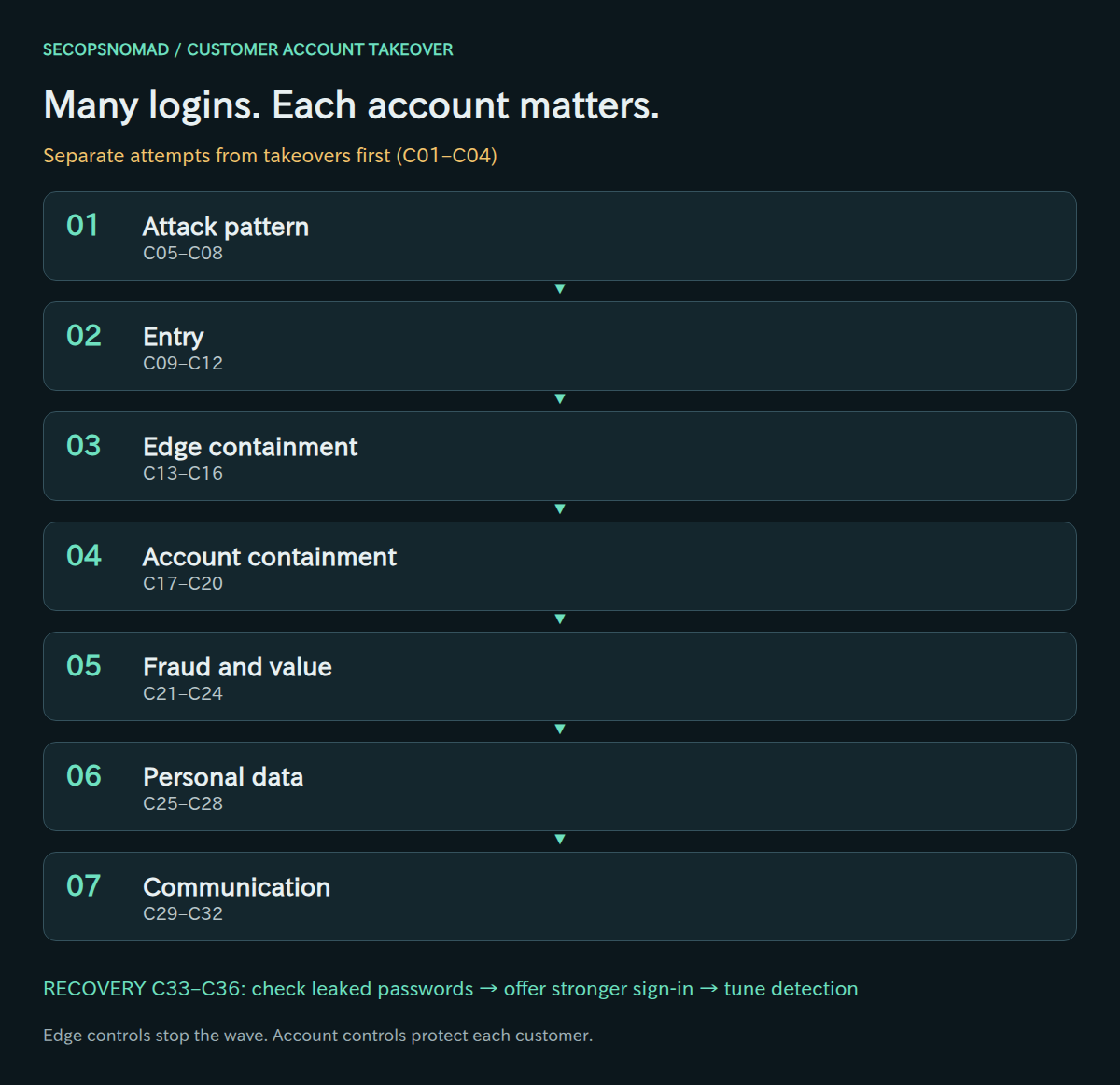
Overview. Attack pattern → how logins succeeded → edge containment → account containment → fraud and value → personal data → communication. Triage comes first and recovery is gated. Every visual decision has an equivalent table below.
Start here: the first hour
New to this? Work down this list in order, then use the stages below for the full response. The goal of the first hour is to stop value leaving customer accounts, without locking every customer out.
- Minute 0–10: separate attempts from takeovers. A wave of failed logins is an attack; a successful login the customer did not make is a takeover. Count both (stage 0 has a query you can adapt).
- Minute 10: open a case and preserve logs. Name an incident lead. Export login, session, WAF/CDN and transaction logs for the period to a safe place now, before rotation deletes them.
- Minute 10–20: measure the wave. Attempts per hour, distinct accounts, distinct source addresses and success rate, compared with a normal day.
- Minute 20: slow the attack at the edge. Turn on rate limiting for every login path: the web page, the mobile app's API and any older endpoint (stage 3).
- Minute 25: list the accounts that were reached. Successful logins from attack sources, success after many failures, or a new device followed straight away by a value action.
- Minute 30: protect those accounts. End their sessions and app tokens, then require a password reset (stage 4).
- Minute 35: hold high-value actions. Pause point redemptions, gift-card purchases, payout changes and contact-detail changes for the affected accounts, or for everyone if you cannot yet tell who is affected.
- Minute 40: call your partners. Points exchanges, gift-card issuers and payment providers can sometimes stop a transfer that has not completed yet.
- Minute 50: brief customer support and Legal/Privacy. Support needs a script today; Legal needs the numbers to judge reporting duties.
- Minute 60: send the first status update and set the next update time.
Do not: lock accounts permanently after a few failures (the attacker can then lock out real customers on purpose); send notices with links (they will be copied by phishers); block whole countries or networks without weighing the customers you will lose; or say "our systems were not breached" before you have checked where the passwords came from.
Preparation and decision rules
Before an incident, make sure every login path (web, mobile app, API, partner single sign-on) writes a log with time, account, source, device or user agent, result and the action taken. Know who can change rate limits and bot rules, revoke sessions in bulk, hold redemptions and payouts, and send customer notices. Agree in advance which signals justify a forced reset.
- Yes: perform the action and continue every other relevant check.
- No: record the evidence, scope and time window supporting the answer. No alert alone is not enough.
- Unknown: keep an open task with an assigned owner and next review time. Use proportionate containment while investigating.
- Not applicable: state why and name the reviewer. Do not use it for missing logs.
Record case ID, service and login path, affected account count, UTC window, answer/rationale, evidence location, action/result, assigned owner and review time. Keep account lists and customer data in a restricted case workspace. Do not publish account identifiers, passwords, tokens or customer details in tickets or public tools.
Download the English decision register (CSV). The blank working columns are for your private case records; treat text added to a spreadsheet as untrusted input.
Owners: the product owner decides customer-facing changes; Platform/SRE runs rate limits, WAF and bot controls; CIAM/IAM handles sessions, resets and MFA; the fraud team reviews value movements; Payments/Finance handles orders, cards and refunds; partner managers contact points-exchange and payment partners; SOC/SIEM builds the timeline; customer support handles contacts and verification; Legal/Privacy decides notification; Communications prepares notices; the incident lead approves restoration and closure.
Words used in this playbook
| Term | Plain meaning |
|---|---|
| Account takeover (ATO) | Someone other than the customer logs in and acts as them. |
| Credential stuffing | Trying username and password pairs leaked from other websites. Works because people reuse passwords. Many accounts, few tries each. |
| Password spraying | Trying a few common passwords against many accounts. |
| Rate limiting | Allowing only a set number of requests in a time period, per source, account or device. |
| Challenge | An extra step for suspicious logins, such as a bot check or a one-time code, instead of a flat block. |
| Residential proxy | A service that sends attack traffic through ordinary home internet connections, so it looks like real customers. |
| Session / token | What keeps a customer logged in after the password check. If stolen or left active, it works without the password. |
| Step-up authentication | Asking for an extra check only before risky actions, such as redeeming points or changing the delivery address. |
| Passkey | A sign-in method based on the customer's device that cannot be phished or reused on another website. |
| Leaked-password check | Refusing passwords that appear in known breach lists, at sign-up, reset and login. |
| Stored value | Anything in an account worth money: points, balances, gift cards, saved payment methods. |
| APPI / PPC | Japan's personal information law and the commission that receives leak reports under it. |
No security team? Who does what
The owners in the tables are roles, not job titles. In a small company one person often holds several. Keep one rule: the person who changes a login control should not be the only one who checks that real customers can still log in.
| Role in this playbook | In a small company, usually | What they need ready |
|---|---|---|
| Incident lead | The CEO, CTO or service manager | Authority to pause features such as point redemption |
| Application owner | The lead developer of the website and app | Access to login, session and account-change data; ability to deploy |
| Edge / infrastructure | Whoever manages the CDN, WAF or hosting | Admin access to rate limiting and security rules |
| Fraud / payments | Operations or finance staff | Contacts at partners, gift-card and payment providers |
| Customer support | The support team or outsourcer | A script, an identity check and an escalation route |
| Legal / Privacy | Outside counsel or the personal-information manager | Counts of affected accounts and the data they show |
| Communications | The CEO or marketing lead | Approved notice wording without links |
| Outside help | Your CDN or hosting provider's support, payment provider, an incident response firm; in Japan, the police cybercrime consultation window for unauthorized access | Attack metrics and the timeline |
0. Triage: separate attempts from takeovers
- Measure the spike: attempts, distinct accounts, success rate and login paths, compared with a normal day.
- Find the successes. A takeover is a successful login the customer did not make, followed by actions they did not take.
- Open a case, assign owners and preserve login, session and transaction logs before rotation or sampling removes them.
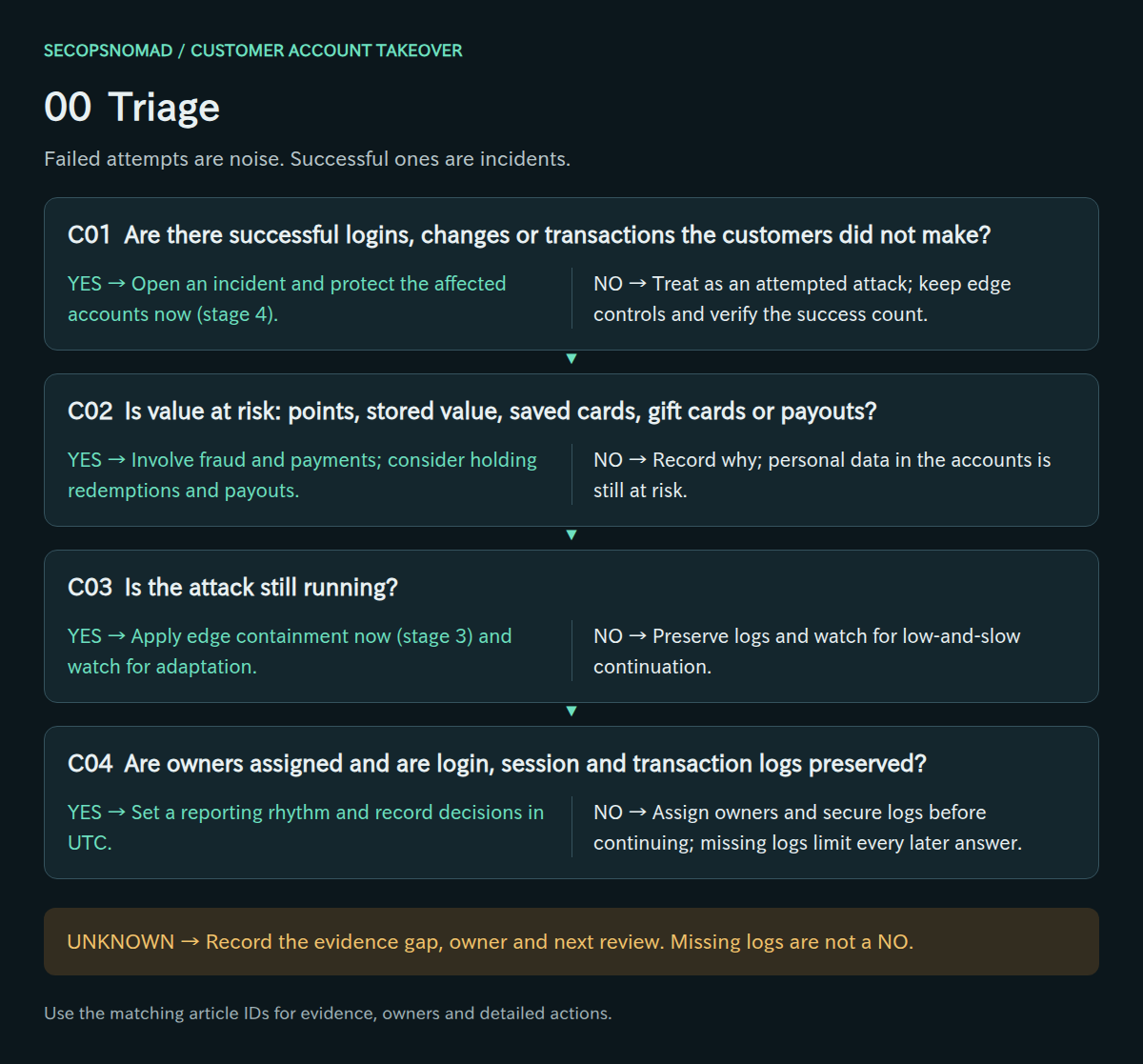
Original decision map. Check each branch independently; unknown answers remain open.
| Decision | Yes | No | Evidence / resolve unknowns | Lead owner |
|---|---|---|---|---|
| C01. Are there successful logins, changes or transactions the customers did not make? | Open an incident and protect the affected accounts now (stage 4). | Treat as an attempted attack; keep edge controls and verify the success count. | Login results, session activity, customer reports, transaction logs. | SOC + product owner |
| C02. Is value at risk: points, stored value, saved cards, gift cards or payouts? | Involve fraud and payments; consider holding redemptions and payouts. | Record why; personal data in the accounts is still at risk. | Account features, balances, recent redemptions, payout settings. | Fraud team + Payments / Finance |
| C03. Is the attack still running? | Apply edge containment now (stage 3) and watch for adaptation. | Preserve logs and watch for low-and-slow continuation. | Attempt rate over time, active sources, current success rate. | Platform / SRE + SOC |
| C04. Are owners assigned and are login, session and transaction logs preserved? | Set a reporting rhythm and record decisions in UTC. | Assign owners and secure logs before continuing; missing logs limit every later answer. | Case roster, log exports, retention settings. | Incident lead |
How to do it: step by step
Get the numbers per hour. Adapt this query to your own login table (the table and column names are examples):
SELECT date_trunc('hour', event_time) AS hour,
       count(*) AS attempts,
       count(DISTINCT account_id) AS accounts,
       count(DISTINCT source_ip) AS sources,
       sum(CASE WHEN success THEN 1 ELSE 0 END) AS successes,
       round(100.0 * sum(CASE WHEN success THEN 1 ELSE 0 END) / count(*), 2) AS success_pct
FROM login_events
WHERE event_time >= now() - interval '7 days'
GROUP BY 1
ORDER BY 1;
Compare with a normal day: a jump in attempts and distinct accounts with a falling success rate is a wave of guessing; any rise in successes needs attention first.
Preserve: export the raw login, session, WAF/CDN and transaction logs for the window into a restricted case folder, and extend log retention if it is short.
Open the case: lead, owners, time the attack was first seen, and the next update time.
Check it worked: you can say how many accounts had successful logins during the attack, and the logs are saved outside their normal retention (C01–C04).
1. Attack pattern: understand what is hitting the login
- Classify the attack: credential stuffing (many accounts, few tries each, leaked pairs), password spraying (common passwords) or targeted takeover.
- Map every login path the attacker used, including mobile APIs and legacy endpoints that bypass the web page’s protections.
- Characterise the sources: data-centre addresses, residential proxies, user agents and timing. Rotating sources make IP blocking alone ineffective.
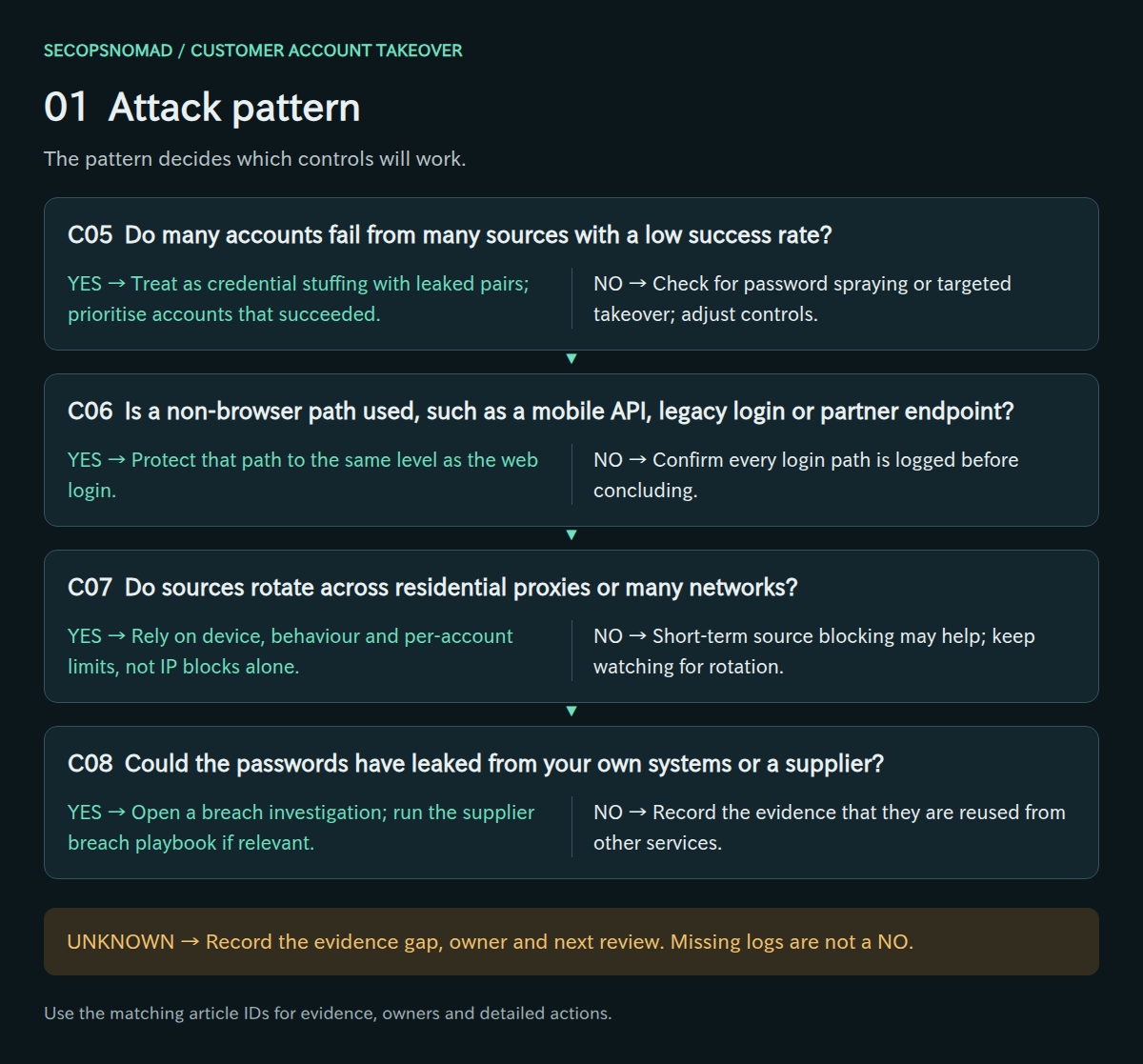
Original decision map. Check each branch independently; unknown answers remain open.
| Decision | Yes | No | Evidence / resolve unknowns | Lead owner |
|---|---|---|---|---|
| C05. Do many accounts fail from many sources with a low success rate? | Treat as credential stuffing with leaked pairs; prioritise accounts that succeeded. | Check for password spraying or targeted takeover; adjust controls. | Accounts per source, attempts per account, success rate. | SOC |
| C06. Is a non-browser path used, such as a mobile API, legacy login or partner endpoint? | Protect that path to the same level as the web login. | Confirm every login path is logged before concluding. | Endpoint names in logs, API gateway records, app versions. | Product owner + Platform / SRE |
| C07. Do sources rotate across residential proxies or many networks? | Rely on device, behaviour and per-account limits, not IP blocks alone. | Short-term source blocking may help; keep watching for rotation. | ASN and network mix, addresses per hour, repeat rates. | Platform / SRE + SOC |
| C08. Could the passwords have leaked from your own systems or a supplier? | Open a breach investigation; run the supplier breach playbook if relevant. | Record the evidence that they are reused from other services. | Hit rate on first try, password storage review, supplier notices. | Incident lead + Legal / Privacy |
How to do it: step by step
Break the traffic down by path: list every endpoint that accepts a password or one-time code (web form, mobile API, older API versions, partner sign-in, password reset, code verification). Attackers prefer the one with the weakest protection.
SELECT endpoint, count(*) AS attempts, count(DISTINCT account_id) AS accounts,
       sum(CASE WHEN success THEN 1 ELSE 0 END) AS successes
FROM login_events
WHERE event_time BETWEEN '2026-10-04 00:00' AND '2026-10-05 00:00'
GROUP BY endpoint
ORDER BY attempts DESC;
Classify: many accounts with one or two tries each and a low success rate is credential stuffing; a few passwords across many accounts is spraying; a handful of high-value accounts tried carefully is targeted takeover.
Characterise the sources: top networks (ASN), countries, user agents and timing. Many networks with few requests each mean residential proxies; blocking addresses alone will not hold.
Ask where the passwords came from: if the pairs match your customers unusually well, check whether your own systems or a supplier leaked them (see the supplier breach playbook).
Check it worked: a one-paragraph description of the attack type, the paths used and the source pattern (C05–C08).
2. Entry: establish how logins succeeded
- Check whether the correct password worked on the first attempt. That points to reused credentials rather than guessing.
- Review the second factor and recovery flow: SMS or email codes, reset links, changed phone numbers and support-assisted recovery.
- Look for stolen sessions or long-lived app tokens. Those need revocation, not a password reset.
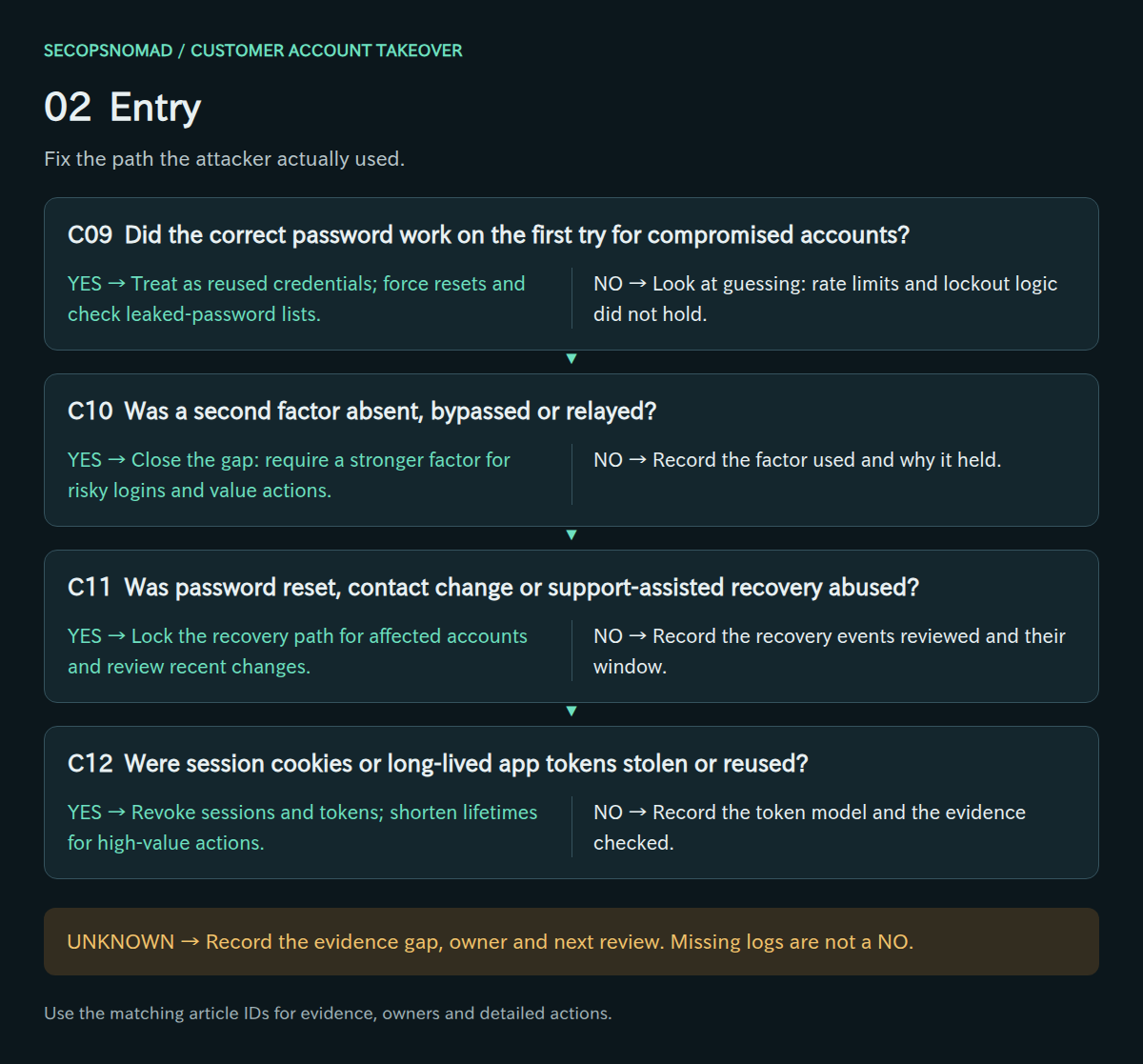
Original decision map. Check each branch independently; unknown answers remain open.
| Decision | Yes | No | Evidence / resolve unknowns | Lead owner |
|---|---|---|---|---|
| C09. Did the correct password work on the first try for compromised accounts? | Treat as reused credentials; force resets and check leaked-password lists. | Look at guessing: rate limits and lockout logic did not hold. | Attempts before success per account, password-check results. | CIAM / IAM + SOC |
| C10. Was a second factor absent, bypassed or relayed? | Close the gap: require a stronger factor for risky logins and value actions. | Record the factor used and why it held. | MFA enrolment rates, challenge results, OTP delivery logs. | CIAM / IAM + product owner |
| C11. Was password reset, contact change or support-assisted recovery abused? | Lock the recovery path for affected accounts and review recent changes. | Record the recovery events reviewed and their window. | Reset requests, email and phone changes, support tickets. | CIAM / IAM + customer support |
| C12. Were session cookies or long-lived app tokens stolen or reused? | Revoke sessions and tokens; shorten lifetimes for high-value actions. | Record the token model and the evidence checked. | Session store, token issue and use logs, device IDs. | CIAM / IAM + Platform / SRE |
How to do it: step by step
First-try success: for each account that logged in from an attack source, count failures before the success. A correct password on the first attempt points to reused credentials.
SELECT s.account_id, s.event_time AS success_time,
       (SELECT count(*) FROM login_events f
         WHERE f.account_id = s.account_id AND NOT f.success
           AND f.event_time BETWEEN s.event_time - interval '1 day' AND s.event_time) AS failures_before
FROM login_events s
WHERE s.success AND s.source_ip IN (SELECT source_ip FROM attack_sources)
ORDER BY failures_before;
Second factor and recovery: check whether these accounts had MFA, whether codes were requested and entered, and whether password resets, email or phone changes, or support-assisted recoveries happened shortly before or after.
Sessions and tokens: look for logins with no password check at all, such as reused session cookies or app refresh tokens. Those need token revocation, not only a reset.
Check it worked: for each affected account you know how the attacker got in: reused password, bypassed second factor, abused recovery or stolen session (C09–C12).
3. Edge containment: slow the wave without locking out customers
- Apply rate limits per account, per device and per source together. One dimension alone is easy to rotate around.
- Challenge suspicious logins progressively. Hard lockouts let an attacker deny service to real customers.
- Cover every path at once. Attackers move to the least protected endpoint within hours.
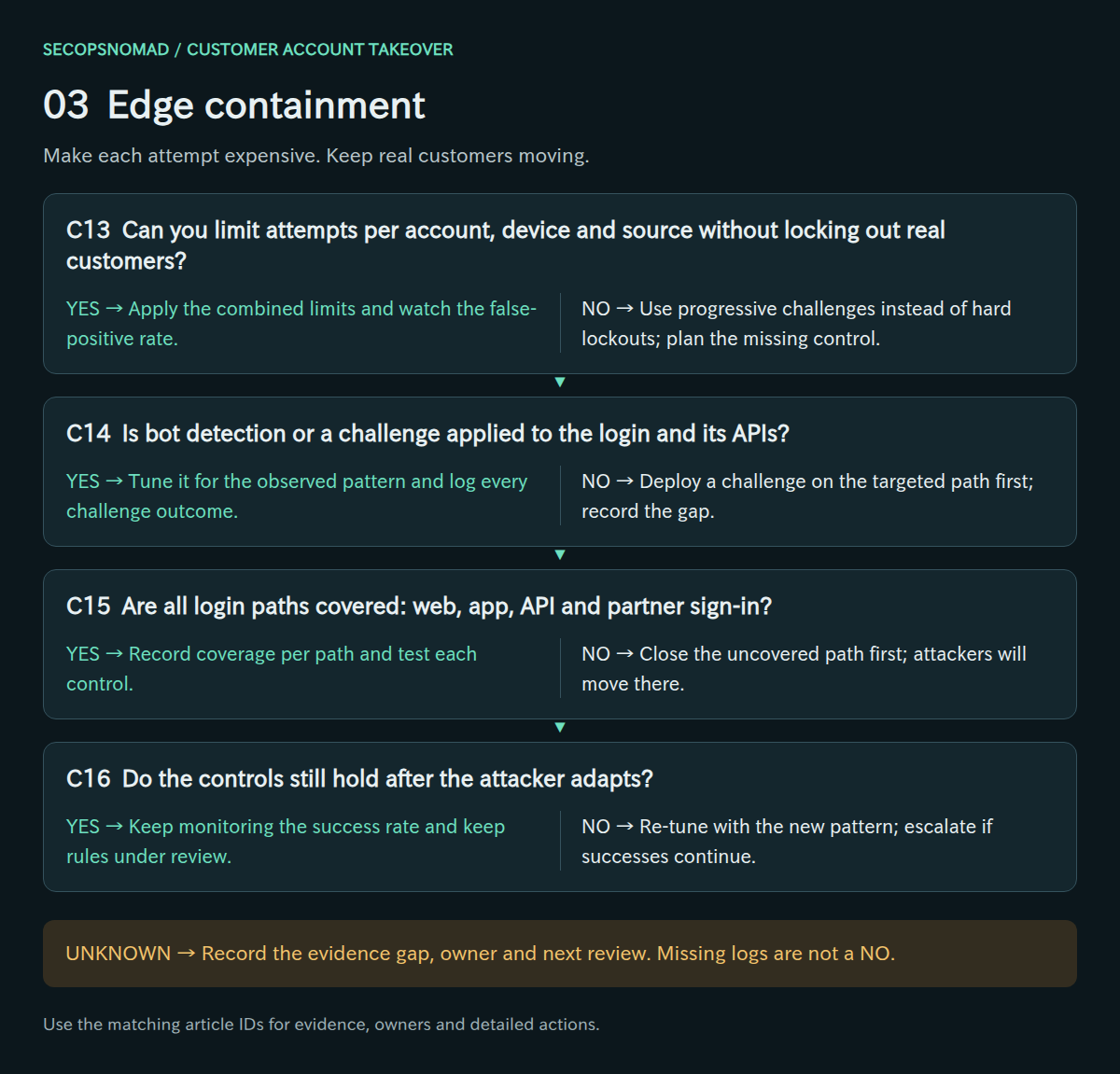
Original decision map. Check each branch independently; unknown answers remain open.
| Decision | Yes | No | Evidence / resolve unknowns | Lead owner |
|---|---|---|---|---|
| C13. Can you limit attempts per account, device and source without locking out real customers? | Apply the combined limits and watch the false-positive rate. | Use progressive challenges instead of hard lockouts; plan the missing control. | Rule changes, block and challenge counts, support complaints. | Platform / SRE + product owner |
| C14. Is bot detection or a challenge applied to the login and its APIs? | Tune it for the observed pattern and log every challenge outcome. | Deploy a challenge on the targeted path first; record the gap. | WAF/bot rules, challenge solve rates, path coverage. | Platform / SRE |
| C15. Are all login paths covered: web, app, API and partner sign-in? | Record coverage per path and test each control. | Close the uncovered path first; attackers will move there. | Path inventory, control matrix, test results. | Product owner + Platform / SRE |
| C16. Do the controls still hold after the attacker adapts? | Keep monitoring the success rate and keep rules under review. | Re-tune with the new pattern; escalate if successes continue. | Success rate after changes, new sources and user agents. | SOC + Platform / SRE |
The OWASP Credential Stuffing Prevention Cheat Sheet recommends defence in depth: multi-factor authentication, CAPTCHA, IP mitigation and intelligence, device and connection fingerprinting, unpredictable usernames, multi-step login, blocking headless browsers, degradation, identifying leaked passwords and notifying users about unusual security events. No single control is expected to stop a determined attacker. OWASP cheat sheet.
How to do it: step by step
- Rate limit at the edge. In Cloudflare: Security → Security rules → Create rule → Rate limiting rules. Match your login path, for example
http.request.uri.path eq "/login"and methodPOST; count by IP; set a threshold and period your real customers never reach; choose Block or a challenge. The free plan allows one rule with a 10-second period; paid plans allow more. Cloudflare: rate limiting rules. - Repeat for every path found in stage 1, especially the mobile API. A rule on the web page alone moves the attack, it does not stop it.
- Add per-account limits in the application: for example, after several failures for one account in 15 minutes, require a challenge or a one-time code rather than locking the account.
- Challenge, don't lock: show a challenge to suspicious logins (new device, attack network, many failures) and let normal logins through.
- Watch for adaptation: check the numbers every hour for the first day. Attackers change paths, user agents and speed within hours.
Check it worked: attempts on every path fall below the agreed threshold, while successful logins by real customers stay near normal (C13–C16).
4. Account containment: protect each customer reached
- Revoke sessions and app tokens for affected accounts before forcing a reset, so the attacker’s session ends.
- Force a reset with verification the attacker cannot complete, and require new, non-reused passwords.
- Revert attacker changes to email, phone, delivery address, payout details and MFA, using the account’s history.
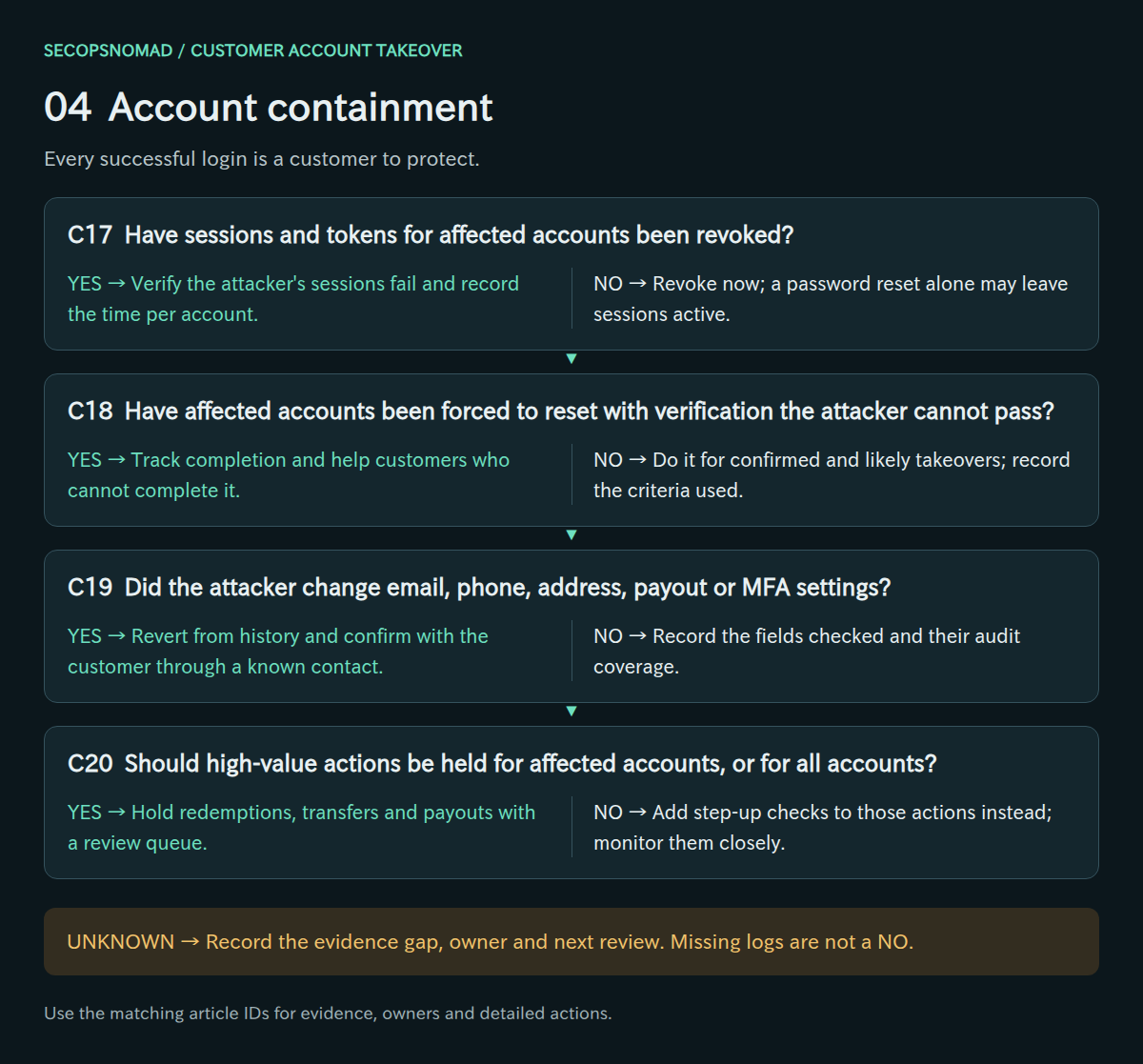
Original decision map. Check each branch independently; unknown answers remain open.
| Decision | Yes | No | Evidence / resolve unknowns | Lead owner |
|---|---|---|---|---|
| C17. Have sessions and tokens for affected accounts been revoked? | Verify the attacker’s sessions fail and record the time per account. | Revoke now; a password reset alone may leave sessions active. | Session revocation logs, post-revocation activity. | CIAM / IAM |
| C18. Have affected accounts been forced to reset with verification the attacker cannot pass? | Track completion and help customers who cannot complete it. | Do it for confirmed and likely takeovers; record the criteria used. | Reset flags, completion rates, verification method. | CIAM / IAM + customer support |
| C19. Did the attacker change email, phone, address, payout or MFA settings? | Revert from history and confirm with the customer through a known contact. | Record the fields checked and their audit coverage. | Profile change history, previous values, customer confirmation. | Customer support + CIAM / IAM |
| C20. Should high-value actions be held for affected accounts, or for all accounts? | Hold redemptions, transfers and payouts with a review queue. | Add step-up checks to those actions instead; monitor them closely. | Hold rules, queue size, customer impact. | Fraud team + product owner |
How to do it: step by step
End sessions first. How depends on your application. Two common patterns (names are examples):
-- Server-side sessions: delete them for the affected accounts
DELETE FROM sessions WHERE account_id IN (SELECT account_id FROM affected_accounts);

-- Signed tokens (JWT): raise a per-account version the server checks on every request
UPDATE accounts SET token_version = token_version + 1
WHERE id IN (SELECT account_id FROM affected_accounts);
Also revoke the mobile app's refresh tokens and any "remember me" tokens.
Revert attacker changes before the reset: use the account change history to restore the original email, phone, delivery address, payout details and MFA settings. Otherwise the reset link goes to the attacker.
Force a reset: require a new password at next login, verified through the restored contact details or a check the attacker cannot pass, and refuse passwords found in breach lists.
Hold value actions: keep redemptions, transfers and payout changes on hold for these accounts until the customer has completed the reset.
Check it worked: a test account in the same state shows that an old session no longer works, and the reset message reaches the original contact details (C17–C20).
5. Fraud and value: stop and reverse what was taken
- List every value movement from affected accounts after the first suspicious login: redemptions, transfers, orders, gift cards and payouts.
- Contact partners quickly. Points exchanged into another programme or converted to gift cards may still be stoppable for a short time.
- Identify the destinations: delivery addresses, recipient accounts and payout details reused across accounts point to the same actor.
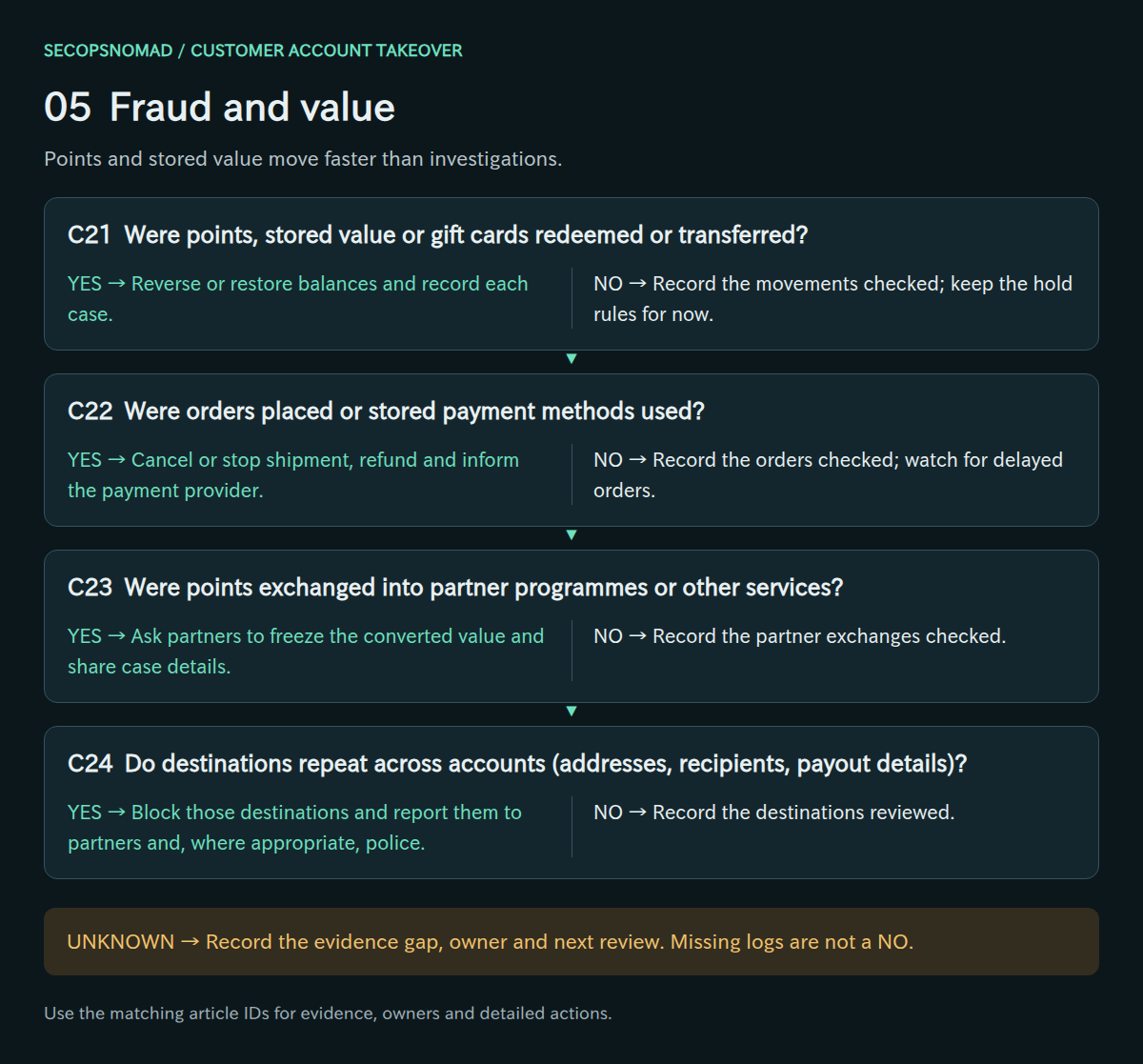
Original decision map. Check each branch independently; unknown answers remain open.
| Decision | Yes | No | Evidence / resolve unknowns | Lead owner |
|---|---|---|---|---|
| C21. Were points, stored value or gift cards redeemed or transferred? | Reverse or restore balances and record each case. | Record the movements checked; keep the hold rules for now. | Ledger entries, redemption logs, balance history. | Fraud team + Payments / Finance |
| C22. Were orders placed or stored payment methods used? | Cancel or stop shipment, refund and inform the payment provider. | Record the orders checked; watch for delayed orders. | Order history, shipping changes, payment records. | Payments / Finance + product owner |
| C23. Were points exchanged into partner programmes or other services? | Ask partners to freeze the converted value and share case details. | Record the partner exchanges checked. | Exchange logs, partner case numbers, timestamps. | Partner manager + Fraud team |
| C24. Do destinations repeat across accounts (addresses, recipients, payout details)? | Block those destinations and report them to partners and, where appropriate, police. | Record the destinations reviewed. | Destination list, account links, reports filed. | Fraud team + Legal / Privacy |
How to do it: step by step
List every value movement from affected accounts after the first suspicious login:
SELECT t.account_id, t.event_time, t.type, t.amount, t.destination
FROM transactions t
JOIN affected_accounts a ON a.account_id = t.account_id
WHERE t.event_time >= a.first_suspicious_login
ORDER BY t.event_time;
Contact partners straight away (template below): points-exchange partners, gift-card issuers, payment providers. Give them transaction IDs and times and ask them to stop anything not yet completed.
Find repeated destinations: the same delivery address, recipient account, payout account or email receiving value from several accounts identifies the attacker's collection points.
SELECT destination, count(DISTINCT account_id) AS accounts, sum(amount) AS total
FROM transactions
WHERE account_id IN (SELECT account_id FROM affected_accounts)
GROUP BY destination
HAVING count(DISTINCT account_id) > 1
ORDER BY accounts DESC;
Block those destinations for new transactions and record the losses per account for reimbursement decisions.
Check it worked: every value movement is listed with its status (stopped, recovered, lost) and an owner (C21–C24).
6. Personal data: establish what the attacker could see
- List what a logged-in customer can see and download: name, address, phone, order history, partial card data, documents.
- Check for bulk harvesting through APIs. Profile and order endpoints can be scraped once a session exists.
- Give Legal/Privacy the scale, the data items and the evidence of access, so they can assess reporting duties.
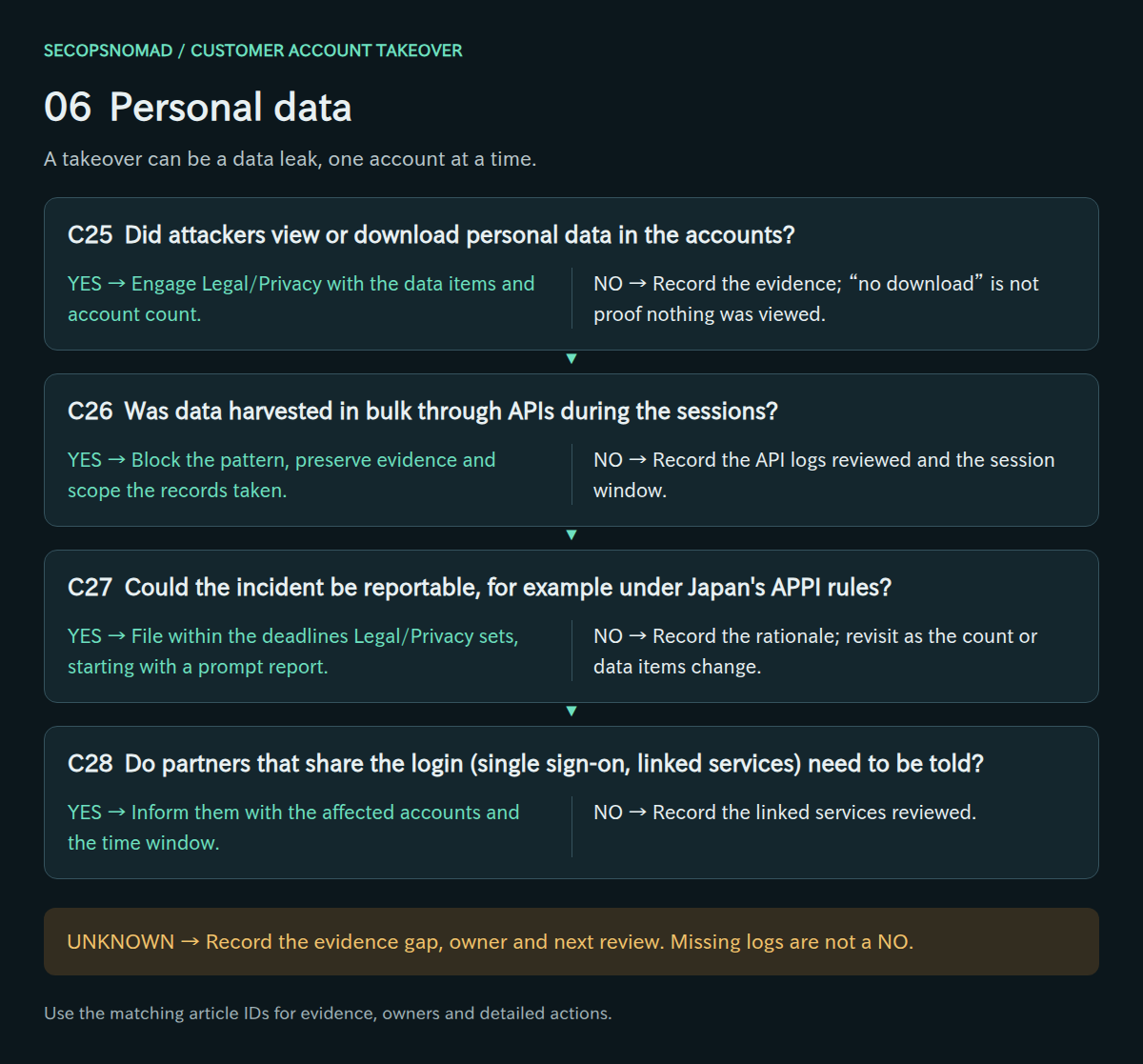
Original decision map. Check each branch independently; unknown answers remain open.
| Decision | Yes | No | Evidence / resolve unknowns | Lead owner |
|---|---|---|---|---|
| C25. Did attackers view or download personal data in the accounts? | Engage Legal/Privacy with the data items and account count. | Record the evidence; “no download” is not proof nothing was viewed. | Page and API access logs, export events, data items shown. | Legal / Privacy + SOC |
| C26. Was data harvested in bulk through APIs during the sessions? | Block the pattern, preserve evidence and scope the records taken. | Record the API logs reviewed and the session window. | API request counts per session, endpoints, response sizes. | Platform / SRE + SOC |
| C27. Could the incident be reportable, for example under Japan’s APPI rules? | File within the deadlines Legal/Privacy sets, starting with a prompt report. | Record the rationale; revisit as the count or data items change. | Legal assessment, account count, data items, date first known. | Legal / Privacy |
| C28. Do partners that share the login (single sign-on, linked services) need to be told? | Inform them with the affected accounts and the time window. | Record the linked services reviewed. | SSO relying parties, linked-account list, notices sent. | Partner manager + Legal / Privacy |
Japan (APPI), for orientation only. The PPC general guidelines give, as an example of data whose misuse could cause financial loss, login IDs with passwords for web services that have payment or remittance functions. Leaks caused by an act with a wrongful purpose, such as unauthorised access, are reportable whatever the number of people, and more than 1,000 people is reportable on its own. Whether a takeover counts as a leak of the data shown in the account is a legal judgement for each case; Legal/Privacy decides. PPC general guidelines, 3-5 (Japanese).
How to do it: step by step
List what a logged-in customer can see and download: go through the account pages and the app screens as a test user and write the data items down (name, address, phone, order history, partial card number, documents).
Check what the attacker actually opened: page views or API calls to profile, address and order endpoints during the attacker's sessions.
Look for bulk harvesting: sessions calling profile or order APIs far more often than a person would.
SELECT session_id, account_id, count(*) AS profile_calls
FROM api_requests
WHERE endpoint IN ('/api/v1/profile', '/api/v1/orders')
  AND session_id IN (SELECT session_id FROM attacker_sessions)
GROUP BY session_id, account_id
ORDER BY profile_calls DESC;
Hand Legal/Privacy three facts: the number of accounts reached, the data items visible in them, and what the logs show was actually viewed. In Japan, login IDs and passwords for services that can make payments, and leaks caused by a wrongful act such as unauthorized access, are among the situations that can require a report to the PPC regardless of the number of people.
Check it worked: Legal/Privacy has the numbers and evidence in writing and has recorded a decision on reporting (C25–C27).
7. Communication: tell customers what to do
- Notify affected customers with what happened, what you did and what they should do, including changing reused passwords elsewhere.
- Prepare support with scripts and an identity check that callers cannot talk their way around.
- Avoid links in email notices. Tell customers to open the app or type the known address, so the notice cannot be imitated.
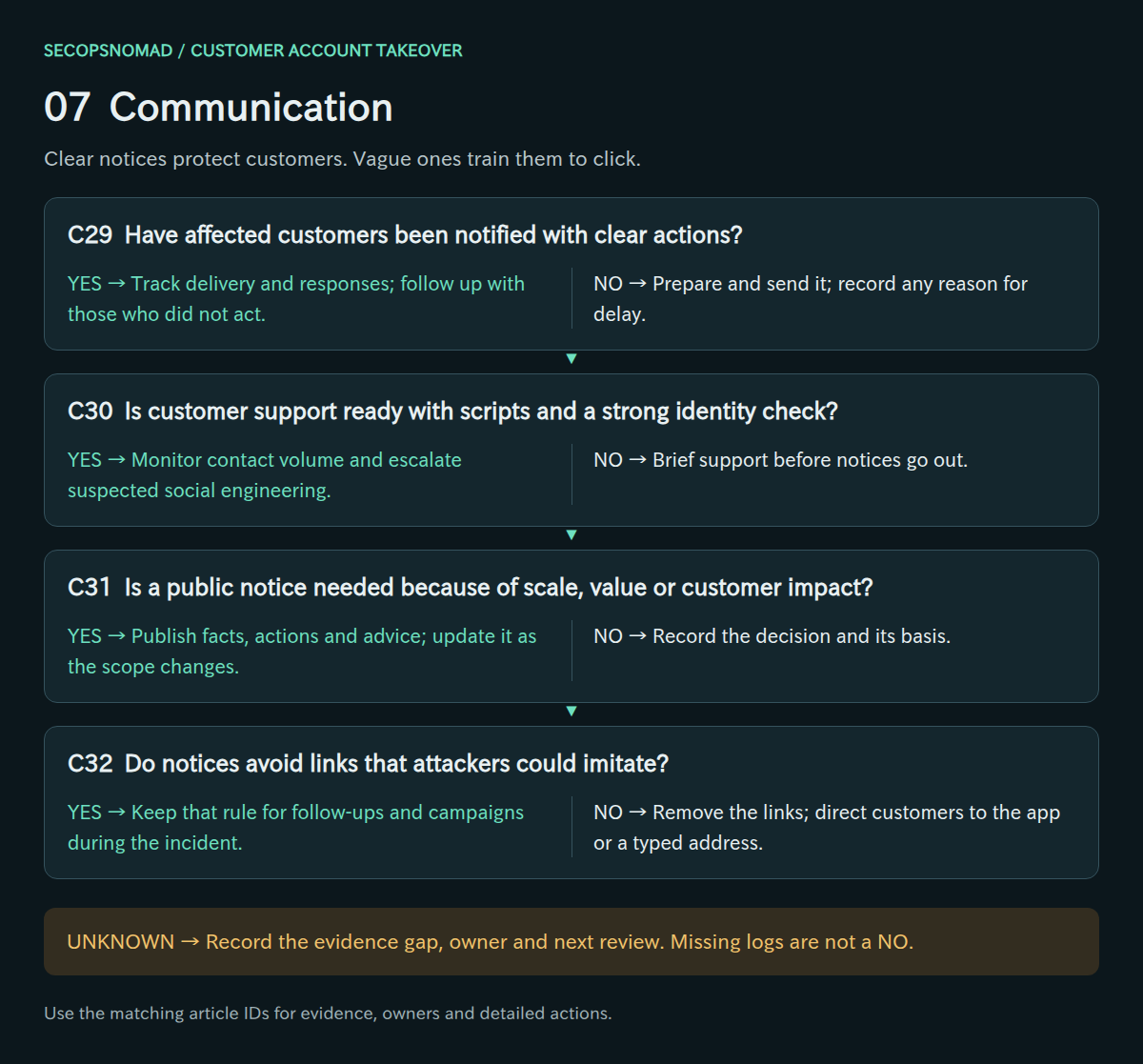
Original decision map. Check each branch independently; unknown answers remain open.
| Decision | Yes | No | Evidence / resolve unknowns | Lead owner |
|---|---|---|---|---|
| C29. Have affected customers been notified with clear actions? | Track delivery and responses; follow up with those who did not act. | Prepare and send it; record any reason for delay. | Notice text, recipient list, delivery and open records. | Communications + product owner |
| C30. Is customer support ready with scripts and a strong identity check? | Monitor contact volume and escalate suspected social engineering. | Brief support before notices go out. | Scripts, verification procedure, contact metrics. | Customer support + CIAM / IAM |
| C31. Is a public notice needed because of scale, value or customer impact? | Publish facts, actions and advice; update it as the scope changes. | Record the decision and its basis. | Scale, fraud amount, legal assessment, notice drafts. | Communications + Legal / Privacy |
| C32. Do notices avoid links that attackers could imitate? | Keep that rule for follow-ups and campaigns during the incident. | Remove the links; direct customers to the app or a typed address. | Notice templates, link checks. | Communications + Email Security |
How to do it: step by step
- Notify affected customers using the template below: what happened, what you did, what they should do. Send it inside the app or account page and by email, and never include links.
- Brief support with the script below and an identity check that callers cannot talk their way around (for example, a code sent to the restored contact details).
- Consider a public notice when many customers are affected, money was lost or customers will see changes such as forced resets. Keep it consistent with the individual notices.
- Tell partners that share the login, such as linked services or single sign-on partners, so they can watch for misuse.
Check it worked: notices sent and counted, support handling calls with the script, and no notice containing a link (C28–C32).
8. Recovery: make the next wave fail
- Check passwords against leaked-password lists at sign-up, reset and login, and keep rate limiting in place.
- Offer stronger sign-in, such as passkeys or app-based authentication, and require step-up for high-value actions.
- Keep detection for success-after-many-failures and new-device value actions, and close the case only with residual risk accepted.
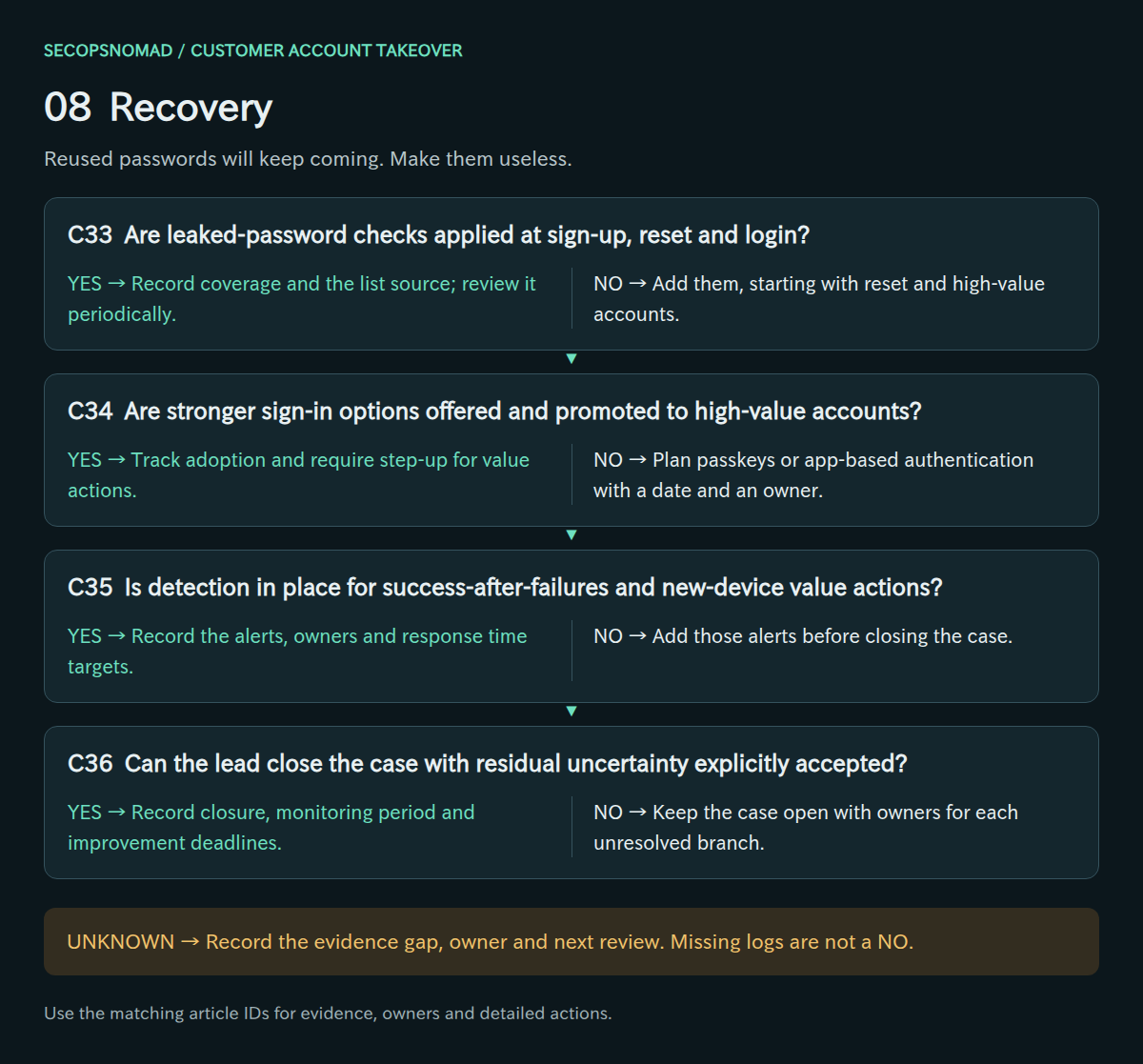
Original decision map. Check each branch independently; unknown answers remain open.
| Decision | Yes | No | Evidence / resolve unknowns | Lead owner |
|---|---|---|---|---|
| C33. Are leaked-password checks applied at sign-up, reset and login? | Record coverage and the list source; review it periodically. | Add them, starting with reset and high-value accounts. | Check implementation, hit rates, list update dates. | CIAM / IAM + product owner |
| C34. Are stronger sign-in options offered and promoted to high-value accounts? | Track adoption and require step-up for value actions. | Plan passkeys or app-based authentication with a date and an owner. | Adoption rates, step-up rules, roadmap. | Product owner + CIAM / IAM |
| C35. Is detection in place for success-after-failures and new-device value actions? | Record the alerts, owners and response time targets. | Add those alerts before closing the case. | Alert rules, test results, on-call routing. | SOC + Fraud team |
| C36. Can the lead close the case with residual uncertainty explicitly accepted? | Record closure, monitoring period and improvement deadlines. | Keep the case open with owners for each unresolved branch. | Final timeline, account and fraud totals, notices, sign-off. | Incident lead + Legal / Privacy |
NIST SP 800-63B-4 requires verifiers to compare chosen passwords against a blocklist of commonly used, expected or compromised values, and to limit consecutive failed authentication attempts. NIST SP 800-63B-4.
How to do it: step by step
Check passwords against breach lists at sign-up, reset and login. Have I Been Pwned's Pwned Passwords range API lets you check without sending the password: only the first five characters of its SHA-1 hash leave your system. A quick manual test:
HASH=$(printf '%s' 'example-password' | sha1sum | awk '{print toupper($1)}')
curl -s "https://api.pwnedpasswords.com/range/${HASH:0:5}" | grep "^${HASH:5}:"
A line in the output means the password is in a breach list. Build the same check into your application rather than running it by hand.
Offer stronger sign-in: passkeys or app-based authentication, promoted first to accounts with high balances, and step-up checks before value actions.
Keep the detections: alerts for success after many failures, many accounts from one device or network, and a new device followed immediately by a value action.
Close with the residual risk stated: for example, accounts whose passwords are known to attackers but which have not yet been used.
Check it worked: a test sign-up with a known breached password is refused, and a simulated success-after-failures raises an alert (C33–C36). OWASP: credential stuffing prevention.
Hunting: login-scoped KQL and Splunk starters
No live IOC is supplied. Credential-stuffing sources rotate quickly and are often residential proxies; a published IP list would mislead. All three examples are read-only, documentation/schema-reviewed and not executed in a live environment.
Customer-login logs are product-specific, so the examples use a placeholder table. The KQL expects one row per login attempt with TimeGenerated, SrcIp, AccountId, Outcome (success or failure) and UserAgent; rename your columns with project-rename or a saved function first. The thresholds (20 accounts, 50 failures, a 10:1 failure ratio) are starting points to tune against a normal day. dcount is an estimate. Each example caps displayed results at 500.
1. Sources that tried many accounts. Groups attempts by source address and keeps those that touched many accounts and mostly failed. Shared NAT, mobile carriers and corporate proxies can look similar; check them before blocking. Distributed attacks may use one attempt per address and will not appear here: also group by user agent, device fingerprint or the time pattern.
2. Successes from those sources. Lists successful logins from sources that also failed against many accounts in the same window. Treat each as a candidate takeover and check what the session did next: profile views, contact changes, redemptions and orders.
3. Sources that tried many accounts, in Splunk. Uses CIM Authentication fields (action, user, src) with your index and sourcetype. Confirm that action takes the values success and failure in your data, and that user is the customer identifier rather than an internal service account.
KQL: sources that tried many customer accounts
Download customer-ato-sources.kql
// Microsoft Sentinel / Log Analytics. Read-only; not live-tested.
// Sources that tried many customer accounts and mostly failed.
// Expects one row per attempt: TimeGenerated, SrcIp, AccountId, Outcome.
let Lookback = 24h;
let MinAccounts = 20;  // tune against a normal day
REPLACE_WITH_CUSTOMER_LOGIN_TABLE
| where TimeGenerated between (ago(Lookback) .. now())
| summarize Attempts = count(), Accounts = dcount(AccountId),
    Failures = countif(Outcome == "failure"), Successes = countif(Outcome == "success"),
    FirstSeen = min(TimeGenerated), LastSeen = max(TimeGenerated)
    by SrcIp
| where Accounts >= MinAccounts and Failures > Successes * 10
| order by Accounts desc
| take 500
KQL: successful logins from those sources
Download customer-ato-success-review.kql
// Microsoft Sentinel / Log Analytics. Read-only; not live-tested.
// Successful logins from sources that also failed against many accounts.
let Lookback = 24h;
let Logins = REPLACE_WITH_CUSTOMER_LOGIN_TABLE
    | where TimeGenerated between (ago(Lookback) .. now());
let StuffingSources = Logins
    | summarize Accounts = dcount(AccountId), Failures = countif(Outcome == "failure") by SrcIp
    | where Accounts >= 20 and Failures >= 50
    | project SrcIp;
Logins
| where Outcome == "success"
| where SrcIp in (StuffingSources)
| project TimeGenerated, AccountId, SrcIp, UserAgent
| order by TimeGenerated asc
| take 500
Splunk: sources that tried many customer accounts
Download customer-ato-sources.spl
index="REPLACE_WITH_LOGIN_INDEX" sourcetype="REPLACE_WITH_LOGIN_SOURCETYPE" earliest=-24h latest=now
| stats count AS attempts dc(user) AS accounts count(eval(action="failure")) AS failures count(eval(action="success")) AS successes min(_time) AS first_seen max(_time) AS last_seen BY src
| where accounts>=20 AND failures>successes*10
| convert ctime(first_seen) ctime(last_seen)
| sort - accounts
| head 500
Copy-paste templates
Replace everything in [square brackets]. Never include passwords or links in customer messages. Have Legal or Privacy review anything that goes to customers or the public.
Notice to an affected customer
Use in stage 7, inside the app or account page and by email.
Subject: Important: we have secured your [service] account

Dear [customer name],
On [date], we detected logins to your account that we believe were not made by you. The attacker most likely used a password that was leaked from another website.
What we have done: we signed your account out on all devices, [reversed changes to your email address / delivery address / points], and [paused point redemptions] until you set a new password.
What to do now:
1. Open the [service] app, or type our website address yourself, and set a new password. Do not use a password you use anywhere else.
2. If you used the same password on other services, change it there too.
3. Check your recent orders and points history. If anything is wrong, contact us below.
We will never ask for your password by email, text message or phone, and this message contains no links.
Contact: [phone number and hours] / [how to reach support from the app].
[Company name]
Customer support script
Use in stage 7 for phone, chat and email.
Opening: "Thank you for contacting us. We are helping customers whose accounts were accessed using passwords leaked from other websites."
Verify identity: [send a code to the contact details on file before the incident / ask the agreed questions]. Never accept a newly changed email or phone number as proof.
If the customer is affected:
- Confirm their account has been signed out and secured.
- Help them reset their password; advise a password they do not use anywhere else.
- Check orders and points since [date]; record any loss in [system] for review.
If the customer asks whether our systems were hacked: "Our investigation so far shows the attackers used passwords from other websites. We will update customers if we learn more."
Never: ask for their password, send them a link, or promise a refund before [team] has reviewed the case.
Escalate to [team/channel] if: the caller cannot be verified, value was lost, or the caller says they did not receive our notice.
Request to a partner to stop transfers
Use in stage 5, by phone first, then in writing.
Subject: Urgent: fraudulent [point exchanges / gift card purchases] from compromised accounts – please hold

Dear [partner team],
We are responding to an account takeover attack on [service]. Between [start time] and [end time] JST, attackers used compromised customer accounts to [exchange points into your programme / buy gift cards].
Attached: [number] transactions with our transaction IDs, times, amounts and destination identifiers.
We ask you to:
1. Hold or cancel any of these transactions that have not completed.
2. Tell us which ones were already completed or redeemed.
3. Watch for further transfers to the destinations listed.
Our contact for this incident is [name, phone, email], available [hours]. Please reply to confirm receipt.
[Name, title, company]
Management briefing (five lines)
1. What happened: a credential stuffing attack on [service] from [time] to [time]; [number] login attempts against [number] accounts.
2. Accounts taken over: [number]; sessions ended and passwords reset; [number] had value removed totalling [amount].
3. Current state: rate limits active on [paths]; [high-value actions paused / resumed at time]; attack [continuing at reduced level / stopped].
4. Decisions needed: [e.g. reimbursement policy; PPC report; public notice; keep redemption hold until date].
5. Next update: [time]. Lead: [name].
Worked example: a weekend wave against a points site
Fictional scenario. The company, people, times and numbers are invented to show how the decisions connect.
The situation: a shopping site with 300,000 members and a points programme that can be exchanged for gift codes. On a Saturday night a credential stuffing wave begins.
- Sun 07:30 – the alert. The on-call engineer sees an unusual number of point redemptions. A query shows 900,000 login attempts since 02:00 against 410,000 account names, with 610 successful logins (C01, C05). The CTO becomes incident lead and the logs are exported (C04).
- 07:50 – classify. 92% of the 610 successes used the correct password on the first try: reused passwords, not guessing (C09). Most traffic hits the mobile API, which had no rate limit (C06, C15).
- 08:20 – slow the wave. Rate limiting goes on for the web login and the mobile API. Within 40 minutes the attacker shifts to an old API version; it is added too (C13, C16).
- 08:40 – hold value. The lead pauses all point redemptions for six hours, accepting complaints over losses (C20).
- 09:00 – protect accounts. Sessions and app tokens of the 610 accounts are revoked; 37 accounts had their email address changed and are reverted before resets are forced (C17–C19).
- 09:30 – chase the value. 85 accounts redeemed points for gift codes worth ¥2.1 million. The gift-code partner cancels 41 codes that were not yet used (C21, C23). Three email addresses received codes from many accounts and are blocked (C24).
- Sunday afternoon – data. The accounts show name, address, phone and order history; no bulk harvesting is found (C25, C26). Because the IDs and passwords give access to stored value and the logins were unauthorized, Legal decides a PPC report is required and files the prompt report on Tuesday (C27).
- Monday – customers. Notices without links go to the 610 customers in the app and by email; support works from the script (C29, C30, C32). Reimbursement is approved for the points lost.
- Two weeks later – recovery. Leaked-password checks, passkeys for members and step-up checks before redemptions are live; alerts watch for success after failures (C33–C35). The lead closes the case, accepting that more customers' passwords may be in attackers' lists (C36).
What made the difference: counting successes, not just attempts; covering the mobile API and the old API on the same morning; and pausing redemptions early, which kept the loss to 85 accounts.
Open questions and post-incident improvement
A takeover campaign rarely leaves a clean boundary. You may not know which credentials the attacker holds but has not used yet, whether accounts were sold on, or what was viewed through screens that are not logged. Record those gaps explicitly and keep elevated monitoring for an agreed period. Completing every row is not a guarantee of exhaustive coverage.
At closure, review how long it took to notice the spike, which login paths lacked logs or controls, how many genuine customers were blocked, and how quickly value movements were stopped. Turn the answers into owners and deadlines, and test them with a controlled exercise against a staging login.
References and revision history
References checked on 2026-10-06. Product capabilities, licensing and telemetry configuration can change; confirm your environment before using the operational examples.
- OWASP: Credential Stuffing Prevention Cheat Sheet
- NIST SP 800-63B-4: Authentication and Authenticator Management
- Personal Information Protection Commission: APPI general guidelines, 3-5 data breach reporting (Japanese)
- Splunk CIM Authentication
2026-10-06: first edition. Published with matching decision IDs and query text in English and Japanese.