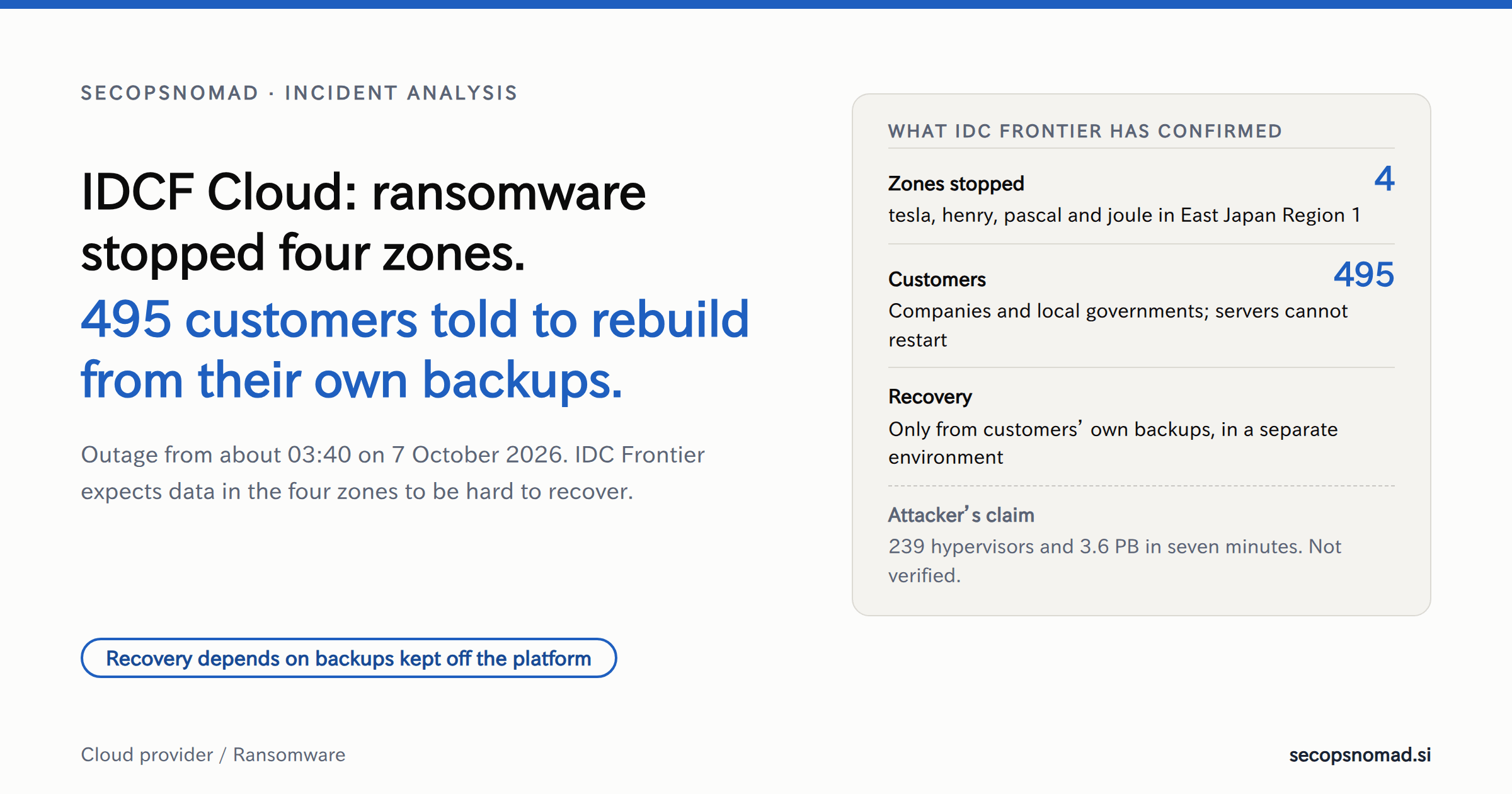
Most ransomware notices are about one company's data. This one is about a platform. An attack on the hypervisors under IDCF Cloud stopped virtual servers belonging to 495 companies and local governments at once, and IDC Frontier at first told them that data in the four affected zones would be hard to get back. On 14 October it said backups can be extracted for 194 of them. How fast each customer recovers depends on what it kept outside the platform. Within two days, JR East, View Card and JR Kyushu were warning that member email addresses held by mail-delivery services on the platform may have been seen.
Update, 15 October: backups for 194 customers, no sign data left their servers, and three more notices
IDC Frontier published its 5th report on 14 October, based on its investigation with an outside security firm. It changes the picture in three ways. 5th report (Japanese)
- Some data can come back. On 8 October IDC Frontier expected data in the four zones to be hard to extract or restore. It now says backup data can be extracted for 194 customers that used its snapshot function. Whether their systems can actually be restored from that data is still being checked, and IDC Frontier is contacting each customer about restoring and how the data will be handed over. This is not a recovery of all 495.
- No trace of data leaving customers' servers. For the four zones (tesla, henry, pascal and joule), IDC Frontier found no trace, and no supporting fact, that data stored inside customers' virtual servers was viewed or taken out. It has concluded that this data did not leak. Safety checks of the other zones and regions continue. INTERNET Watch (Japanese) · Impress Watch (Japanese)
- The customer portal was queried. The registration details of 48 customers in the IDCF Cloud portal were looked up without authorisation, including company name, login ID, hashed password, notification email address and the total monthly charge. For two of them, one email address each may include a person's name. IDC Frontier found no trace that these details were taken out. Security Measures Lab (Japanese)
Customers' notices kept coming. IDC Frontier's finding is about data inside customers' virtual servers. Companies whose mail-delivery contractors ran on the platform are still announcing that data may have leaked:
| Company and service | Announced | Records in scope | Data named | Status as stated |
|---|---|---|---|---|
| JR Central: JR Central MARKET and Iimono Tanbou shopping sites | 13 October | About 15,000 | Email address, plus names, addresses, phone numbers, orders and delivery details written in the emails | Viewing cannot be ruled out; no leak confirmed; reported to the Personal Information Protection Commission; mail moved to another environment |
| Mouse Computer: newsletters | 14 October | About 420,000 | Email address and sending records | Under investigation; no leak confirmed |
| Izumi: Yume Online and Yume Delivery members | 14 October | Up to about 400,000 | Name and email address | No leak or misuse confirmed; addresses, phone numbers and card numbers not included |
JR Central says card details and login passwords are not affected. As with the 9 October notices, these are upper limits for investigation, not confirmed leaks.
What it changes for readers. If you are an IDCF Cloud customer, ask IDC Frontier whether you are one of the 194 and one of the 48 (see the defender's playbook below). If a supplier sends your customers email, the question is no longer only “were you on IDCF Cloud?” but “what did your sending servers keep, and for how long?”
What IDC Frontier has disclosed
IDC Frontier is SoftBank's cloud and data-centre subsidiary. It has published five reports so far. 3rd report (Japanese)
- 7 October, about 03:40. The outage began in East Japan Region 1. The Mainichi reports that a monitoring alert detected it. Mainichi (Japanese) IDC Frontier set up an emergency headquarters at 09:00, according to its 4th report, and published its first notice of the outage the same day. 1st report (Japanese)
- 7 October, 2nd report. The cause was unauthorized access by a third party: a ransomware attack. 2nd report (Japanese) The same day, IDC Frontier cut East Japan Region 1 off from the network and stopped the customer management consoles.
- 8 October, 3rd report. Virtual servers in four zones of East Japan Region 1 (tesla, henry, pascal and joule) have stopped and cannot be restarted. 495 companies and local governments are affected. IDC Frontier expects customer data in those zones to be hard to extract or restore. In its current view, the data can be restored only from backups that customers hold themselves, and it is advising them to rebuild in a separate environment. An outside security firm is investigating the route of entry across the East and West Japan regions. The company has reported to the supervising ministry and to the Tokyo Metropolitan Police Department.
- 9 October, 4th report. SoftBank's enterprise division is now the point of contact for customers, and SoftBank's technical staff are working alongside IDC Frontier's. 4th report (Japanese)
- 14 October, 5th report. Backup data can be extracted for 194 customers that used snapshots; no trace that data inside customers' servers in the four zones was viewed or taken; 48 customers' portal details were looked up. See the 15 October update above. 5th report (Japanese)
| Where the servers run | Status in the 3rd report | What customers were told |
|---|---|---|
| East Japan Region 1: tesla, henry, pascal and joule zones | Virtual servers stopped and cannot restart; data hard to extract or restore | Rebuild in a separate environment; restore from your own backups |
| East Japan Region 1: radian and newton zones; East Japan Regions 2 and 3; West Japan Region 1 | No unauthorized access confirmed; customer consoles stopped | Take your own backups now; IDC Frontier starts and stops servers on request |
| IDCF Cloud TypeS (formerly White Cloud ASPIRE) and IDCF Private Cloud | Outside the incident | No action stated |
Nikkei reports that the affected data centre is in Shirakawa, Fukushima, and that Ibaraki Prefecture's website was among the services that went down. Nikkei (Japanese)
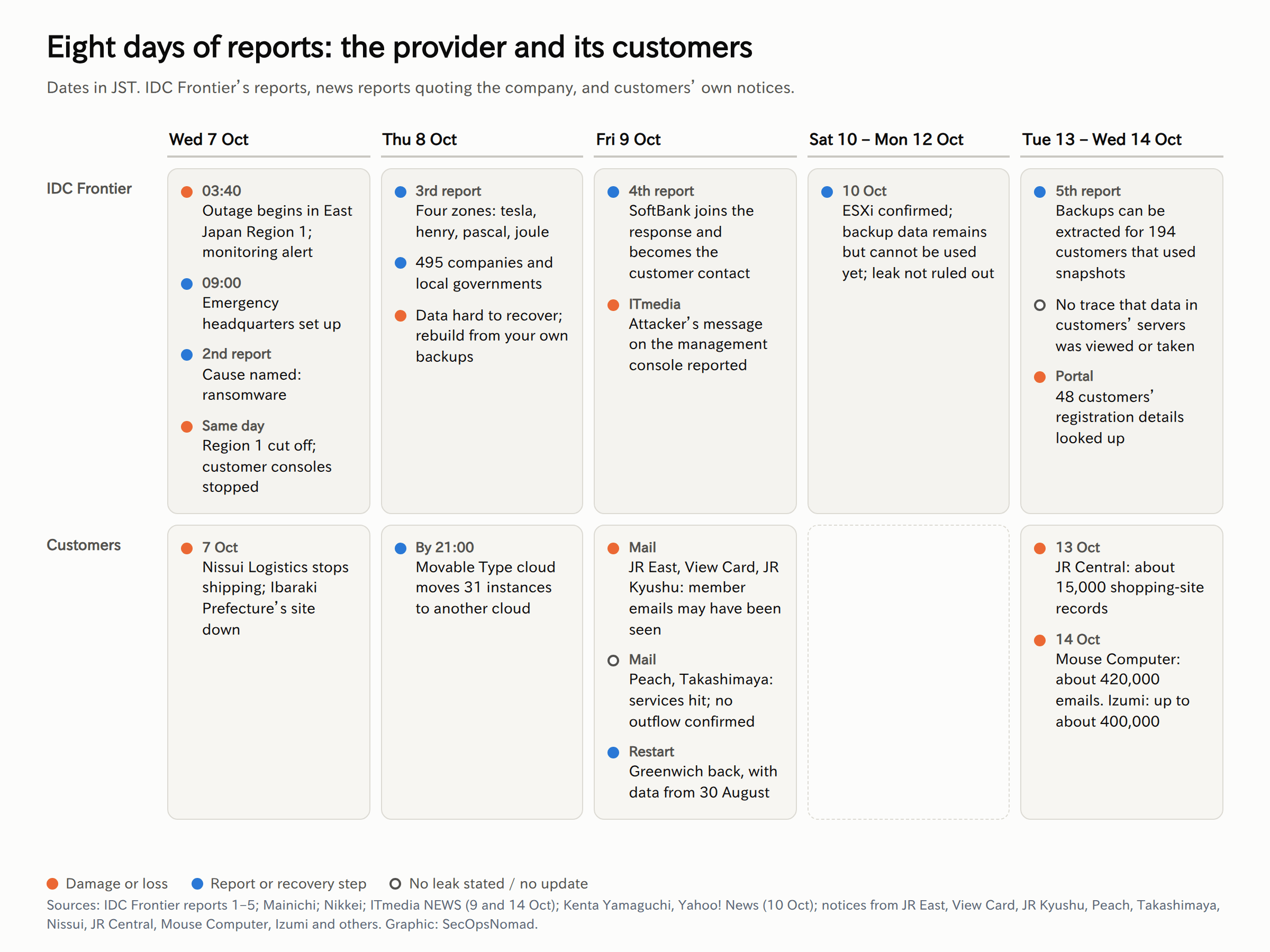
Figure 1. Eight days of reports, updated 15 October. Original graphic for this article.
What the attacker claims
ITmedia reported on 9 October that a message from the attacker had appeared on the management console for the East Japan region. ITmedia NEWS (Japanese) In it, the attacker claims to have:
- encrypted the whole of East Japan Region 1 in seven minutes, with the operators still unaware seven hours later;
- encrypted 239 hypervisors, 225 datastores and more than 16,600 virtual-machine disks, 3.6 PB in all;
- destroyed 554,153 snapshots and 41.5 PB of backup capacity.
The message tells the operators to connect to a VMware ESXi host and read a file there. IDC Frontier told ITmedia that it has confirmed several images matching what was on the console and is investigating the content and the figures.
None of these numbers has been verified, and ransomware groups inflate their claims to raise pressure. IDC Frontier's own account already differs on one point. It confirmed to Kenta Yamaguchi, writing for Yahoo! News, that virtual machines on VMware ESXi were hit, but only in part of the region, not all of it. It also said its backup service offers an immutable-storage option and that the backup data still exists, but cannot be used while the management cluster is stopped. It is checking whether the file the attacker points to is safe to open, and it says a data leak cannot be completely ruled out. Yahoo! News (Japanese)
What “seven minutes” would mean
Even if the figures are exaggerated, the shape of the claim matters. Encrypting hundreds of hypervisors within minutes is not done host by host. It requires central control of the management plane: vCenter, an automation account, or a root password shared across hosts. The attacker then runs the encryptor everywhere at once. That makes this a case about privileged access to infrastructure, not about any one server's patch level.
The same sequence runs through the ESXi ransomware campaigns documented since 2023: take a domain or vCenter administrator account, turn on SSH, stop the virtual machines, delete the snapshots, encrypt the datastores. Microsoft: ransomware operators exploit an ESXi hypervisor vulnerability for mass encryption Where the backups are managed from the same domain, they are within reach too.
The notices that followed
495 is the number of affected IDCF Cloud contracts, not the number of organisations that lost data. This section covers the notices of 7 to 12 October; JR Central, Mouse Computer and Izumi followed on 13 and 14 October (see the 15 October update). Many customers run services for other companies, so the outage, and the questions about data, spread a layer further.
Mail-delivery services. On 9 October several large consumer brands said that external services they use to email their members ran on IDCF Cloud, and that email logs containing addresses may have been viewed or taken.
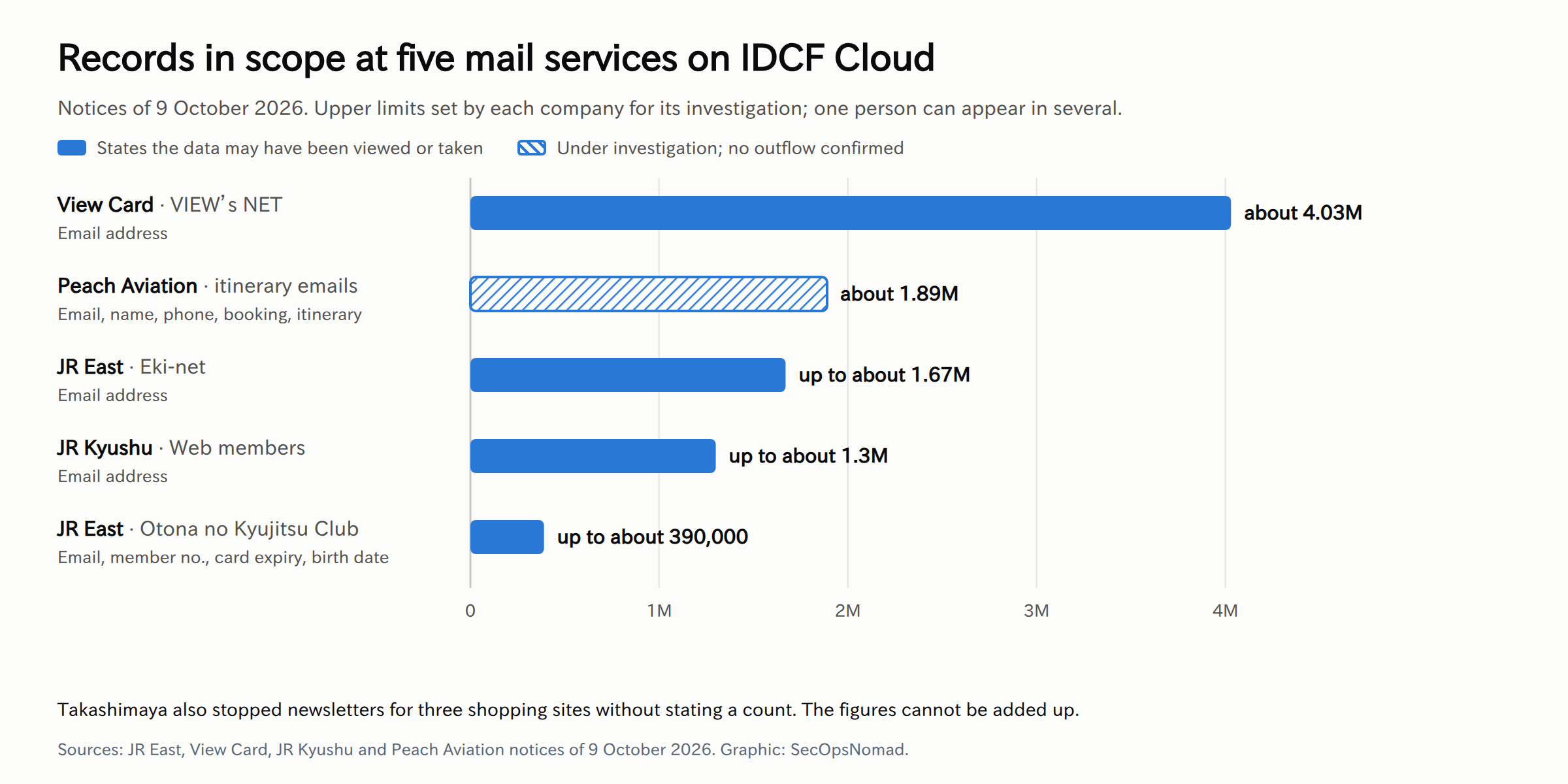
Figure 2. Records in scope at five mail services. Original graphic for this article.
| Company and service | Records in scope | Data named | Status as stated |
|---|---|---|---|
| View Card: VIEW's NET | About 4.03 million | Email address | May have been viewed or taken |
| Peach Aviation: itinerary emails | About 1.89 million | Email address, name in Latin letters, phone number, booking number, itinerary | Under investigation; no outflow confirmed |
| JR East: Eki-net (えきねっと) | Up to about 1.67 million | Email address | May have been viewed or taken |
| JR Kyushu: Web members | Up to about 1.3 million | Email address | May have been viewed or taken |
| JR East: Otona no Kyujitsu Club (大人の休日倶楽部) | Up to about 390,000 | Email address, member number, card expiry date, date of birth | May have been viewed or taken |
| Takashimaya: newsletters for three shopping sites | Not stated | Email address, name, date of birth, postcode, address to city level | Newsletters stopped; no outflow confirmed |
JR East, View Card and JR Kyushu say names, home addresses, phone numbers and card numbers are not at risk, and that they will email affected members. Peach says card and passport details were not on the server. These are upper limits for investigation, set by different companies. One person can appear in several, so the counts cannot be added up.
The e-commerce platform futureshop explained what a sending server holds. Its mail servers on IDCF Cloud stored recipient addresses, sender details and parts of message bodies, which can include names, birthdays and member IDs. It says the data was encrypted at rest and deleted automatically 14 days after sending. Every company should ask its own mail-delivery provider for the same details. Security Measures Lab roundup (Japanese)
Operations. Others lost service rather than data, and how fast they came back depended on where their backups were.
| Organisation | What stopped | Recovery as reported |
|---|---|---|
| Nissui Logistics (Nissui group) | Shipping and receiving system | Partly resumed on 9 October; Nissui says no personal or customer data was on the damaged server |
| Movable Type cloud edition | Admin screens and sites for 31 instances | All 31 moved to Sakura Cloud by 21:00 on 8 October, from backups kept on Google Cloud as of 01:00 on 7 October |
| Greenwich (らくらく在庫 inventory service) | Inventory and pricing tools | Back on 9 October on another cloud, from data as of 30 August |
| Soliton SecureDesktop | Part of the service | Its backup server on the same platform was also unusable; rebuilding elsewhere |
| UD Talk | Shared-talk and admin features | QR-code data for shared talks and admin settings lost |
| THE SURF NEWS | News site | Back online on 9 October with recent articles missing |
| Cyber University | Course registration and tuition payment | Considering a rebuild from backups kept elsewhere |
Other organisations that named IDCF Cloud include Poppins, Fibergate, Nova System's face-recognition entry system, Medialink's cloud phone services, SKE48 Mail and NMB48 Mail, Mediwel, Broccoli, Jaic, Autoserver's corporate site, Shiga Prefecture (through a contractor) and Kosai City's library. Hatena paused Mackerel's IDCF Cloud integration as a precaution. Kodaira City reported a ransomware attack on the cloud platform used by its website contractor without naming the provider. Security Measures Lab roundup (Japanese)
The pattern is plain. Movable Type came back within a day because its backups were with another provider. Soliton could not, because its backup server sat on the same platform. Greenwich came back with data five weeks old.
The attacker's playbook: what this case enables
No group has been named and the route in has not been disclosed. This is how a red team would take down a hosting platform's hypervisors, mapped to MITRE ATT&CK. It is not a reconstruction of this attack.
| Step | What it would look like | ATT&CK |
|---|---|---|
| Get in | A VPN or remote-access appliance with stolen credentials; a flaw in vCenter or another appliance; a contractor's access | T1133 External Remote Services; T1190 Exploit Public-Facing Application; T1078 Valid Accounts |
| Take the management plane | Domain administrator, then vCenter administrator; or a directory group that domain-joined ESXi hosts trust as admins; or a root password reused across hosts | T1078.002 Domain Accounts; T1098 Account Manipulation |
| Reach the hypervisors | Turn on SSH or the ESXi Shell and log in to every host at once | T1021.004 SSH; T1059.004 Unix Shell |
| Blind the defenders | Switch off execInstalledOnly, redirect or stop syslog, open the host firewall |
T1562.001 Disable or Modify Tools; T1562.004 Disable or Modify System Firewall |
| Stop the guests | Kill virtual-machine processes so their disk files can be encrypted | T1489 Service Stop |
| Remove recovery | Delete snapshots; wipe or encrypt backup stores managed from the same domain | T1490 Inhibit System Recovery |
| Encrypt | Run the encryptor against the disk files on every datastore in parallel | T1486 Data Encrypted for Impact |
| Announce | Put the ransom message on the management console or the host's welcome screen | T1491.001 Internal Defacement |
| Add leverage | Copy data from guests or mail servers before encrypting, then threaten to publish it | T1005 Data from Local System; T1567 Exfiltration Over Web Service |
The economics favour the attacker. One management-plane compromise reaches hundreds of tenants, and each tenant's recovery depends on choices the provider cannot make for them.
There is a second-order risk. The email addresses in the downstream notices are tied to rail, card and airline brands that people use every week. “Your booking”, “your card statement” and “your itinerary has changed” are credible lures this month, and genuine notices from the same brands are arriving at the same time (T1566 Phishing).
The defender's playbook
1. If you use IDCF Cloud
- Treat servers in the four zones as lost unless IDC Frontier tells you otherwise. Rebuild from clean images in a separate environment, as IDC Frontier advises. If you are one of the 194 customers whose snapshot data can be extracted, treat it as untrusted: check when each snapshot was taken, scan it, and restore it into an isolated network first.
- Rotate the secrets on those servers anyway. IDC Frontier found no trace that data inside them was viewed or taken, but the attacker controlled the hypervisors they ran on. Rotate everything that lived on them: database passwords, API keys, cloud access keys, SSH keys, TLS private keys, and service accounts that connect back to your company.
- Decide on personal data early. Japan's personal information rules require a report to the Personal Information Protection Commission when a leak, loss or damage caused by an attack may have occurred, not only when it is confirmed. Take advice on whether that applies to what was on your servers.
- In the other zones and regions, copy your data off the platform now and plan for the consoles to stay off for some time.
- Ask IDC Frontier for specifics: whether your servers' disks were encrypted, whether you are one of the 194 with extractable snapshots, any sign of access to your data, and the time window. Keep a written record.
- Treat your portal account as exposed. Ask whether you are one of the 48 customers whose portal details were looked up. Either way, change the portal password and any password reused elsewhere, and expect phishing at the notification email address.
2. If your suppliers run on IDCF Cloud
- Ask every supplier directly. SaaS providers, mail-delivery services, web agencies and hosting companies may not have told you where they run. Use the questions below.
- Start with mail delivery. Its sending servers and logs hold your customers' addresses and parts of message bodies. Ask what is kept, for how long and how it is encrypted.
- Check the restart, not just the service. Greenwich and THE SURF NEWS came back with old or missing data. Ask suppliers what was lost between their last backup and the outage.
- The supplier breach playbook covers contract, notification and evidence steps when a supplier is hit.
3. If you run VMware ESXi and vCenter yourself
This is the lesson that applies to most readers.
- Separate the management plane. Keep ESXi management interfaces and vCenter on their own network, reachable only from admin jump hosts with multi-factor sign-in. Query 2 below shows who connects today.
- Turn on lockdown mode and keep SSH and the ESXi Shell off. Start them only for an approved change, and alert when they start.
- Enforce
execInstalledOnlyso hosts run only installed, signed code. On hosts with a TPM, enforce it through the host's encryption settings so it cannot simply be switched off from the shell. - Do not let the directory own the hypervisors. Take ESXi hosts out of Active Directory where you can. Where you cannot, change the default admin group behaviour that CVE-2024-37085 abused. Give each host a unique root password held in a vault.
- Patch vCenter and ESXi quickly. Attackers look for flaws in these appliances.
- Forward ESXi and vCenter logs off the host to your SIEM. If the only copy of the evidence is on the host, it is encrypted with it.
- Keep one backup copy outside the blast radius: a different provider or region, a different admin identity, immutable or offline. Test a full restore and time it. Movable Type and Soliton show the difference.
4. Detect the run-up, not only the encryption
- Alert on each step: SSH or the ESXi Shell enabled,
execInstalledOnlychanged, syslog settings changed, the host firewall changed, new local accounts, files made executable in/tmpor on datastores, and the welcome message changed. - Watch the fleet, not one host. The same destructive command on many hosts within ten minutes is a ransomware run, not maintenance. Query 1 counts hosts per window.
- Watch for many VMs powered off or killed within minutes, and for snapshots removed in bulk.
5. Prepare staff for phishing that uses these brands
- Give one rule: JR East, View Card and JR Kyushu say they will email affected members. Even so, do not act on links in any message about the incident. Open the official app or type the address.
- Run the mail query below and block confirmed lookalike domains, with a review date.
- The phishing response playbook covers clean-up if someone clicks, and the ransomware playbook covers your own containment and recovery decisions.
6. Which teams should act
| Team | Exposure to review | Next step | Evidence needed |
|---|---|---|---|
| IT Operations | Own ESXi and vCenter; any IDCF Cloud use | Run the infrastructure checks below; copy data off the platform | Check results per host; backup locations and restore times |
| EDR / SOC | Who reaches the management plane | Run queries 1 and 2; alert on SSH enablement and mass VM stops | Query schedule, alert routing |
| SIEM | ESXi and vCenter logs | Confirm the logs arrive; schedule the hypervisor query | Log source list, retention |
| Third-party Risk | Suppliers' hosting providers | Send the supplier questions; record who runs on IDCF Cloud | Written answers, affected services |
| Email Security | Lures naming rail, card and airline brands | Run the mail query; block confirmed lookalikes | Message list, recipients, click records |
| Legal / Privacy | Personal data on affected servers, own or suppliers' | Decide on reporting; collect suppliers' facts | Data inventory, decision record |
Hunting: is anything moving on your hypervisors?
No indicators have been published. IDC Frontier has not released attacker addresses, file names or hashes. The queries look in your own estate for the steps hypervisor ransomware needs, and in your mail for lures that use the affected brands.
All queries are illustrative and were not run against live data. Table and field names were checked against vendor documentation on 12 October 2026 (JST). Expect noise: maintenance enables SSH and powers off VMs, so compare hits with your change records.
1. ESXi hosts: shell access switched on, protections changed, VMs killed, snapshots removed. Microsoft Sentinel, with ESXi hosts sending syslog to the Syslog table.
// Illustrative; not run against live data. Microsoft Sentinel, Syslog table fed by your ESXi hosts.
// Shell access switched on, protections changed, VMs killed and snapshots removed: the steps hypervisor ransomware needs.
// HostsInWindow counts how many hosts did any of this in the same 10 minutes. Many hosts at once is a ransomware run, not maintenance.
let Since = ago(14d);
let EsxiHosts = @"(?i)REPLACE_WITH_ESXI_HOSTNAME_PATTERN";
let Risky = @"(?i)(execInstalledOnly|esxcli\s+vm\s+process\s+(list|kill)|vim-cmd\s+vmsvc/(getallvms|power\.off|power\.shutdown|snapshot\.removeall|snapshot\.remove)|vim-cmd\s+hostsvc/(enable_ssh|start_ssh|enable_esx_shell|start_esx_shell)|esxcli\s+system\s+(syslog\s+config\s+set|account\s+(add|set)|permission\s+set|welcomemsg\s+set)|esxcli\s+network\s+firewall\s+set|chmod\s+\+?[0-7x]+\s+/(tmp|vmfs/volumes)/|SSH access has been enabled|ESXi Shell access has been enabled)";
let Hits = Syslog
    | where TimeGenerated > Since
    | extend Host = coalesce(HostName, Computer)
    | where Host matches regex EsxiHosts
    | where SyslogMessage matches regex Risky
    | extend Window = bin(TimeGenerated, 10m), Action = tolower(extract(Risky, 1, SyslogMessage));
Hits
| summarize Events = count(), Actions = make_set(Action, 20), Samples = make_set(SyslogMessage, 5),
    FirstSeen = min(TimeGenerated), LastSeen = max(TimeGenerated) by Host, Window
| join kind=inner (Hits | summarize HostsInWindow = dcount(Host) by Window) on Window
| project-away Window1
| order by HostsInWindow desc, FirstSeen asc
| take 500
2. Who reaches your hypervisors' management interfaces. Microsoft Defender XDR advanced hunting. Devices other than admin jump hosts that connect to ESXi or vCenter on SSH, web or console ports.
// Illustrative; not run against live data. Microsoft Defender XDR advanced hunting.
// Which devices open SSH, web-client or console sessions to your ESXi hosts and vCenter?
// Only admin jump hosts should. Every other device in the result is a path an attacker could use to reach the hypervisors.
let Since = ago(30d);
let ManagementSubnet = "REPLACE_WITH_MANAGEMENT_SUBNET_CIDR";
let JumpHosts = dynamic(["REPLACE_WITH_ADMIN_JUMP_HOST_1", "REPLACE_WITH_ADMIN_JUMP_HOST_2"]);
DeviceNetworkEvents
| where Timestamp > Since
| where ActionType in ("ConnectionSuccess", "ConnectionAttempt")
| where RemotePort in (22, 443, 902, 5480, 9443)
| where ipv4_is_in_range(RemoteIP, ManagementSubnet)
| where not(DeviceName in~ (JumpHosts))
| summarize Connections = count(), Ports = make_set(RemotePort), Processes = make_set(InitiatingProcessFileName, 10),
    Accounts = make_set(InitiatingProcessAccountName, 10), FirstSeen = min(Timestamp), LastSeen = max(Timestamp)
    by DeviceName, RemoteIP
| order by Connections desc
| take 500
3. Inbound mail naming the affected brands from other domains. Microsoft Defender XDR advanced hunting; needs Defender for Office 365.
// Illustrative; not run against live data. Microsoft Defender XDR advanced hunting.
// Inbound mail since 9 Oct 2026 that names the brands whose mail-delivery services were affected, but was not sent from their domains.
// JR East, View Card and JR Kyushu say they will email affected members, so genuine notices will arrive too. Check a genuine message's headers before adding a sender domain.
let Since = datetime(2026-10-09T00:00:00Z);
let LurePattern = @"(?i)えきねっと|大人の休日倶楽部|ビューカード|view'?s ?net|jr東日本|jr九州|peach aviation|ピーチ|高島屋|takashimaya|idcf|idcフロンティア";
let OfficialDomains = @"(?i)(^|\.)(jreast\.co\.jp|eki-net\.com|jrkyushu\.co\.jp|flypeach\.com|takashimaya\.co\.jp|idcf\.jp|REPLACE_WITH_OTHER_VERIFIED_SENDER_DOMAIN)$";
EmailEvents
| where Timestamp > Since
| where EmailDirection == "Inbound"
| where Subject matches regex LurePattern or SenderDisplayName matches regex LurePattern
| where not(SenderFromDomain matches regex OfficialDomains)
| join kind=leftouter (
    EmailUrlInfo
    | where Timestamp > Since
    | project NetworkMessageId, UrlDomain
    ) on NetworkMessageId
| summarize Recipients = dcount(RecipientEmailAddress), UrlDomains = make_set(UrlDomain, 10),
    FirstSeen = min(Timestamp), LastSeen = max(Timestamp)
    by SenderFromAddress, SenderFromDomain, Subject, DeliveryAction
| order by FirstSeen asc
| take 500
4. The hypervisor check in Splunk for ESXi syslog. Replace the index and host pattern.
index="REPLACE_WITH_ESXI_SYSLOG_INDEX" host="REPLACE_WITH_ESXI_HOSTNAME_PATTERN" earliest=-14d
| regex _raw="(?i)(execInstalledOnly|esxcli\s+vm\s+process\s+(list|kill)|vim-cmd\s+vmsvc/(getallvms|power\.off|power\.shutdown|snapshot\.removeall|snapshot\.remove)|vim-cmd\s+hostsvc/(enable_ssh|start_ssh|enable_esx_shell|start_esx_shell)|esxcli\s+system\s+(syslog\s+config\s+set|account\s+(add|set)|permission\s+set|welcomemsg\s+set)|esxcli\s+network\s+firewall\s+set|chmod\s+\+?[0-7x]+\s+/(tmp|vmfs/volumes)/|SSH access has been enabled|ESXi Shell access has been enabled)"
| rex field=_raw "(?i)(?<action>execInstalledOnly|esxcli\s+\S+\s+\S+\s+\S+|vim-cmd\s+\S+|chmod\s+\S+\s+\S+|SSH access has been enabled|ESXi Shell access has been enabled)"
| bin _time span=10m
| stats count AS events values(action) AS actions BY _time host
| eventstats dc(host) AS hosts_in_window BY _time
| sort 0 - hosts_in_window _time
Download the examples: hypervisor KQL · management access KQL · mail KQL · hypervisor SPL.
Other platforms. Sumo Logic, ESXi syslog: the same destructive steps, counted per host in 10-minute slices.
_sourceCategory="REPLACE_WITH_ESXI_SYSLOG_SOURCE_CATEGORY" ("esxcli" OR "vim-cmd" OR "execInstalledOnly" OR "SSH access has been enabled" OR "ESXi Shell access has been enabled")
| parse regex "(?i)(?<action>execInstalledOnly|esxcli\s+vm\s+process\s+kill|vim-cmd\s+vmsvc/(?:power\.off|snapshot\.removeall|getallvms)|vim-cmd\s+hostsvc/(?:enable_ssh|enable_esx_shell)|esxcli\s+system\s+(?:syslog\s+config\s+set|welcomemsg\s+set|account\s+add)|esxcli\s+network\s+firewall\s+set|SSH access has been enabled|ESXi Shell access has been enabled)"
| timeslice 10m
| count by _timeslice, _sourceHost, action
| sort by _timeslice asc
In CrowdStrike Falcon (LogScale / Next-Gen SIEM), endpoints opening SSH, web or console connections to the management subnet. Add your jump hosts' agent IDs as exclusions.
#event_simpleName=NetworkConnectIP4
| in(field="RemotePort", values=["22", "443", "902", "5480", "9443"])
| cidr(field="RemoteAddressIP4", subnet="REPLACE_WITH_MANAGEMENT_SUBNET_CIDR")
| groupBy([aid, RemoteAddressIP4, RemotePort], function=count())
No result does not prove nothing happened. If ESXi hosts do not forward their logs, the evidence sits on the hosts that get encrypted, and mail to personal addresses never reaches company tools. Syslog table · DeviceNetworkEvents · EmailEvents
Copy-paste templates
Replace everything in [square brackets]. Have Legal or Privacy review anything that leaves the company.
Questions for suppliers
Subject: [Company] – does any part of your service run on IDCF Cloud?

Dear [contact],
IDC Frontier reported on 8 October 2026 that ransomware stopped virtual servers in four zones of IDCF Cloud's East Japan Region 1, and that data there may not be recoverable. Please answer the following in writing by [date].
1. Does any part of the service you provide to us (application, database, mail delivery, backup, logging, DNS, web hosting) run on IDCF Cloud? If so, in which region and zone?
2. Which of our data, or our customers' data, is stored there, including logs and mail queues?
3. Was any of it in the tesla, henry, pascal or joule zones? Is the service affected now?
4. Where are your backups of that data held: with the same provider, in the same region, under the same administrator accounts? When did you last test a full restore, and how long did it take?
5. Have you or IDC Frontier found evidence that data was viewed or copied? When do you expect to know?
6. For mail delivery: what do your sending servers and logs keep (addresses, sender, subject, body), for how long, and how is it encrypted?
7. Which credentials or keys that connect to our systems were stored on the affected servers, and have they been rotated?
8. What is your recovery plan and expected date? What data between your last backup and 7 October will be missing?
9. If personal data we entrusted to you may have leaked, when will you give us what we need to report to the Personal Information Protection Commission, and through which verified channel?
Kind regards,
[Name, title, department]
Checks for the infrastructure team
Title: Hypervisor ransomware readiness – ESXi and vCenter checks (following the IDCF Cloud incident)

Context: on 7 October 2026 ransomware stopped virtual servers on IDCF Cloud (VMware ESXi) for 495 customers. The attacker claims 239 hosts were encrypted in seven minutes. That is unverified, but it describes central control of the management plane. Please check our estate by [date] and record evidence for each item.
1. Inventory: every ESXi host and vCenter, version and build, last patch date.
2. Management network: management interfaces and vCenter reachable only from the admin network or jump hosts. List any other source seen in the last 30 days (query 2).
3. Lockdown mode on; SSH and ESXi Shell stopped and set to start manually; an alert when either starts.
4. execInstalledOnly enforced on every host, through the encryption settings where a TPM is present.
5. Active Directory: which hosts are domain-joined, which group grants full admin, and is the CVE-2024-37085 behaviour mitigated?
6. Root passwords unique per host and held in the vault; vCenter administrators protected by multi-factor sign-in.
7. ESXi and vCenter logs forwarded to the SIEM; queries 1 and 4 scheduled.
8. Backups: at least one copy outside this vCenter's administrative domain, immutable or offline, under separate credentials. Date and duration of the last full restore test.
9. Snapshots: confirm nothing relies on snapshots as its only backup.
Owner: [name]. Due: [date]. Report to: [security contact].
Note to employees
Subject: Fake messages about JR East, View Card, JR Kyushu and Peach

After a cyberattack on a cloud service, JR East (Eki-net and Otona no Kyujitsu Club), View Card (VIEW's NET) and JR Kyushu said on 9 October 2026 that members' email addresses may have been seen. Peach is investigating about 1.89 million records linked to its itinerary emails.
- The companies say they will email affected members. Even so, do not click links in any message about this. Open the official app or type the address yourself.
- Expect fake messages about bookings, refunds, card statements, points or "account checks". None of these companies needs your password or card number by email.
- If a message reaches your work mailbox, report it with [report button or address]. Do not forward it to colleagues.
- If you registered a work email address with any of these services, the genuine notice may arrive at work.
Questions: [security contact].
Five-line briefing for management
1. What happened: on 7 Oct 2026 ransomware stopped virtual servers in four zones of IDCF Cloud (IDC Frontier, SoftBank group), affecting 495 companies and local governments. On 14 Oct IDC Frontier said backups can be extracted for 194 of them and found no sign that data inside customers' servers left; 48 customers' portal details were looked up. Mail services on the platform led JR East, View Card, JR Kyushu, JR Central, Mouse Computer and Izumi to warn that customer data may have been seen.
2. Our direct exposure: we [do / do not] use IDCF Cloud; [systems, regions and zones].
3. Our supplier exposure: [number] suppliers asked; [number] confirmed on IDCF Cloud; affected services: [list].
4. Our own platform: ESXi and vCenter checks [done / due date]; backup copy outside the management domain [yes / no]; last full restore test [date, duration].
5. Decisions needed: [e.g. fund an off-platform backup copy; require suppliers to disclose their hosting providers; issue the staff phishing warning]. Next update: [time].
What remains unknown
- How the attacker got in, and when: a remote-access device, an appliance flaw, stolen administrator credentials or a contractor.
- Whether the attacker's figures are true: seven minutes, 239 hypervisors, 3.6 PB, and the destroyed snapshots and backups.
- Whether data was copied from the mail systems. IDC Frontier found no trace for data inside customers' servers in the four zones, but the companies whose mail contractors ran on the platform still say a leak cannot be ruled out. Checks of the other zones and regions continue.
- Whether systems can be restored from the snapshot data now extractable for 194 customers, what the rest can recover, and when the management cluster and consoles will return.
- Whether other zones and regions were touched. The investigation covers both East and West Japan.
- Who the attacker is, and whether a ransom demand will be published.
- How many of the 495 customers held personal data, and how many more notices are still to come.
Sources and updates
- IDC Frontier: 1st report (Japanese), 7 October 2026
- IDC Frontier: 2nd report (Japanese), 7 October 2026
- IDC Frontier: 3rd report (Japanese), 8 October 2026
- IDC Frontier: 4th report (Japanese), 9 October 2026
- IDC Frontier: 5th report (Japanese), 14 October 2026
- INTERNET Watch: the 5th report (Japanese), 14 October 2026
- Impress Watch: the 5th report (Japanese), 14 October 2026
- Security Measures Lab: 194 customers and 48 portal records (Japanese)
- ITmedia NEWS: the attacker's message on the console (Japanese), 9 October 2026
- Kenta Yamaguchi, Yahoo! News: IDC Frontier on ESXi and backups (Japanese), 10 October 2026
- Nikkei (Japanese), 7 October 2026
- Mainichi (Japanese), 7 October 2026
- JR East (Japanese, PDF), 9 October 2026
- View Card (Japanese, PDF), 9 October 2026
- JR Kyushu (Japanese, PDF), 9 October 2026
- Peach Aviation (Japanese), 9 October 2026
- Takashimaya (Japanese), 9 October 2026
- ITmedia NEWS: JR Central (Japanese), 14 October 2026
- Security Measures Lab: Mouse Computer (Japanese), 14 October 2026
- San'in Chuo Shimpo: Izumi (Japanese), 14 October 2026
- Security Measures Lab: services affected by the IDCF Cloud outage (Japanese)
- Microsoft Security: ransomware operators exploit an ESXi hypervisor vulnerability for mass encryption, July 2024
- MITRE ATT&CK: Data Encrypted for Impact, T1486
This incident also appears in our 60-day review of Japanese breach notices.
15 October 2026, about 13:15 JST: added IDC Frontier's 5th report of 14 October (backups extractable for 194 customers, no trace that data in customers' servers left, 48 portal records looked up) and the notices from JR Central, Mouse Computer and Izumi. Updated Figure 1, which also had the wrong weekdays. The defender's playbook, the briefing template and the open questions now reflect the 5th report. Sources were checked through news reports and search results on 15 October (JST); we could not open the companies' pages directly.
12 October 2026: first published. IDC Frontier's reports and the companies' notices were checked on the morning of 12 October (JST). We will update this analysis when IDC Frontier publishes its next report.