Contain the incident before completing the story
A ransom note is an impact signal, not the beginning of the intrusion. The response has to answer three separate questions: what access remains, what data or services were affected, and what can be restored safely?
This reusable playbook contains 36 decisions across nine response sections, with a visual map for each section. It is original SecOpsNomad operational guidance, not a report of a new breach or a claim to cover every environment. The Cyber Kill Chain provides seven analytical stages; the urgent-triage and recovery sections are response workstreams added here. The seven-stage terminology is documented in AWS’s discussion of Lockheed Martin’s framework.
The arrows describe an analytical model, not a waiting sequence. Start at the evidence you have. Stages may overlap, repeat or remain unobserved; valid-account and cloud attacks do not always fit neatly. “Command and control” is abbreviated C2. Continue beyond C2 to encryption, data theft and recovery.
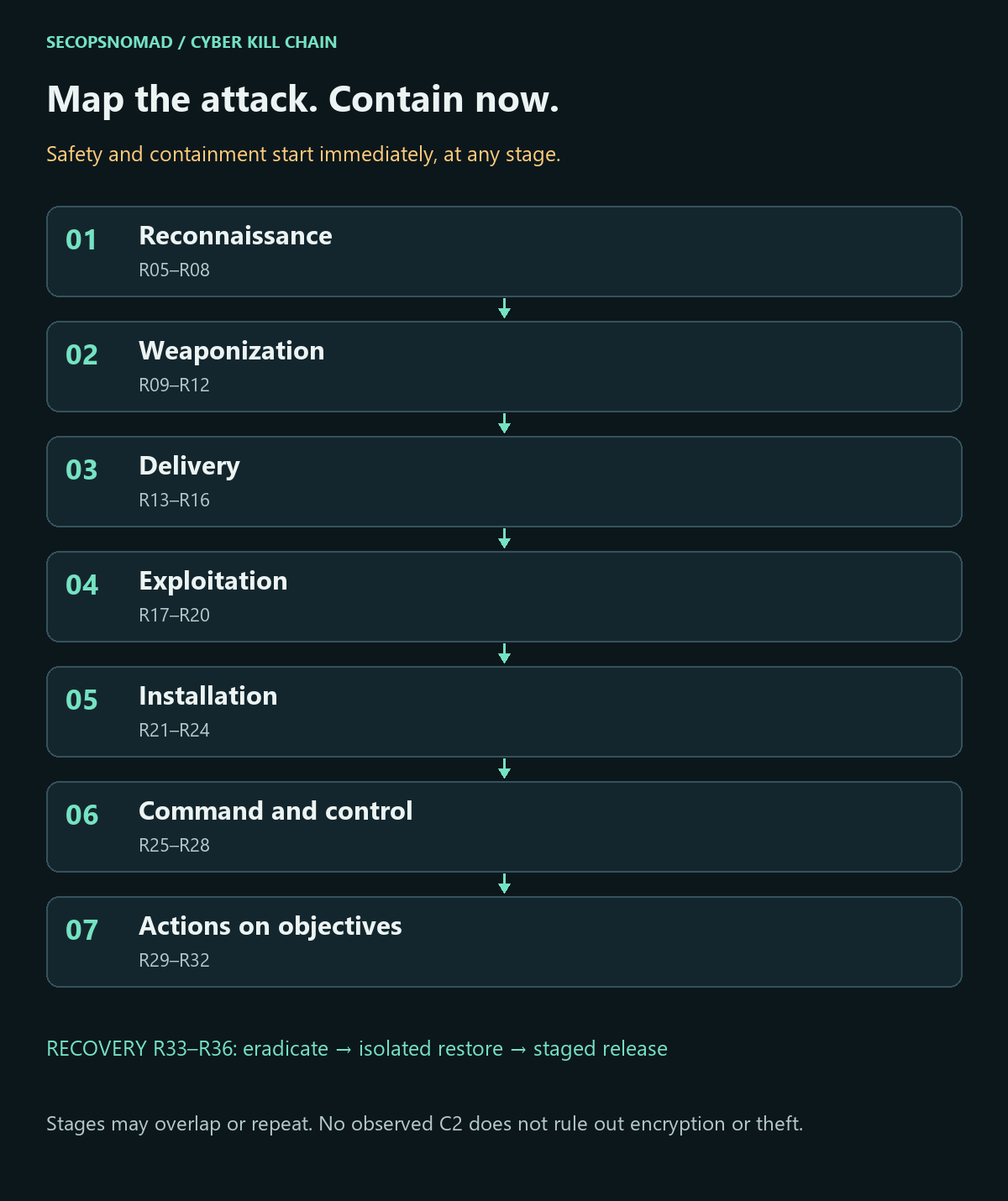
Overview. The seven stages are reconnaissance, weaponization, delivery, exploitation, installation, command and control, and actions on objectives. R01–R04 handle urgent triage; R33–R36 govern recovery. The sections below provide the text equivalent of every map.
Start here: the first hour
New to this? Work down this list in order, then use the sections below for the full response. The first hour is about stopping the spread and protecting your way back, not about finding the attacker.
- Minute 0–5: disconnect, don't switch off. Unplug the network cable or turn off Wi-Fi on machines showing ransom notes or encrypted files, and leave them powered on. Memory holds evidence and sometimes keys. Photograph the ransom note.
- Minute 5: call the incident lead and move the response to a channel the attacker cannot read: phones, or a chat outside your company's email and Teams. Assume company email may be watched.
- Minute 5–15: isolate with your EDR where you can (section 0 shows how). If many machines are affected, isolate whole network segments at the switch or firewall, or cut internet access, after the incident lead agrees.
- Minute 15: protect the backups. Disconnect backup servers and storage from the network, and check that the backup console still shows your recent copies. Do not start restoring yet.
- Minute 20: list what is down. Which servers, services and sites are affected, and whether any safety-critical or customer-facing system is among them.
- Minute 25: disable accounts you know the attacker used. Plan password resets from a clean device later; typing admin passwords on infected machines hands them to the attacker.
- Minute 30: call for help. Your cyber insurance hotline, if you have one (policies often require their approved responders), and your IT provider or an incident response firm.
- Minute 40: preserve what is easy to lose. Export firewall, VPN and EDR logs; collect an EDR investigation package from a few affected machines. Do not wipe or rebuild anything yet.
- Minute 50: brief management and Legal. Police report, possible personal-data report, customer notices and contracts all need decisions soon. Nobody contacts the attacker without the lead, Legal and the insurer.
- Minute 60: send the first staff instruction (template near the end of this page) and set an update rhythm, for example every two hours.
Do not: pay or negotiate on your own; restore backups into a network the attacker may still be in; run clean-up tools that delete evidence; reboot everything to "see if it helps"; or sign in with domain administrator accounts on machines you have not checked.
How to use the decisions
- Yes: follow the action and continue all other relevant branches. These are independent checks, not mutually exclusive paths.
- No: record affirmative supporting evidence, including the systems and period checked. No alert alone is insufficient.
- Unknown: keep the check open, assign an evidence owner and next review time, and use proportionate containment while investigating.
- Not applicable: record the environment-specific reason and reviewer. Never use it to hide a telemetry gap.
For every check retain the case ID, affected asset/account, UTC time window, answer, evidence reference, owner, action/result and next review. Store sensitive evidence in the restricted case workspace, not the public blog. The downloadable register has blank working fields for these records.
Download the English decision register (CSV). Treat values added to spreadsheets as untrusted text. The images are summaries; the tables add evidence requirements and responsible teams.
Operational owners: SOC/SIEM correlates evidence; EDR/DFIR investigates hosts; Network contains paths; IAM/Directory handles identities; Backup/Infrastructure owns recovery resources; Email Security scopes delivery; Third-party Risk coordinates suppliers; Legal/Privacy evaluates data and disclosure; service owners and leadership decide continuity priorities. Some owners are more specific than the site’s broad team tags.
Microsoft’s ransomware response guidance supports secure communications, coordinated containment and recovery after attacker access is addressed. The decision register below is our editorial implementation of those principles; adapt it to your authority and service procedures.
Words used in this playbook
| Term | Plain meaning |
|---|---|
| Ransomware | Malware that encrypts files and systems so they cannot be used, followed by a demand for payment. |
| Double extortion | Copying data before encrypting it, then threatening to publish it. Restoring from backup does not remove this threat. |
| Patient zero | The first machine or account the attacker used. Finding it tells you how they got in. |
| Lateral movement | The attacker moving from one machine to others, usually with stolen administrator credentials. |
| Domain controller / Active Directory | The servers that manage company accounts and passwords on a Windows network. If they are compromised, every account is suspect. |
| krbtgt | A special Active Directory account whose password signs all Kerberos tickets. Resetting it twice invalidates forged tickets. |
| EDR isolation | A security-tool action that cuts a machine off from the network while keeping it reachable by the security tool. |
| Persistence | Something the attacker sets up to get back in, such as a scheduled task, service, new account or remote tool. |
| C2 (command and control) | The channel the attacker uses to send commands to infected machines. |
| RMM tool | Remote management software (for example AnyDesk or ScreenConnect). Legitimate, but often installed by attackers. |
| Immutable / offline backup | A backup copy that cannot be changed or deleted for a set time, or is disconnected. Often the only thing that survives. |
| RPO / RTO | How much data you can afford to lose (recovery point) and how long you can be down (recovery time). |
| Leak site | A website where ransomware groups publish stolen data from victims who do not pay. |
| Out-of-band communication | Talking through channels separate from the possibly compromised company systems. |
No security team? Who does what
The owners in the tables are roles, not job titles. In a small company one person often holds several, and outside help is normal for ransomware. Keep one rule: the person who declares a system clean should not be the only person who checked it.
| Role in this playbook | In a small company, usually | What they need ready |
|---|---|---|
| Incident lead | The managing director | Authority to shut down services, spend money and speak for the company |
| IT / infrastructure | The in-house IT person or IT provider | Network diagrams, admin access from a clean device, the asset list |
| EDR / DFIR | An incident response firm, often via the insurer | EDR console access; permission to collect evidence |
| Network | The IT provider or firewall vendor | Access to firewall, VPN and switch configuration and logs |
| Identity | The IT provider | Domain and Microsoft 365 admin access, emergency accounts |
| Backup / recovery | Whoever runs backups, often the IT provider | Backup console access, offline copies, restore test records |
| Legal / Privacy | Outside counsel | Contracts, insurance policy, data inventory |
| Communications | The managing director or sales lead | Staff, customer and press wording, agreed with Legal |
| Service owners | Department heads | The order in which services must come back |
| Outside help | Your insurer's hotline and an incident response firm; in Japan, report to the police through the cybercrime consultation window and request coordination from JPCERT/CC; check No More Ransom for free decryptors; CISA's ransomware guide has a checklist | The fact sheet template below |
0. Urgent triage and incident command
- Start containment and investigation in parallel. Use clean administration and a trusted communication channel. Preserve readily available evidence without delaying urgent action.
- Identify essential services and safety constraints before isolating OT, clinical systems, domain controllers or shared infrastructure. Prefer network isolation to routine power-off; preserve volatile evidence when practical.
- If isolation is impossible and destructive activity continues, the incident lead and service/safety owner must explicitly decide whether emergency shutdown is necessary, recording the evidence-loss and operational tradeoff.
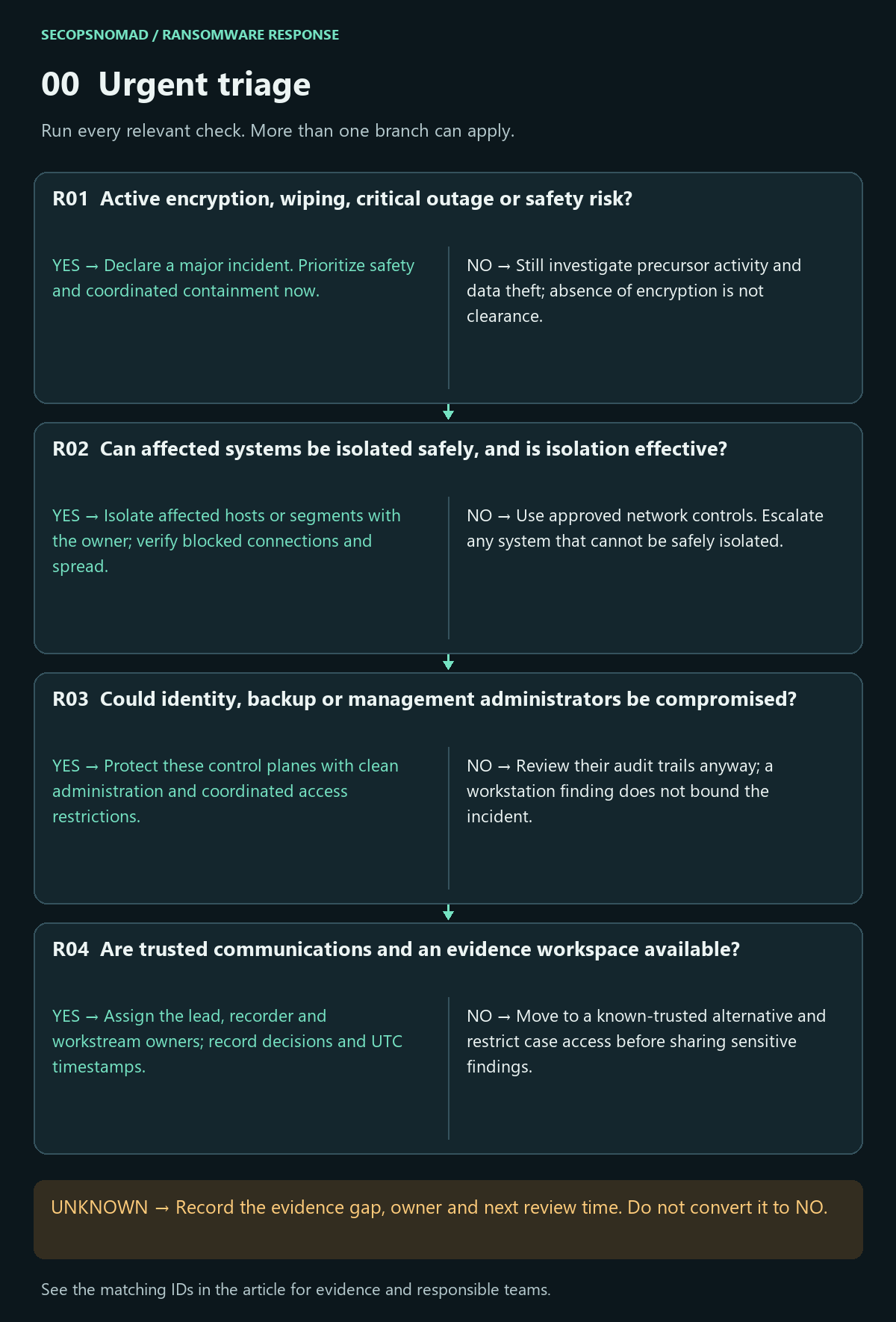
| Decision | Yes | No | Evidence / resolve unknowns | Lead owner |
|---|---|---|---|---|
| R01. Active encryption, wiping, critical outage or safety risk? | Declare a major incident. Prioritize safety and coordinated containment now. | Still investigate precursor activity and data theft; absence of encryption is not clearance. | File changes, service health, EDR timeline, affected users and safety assessment. | Incident lead + EDR + IT / OT |
| R02. Can affected systems be isolated safely, and is isolation effective? | Isolate affected hosts or segments with the owner; verify blocked connections and spread. | Use approved network controls. Escalate any system that cannot be safely isolated. | EDR action status, network reachability, segmentation and business dependencies. | EDR + Network + service owner |
| R03. Could identity, backup or management administrators be compromised? | Protect these control planes with clean administration and coordinated access restrictions. | Review their audit trails anyway; a workstation finding does not bound the incident. | Privileged sessions, roles, backup consoles, hypervisor and RMM audit records. | IAM + Backup + Infrastructure |
| R04. Are trusted communications and an evidence workspace available? | Assign the lead, recorder and workstream owners; record decisions and UTC timestamps. | Move to a known-trusted alternative and restrict case access before sharing sensitive findings. | Verified contact list, case ID, evidence access, collection time and file hashes. | Incident lead + DFIR |
How to do it: step by step
- Isolate with EDR: Microsoft Defender for Endpoint: Defender portal → Assets → Devices → open the device → Isolate device → add a comment → Confirm. CrowdStrike Falcon: open the host and choose Network contain. Isolation keeps the machine connected to the security tool so you can still investigate it.
- Without EDR: unplug the network cable or disable Wi-Fi. Leave the machine running. If encryption is visibly spreading and you cannot isolate, the incident lead decides on emergency shutdown and records why.
- Shared infrastructure first: domain controllers, file servers, hypervisors and backup servers need a decision by their owners; isolating a domain controller or hypervisor affects everything that depends on it.
- Out-of-band channel: a phone list and a chat group outside the company tenant, with the lead, IT, the IR firm, Legal and management.
- Collect quick evidence: photograph the ransom note and note the encrypted file extension; in Defender for Endpoint use Collect investigation package on a few affected devices.
- Check isolation held: the device page shows the isolation status; re-check it every day, because isolation can be released or expire.
Check it worked: affected machines show as isolated or disconnected, the lead has a written list of what was isolated and why, and the team is talking outside company email (R01–R04). Microsoft: device response actions.
1. Reconnaissance: establish the earliest credible activity
- Build a UTC timeline from the earliest credible access, not the first ransom note. Compare internet exposure, identity attempts and asset ownership.
- Separate external reconnaissance from discovery performed after entry. Mark observations, hypotheses and missing evidence distinctly.
- Extend collection backward when earlier activity appears. Record retention limits; do not label routine internet scanning as proof of this incident.
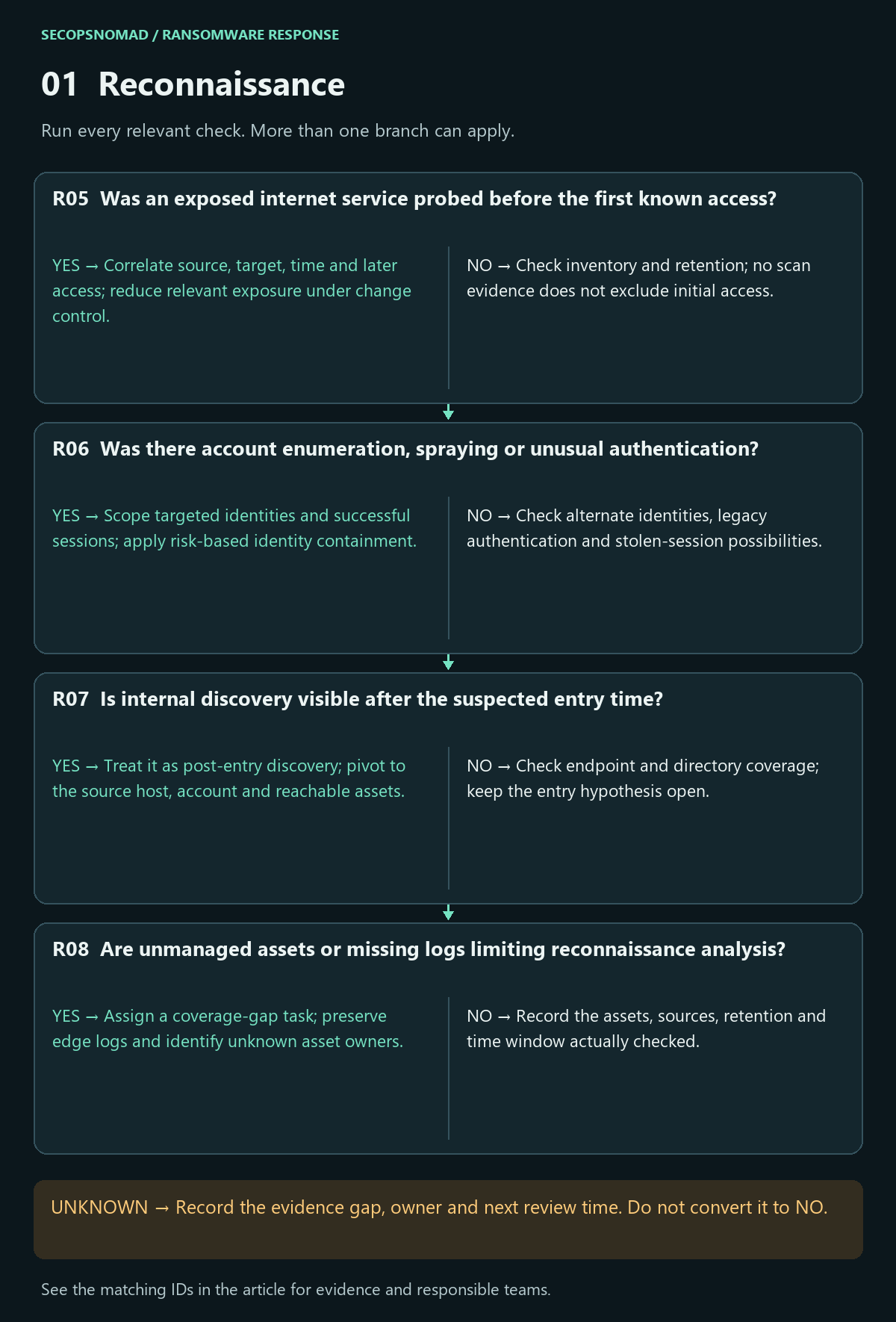
| Decision | Yes | No | Evidence / resolve unknowns | Lead owner |
|---|---|---|---|---|
| R05. Was an exposed internet service probed before the first known access? | Correlate source, target, time and later access; reduce relevant exposure under change control. | Check inventory and retention; no scan evidence does not exclude initial access. | Edge, WAF, VPN and firewall logs; exposed asset inventory and patch state. | Network + Vulnerability + SIEM |
| R06. Was there account enumeration, spraying or unusual authentication? | Scope targeted identities and successful sessions; apply risk-based identity containment. | Check alternate identities, legacy authentication and stolen-session possibilities. | IdP and VPN results, MFA events, device context and sign-in baselines. | IAM + SIEM |
| R07. Is internal discovery visible after the suspected entry time? | Treat it as post-entry discovery; pivot to the source host, account and reachable assets. | Check endpoint and directory coverage; keep the entry hypothesis open. | Directory queries, network discovery, process ancestry and authenticated sessions. | EDR + SIEM + Directory |
| R08. Are unmanaged assets or missing logs limiting reconnaissance analysis? | Assign a coverage-gap task; preserve edge logs and identify unknown asset owners. | Record the assets, sources, retention and time window actually checked. | Inventory reconciliation, sensor health, clock drift and oldest available records. | IT Operations + SIEM |
How to do it: step by step
- List what faces the internet: VPN gateways, remote desktop, webmail, file transfer and any web application. Your firewall's port-forwarding (NAT) rules are the quickest source.
- Pull authentication logs from the VPN or remote access gateway and from domain controllers for at least 30 days. On a domain controller, failed logons are Security event 4625 and successful logons 4624.
- Look for spraying and guessing: many failures from few addresses, or failures across many accounts, before the first successful attacker logon.
- Separate before and after entry: scanning from the internet is constant background; scanning from inside your network (one machine probing many) is the attacker exploring.
- Write down the gaps: devices without logging, logs that rolled over, and machines nobody owns.
Check it worked: a UTC timeline starting at the earliest credible activity, with each entry marked observed, suspected or unknown (R05–R08).
2. Weaponization: assess artifacts without waiting for attribution
- Weaponization often happens outside victim visibility. Record this stage as unknown when unsupported; a complete seven-stage narrative is not required.
- Preserve originals and analyze only through approved isolated tooling. Do not execute samples on responder devices or upload confidential artifacts to public scanners.
- Create an indicator record with source, type, confidence, observation window and intended use. Family naming and a malware hash are useful context, not prerequisites for incident response.
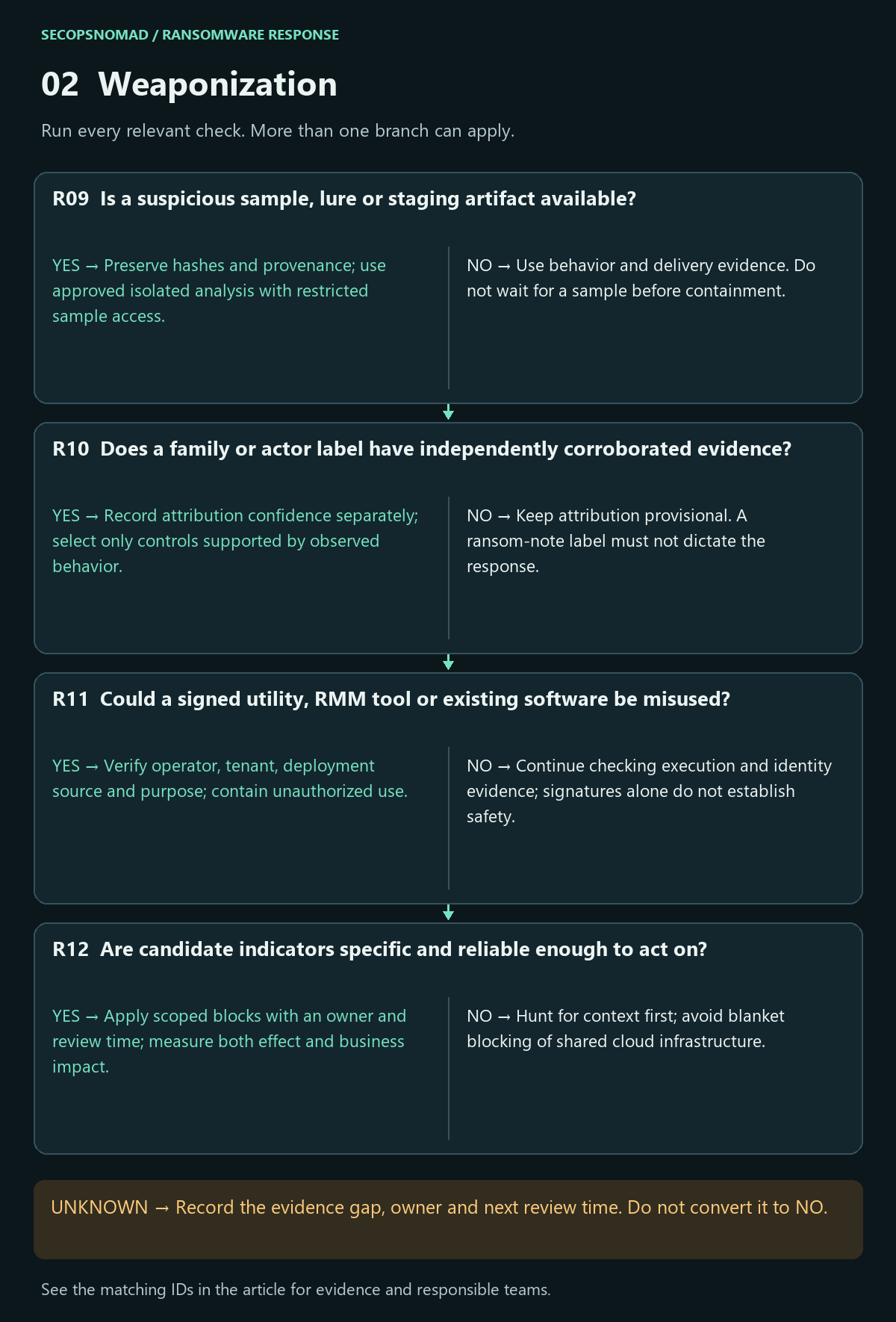
| Decision | Yes | No | Evidence / resolve unknowns | Lead owner |
|---|---|---|---|---|
| R09. Is a suspicious sample, lure or staging artifact available? | Preserve hashes and provenance; use approved isolated analysis with restricted sample access. | Use behavior and delivery evidence. Do not wait for a sample before containment. | Original message or artifact, acquisition path, hash and authorized analysis report. | DFIR + Email Security |
| R10. Does a family or actor label have independently corroborated evidence? | Record attribution confidence separately; select only controls supported by observed behavior. | Keep attribution provisional. A ransom-note label must not dictate the response. | Sample analysis, note, behavior, source date and conflicting evidence. | Threat Intelligence + DFIR |
| R11. Could a signed utility, RMM tool or existing software be misused? | Verify operator, tenant, deployment source and purpose; contain unauthorized use. | Continue checking execution and identity evidence; signatures alone do not establish safety. | Installation history, approved tool list, operator account and management audit trail. | EDR + IT + supplier owner |
| R12. Are candidate indicators specific and reliable enough to act on? | Apply scoped blocks with an owner and review time; measure both effect and business impact. | Hunt for context first; avoid blanket blocking of shared cloud infrastructure. | Indicator type, provenance, first/last seen, confidence, related process and exceptions. | Threat Intelligence + Network + SIEM |
How to do it: step by step
Record the ransom note and extension exactly; they identify the family more reliably than guesses.
Hash suspicious files on a copy, using a trusted machine:
Get-FileHash -Algorithm SHA256 -Path .\suspicious-file.exeSearch by hash, don't upload: look the hash up in your EDR or threat intelligence; do not upload confidential files to public scanners.
Check for a free decryptor: No More Ransom offers decryptors for some families and a "Crypto Sheriff" identification tool. Only submit non-sensitive encrypted sample files and the note, and only with the lead's approval.
Look for misused legitimate tools: remote management software, PsExec, rclone or archive tools that appeared recently on servers.
Check it worked: an indicator list where each item has a source, type, confidence and the time it was seen (R09–R12).
3. Delivery: find how access reached the environment
- Trace the first observed execution or session back to its source. Compare email/web, remote access, public applications and trusted third parties.
- Preserve delivery and access evidence before remediation changes it. Distinguish a delivered file, a successful login and actual execution.
- Search related recipients, hosts, identities and deployment jobs. Record unsuccessful containment actions and assign retries to an owner.
Use the phishing response playbook when that delivery route applies.
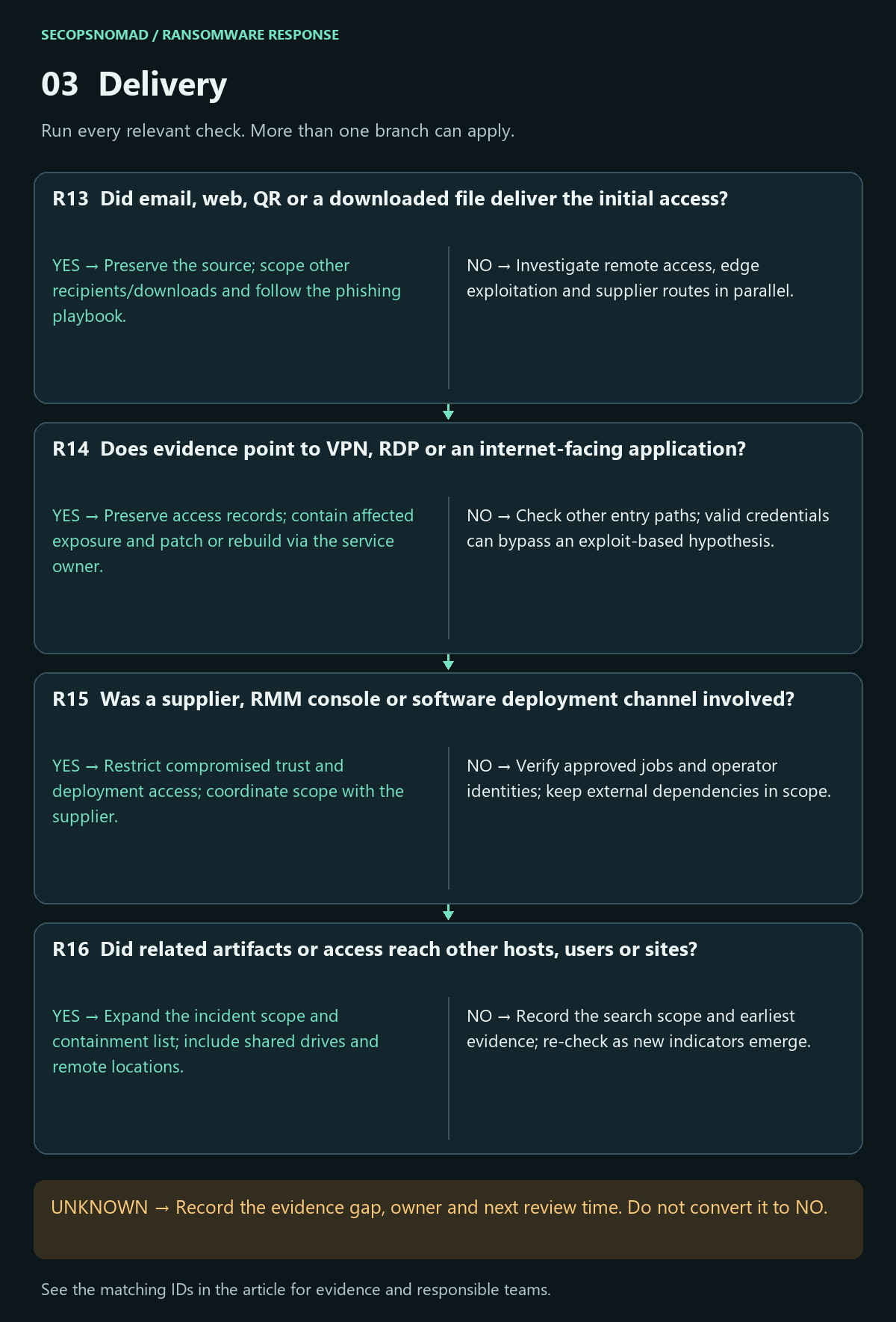
| Decision | Yes | No | Evidence / resolve unknowns | Lead owner |
|---|---|---|---|---|
| R13. Did email, web, QR or a downloaded file deliver the initial access? | Preserve the source; scope other recipients/downloads and follow the phishing playbook. | Investigate remote access, edge exploitation and supplier routes in parallel. | Message trace, browser/proxy logs, download origin and first execution time. | Email Security + EDR + SIEM |
| R14. Does evidence point to VPN, RDP or an internet-facing application? | Preserve access records; contain affected exposure and patch or rebuild via the service owner. | Check other entry paths; valid credentials can bypass an exploit-based hypothesis. | VPN/RDP sessions, edge appliance logs, application audit and version history. | Network + IAM + application owner |
| R15. Was a supplier, RMM console or software deployment channel involved? | Restrict compromised trust and deployment access; coordinate scope with the supplier. | Verify approved jobs and operator identities; keep external dependencies in scope. | RMM jobs, deployment artifacts, service accounts, supplier timeline and contracts. | Third-party Risk + IT + IAM |
| R16. Did related artifacts or access reach other hosts, users or sites? | Expand the incident scope and containment list; include shared drives and remote locations. | Record the search scope and earliest evidence; re-check as new indicators emerge. | Delivery records, destination assets, shared storage and campaign variants. | Incident lead + SIEM |
How to do it: step by step
- Start from patient zero: the earliest machine with attacker activity. Ask how it was reached: a VPN or remote desktop logon, an email attachment, a web application, or a supplier's remote tool.
- VPN and remote access: find logons by accounts that should not have been active, logons without MFA, and logons from unusual countries or hosting providers. Check the appliance vendor's security advisories for vulnerabilities on your version.
- Email: Exchange admin center → Mail flow → Message trace for messages to patient zero's user around the first activity; use the phishing playbook if a lure is found.
- Suppliers and RMM: ask IT providers whether their tools or accounts connected in the window; review the RMM console's session history.
- Preserve the evidence for each path before patching or changing it.
Check it worked: the most likely entry path is written down with evidence, and other paths are either ruled out with evidence or left open with an owner (R13–R16).
4. Exploitation: verify execution, privilege and movement
- Correlate process lineage, authentication and application records. Record what the attacker demonstrably ran and with which effective privileges.
- Scope lateral movement using both source and destination evidence. Expand beyond Windows workstations to servers, identity systems, hypervisors and cloud workloads.
- Plan credential and key changes with dependency owners. Rotate from trusted infrastructure after attacker access is constrained, and verify both service health and access revocation.
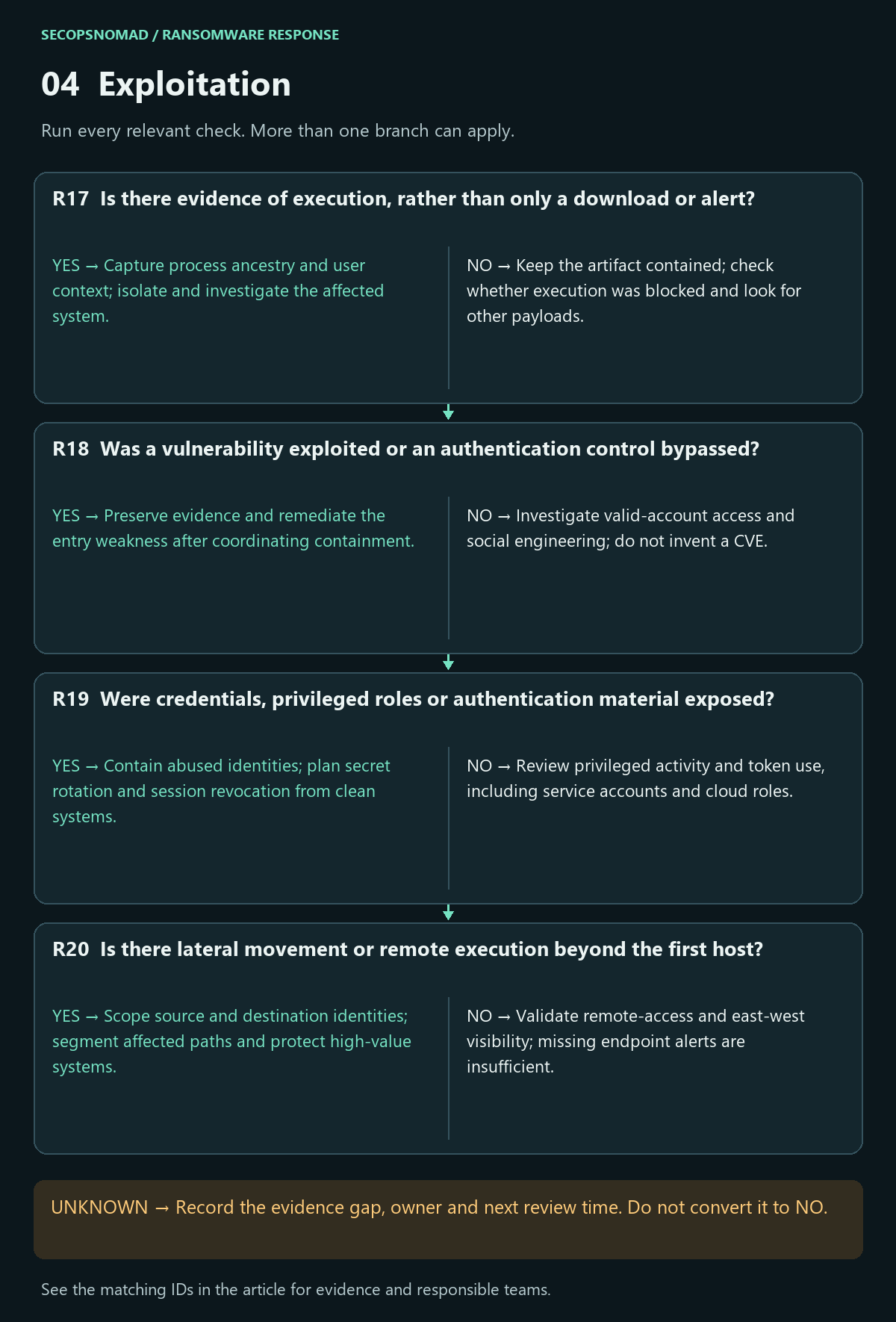
| Decision | Yes | No | Evidence / resolve unknowns | Lead owner |
|---|---|---|---|---|
| R17. Is there evidence of execution, rather than only a download or alert? | Capture process ancestry and user context; isolate and investigate the affected system. | Keep the artifact contained; check whether execution was blocked and look for other payloads. | Process creation, script logs, EDR action results, parent process and event time. | EDR + DFIR |
| R18. Was a vulnerability exploited or an authentication control bypassed? | Preserve evidence and remediate the entry weakness after coordinating containment. | Investigate valid-account access and social engineering; do not invent a CVE. | Exploit traces, application errors, build versions, sign-ins and patch verification. | Vulnerability + IAM + application owner |
| R19. Were credentials, privileged roles or authentication material exposed? | Contain abused identities; plan secret rotation and session revocation from clean systems. | Review privileged activity and token use, including service accounts and cloud roles. | Role changes, credential-access alerts, key use, session records and admin actions. | IAM + Directory + Cloud |
| R20. Is there lateral movement or remote execution beyond the first host? | Scope source and destination identities; segment affected paths and protect high-value systems. | Validate remote-access and east-west visibility; missing endpoint alerts are insufficient. | RDP/SMB/WinRM activity, remote tasks, service creation and domain/cloud audit trails. | EDR + Network + SIEM |
How to do it: step by step
Use the EDR process tree for patient zero and each encrypted server: what ran, from which parent, under which account.
Find remote logons in domain controller and server Security logs: event 4624 with logon type 3 (network) or 10 (remote desktop) from patient zero or other suspect machines. Run collection from a trusted admin workstation, and narrow the time range on busy domain controllers, for example:
# Event 4624 fields: [5] account, [8] logon type, [18] source address. Works in any Windows display language.
Get-WinEvent -ComputerName DC01 -FilterHashtable @{ LogName = 'Security'; Id = 4624; StartTime = (Get-Date).AddDays(-14) } |
  Where-Object { $_.Properties[8].Value -in 3, 10 } |
  Select-Object TimeCreated,
    @{ n = 'Account'; e = { $_.Properties[5].Value } },
    @{ n = 'LogonType'; e = { $_.Properties[8].Value } },
    @{ n = 'SourceIp'; e = { $_.Properties[18].Value } } |
  Export-Csv .\dc01-remote-logons.csv -NoTypeInformation
Track administrator accounts: where each domain or local administrator account logged on during the window. Any account used by the attacker must be treated as compromised everywhere.
Widen beyond Windows PCs: hypervisor consoles (for example VMware ESXi), storage, cloud consoles and backup systems are common targets.
Plan credential changes for after containment, from a clean device, starting with the accounts the attacker used and all privileged accounts.
Check it worked: a list of machines the attacker reached and the accounts used, each with source and destination evidence (R17–R20).
5. Installation: remove persistence and restore visibility
- Inventory unauthorized changes to endpoint, application, identity and management-plane configuration; compare with reliable baselines.
- Preserve evidence before removal. Choose rebuild or controlled eradication based on trust, scope and the responder’s ability to verify the result.
- Review backup and security-console administrators separately. An installed EDR agent and a successful remediation request do not prove that monitoring or eradication worked.
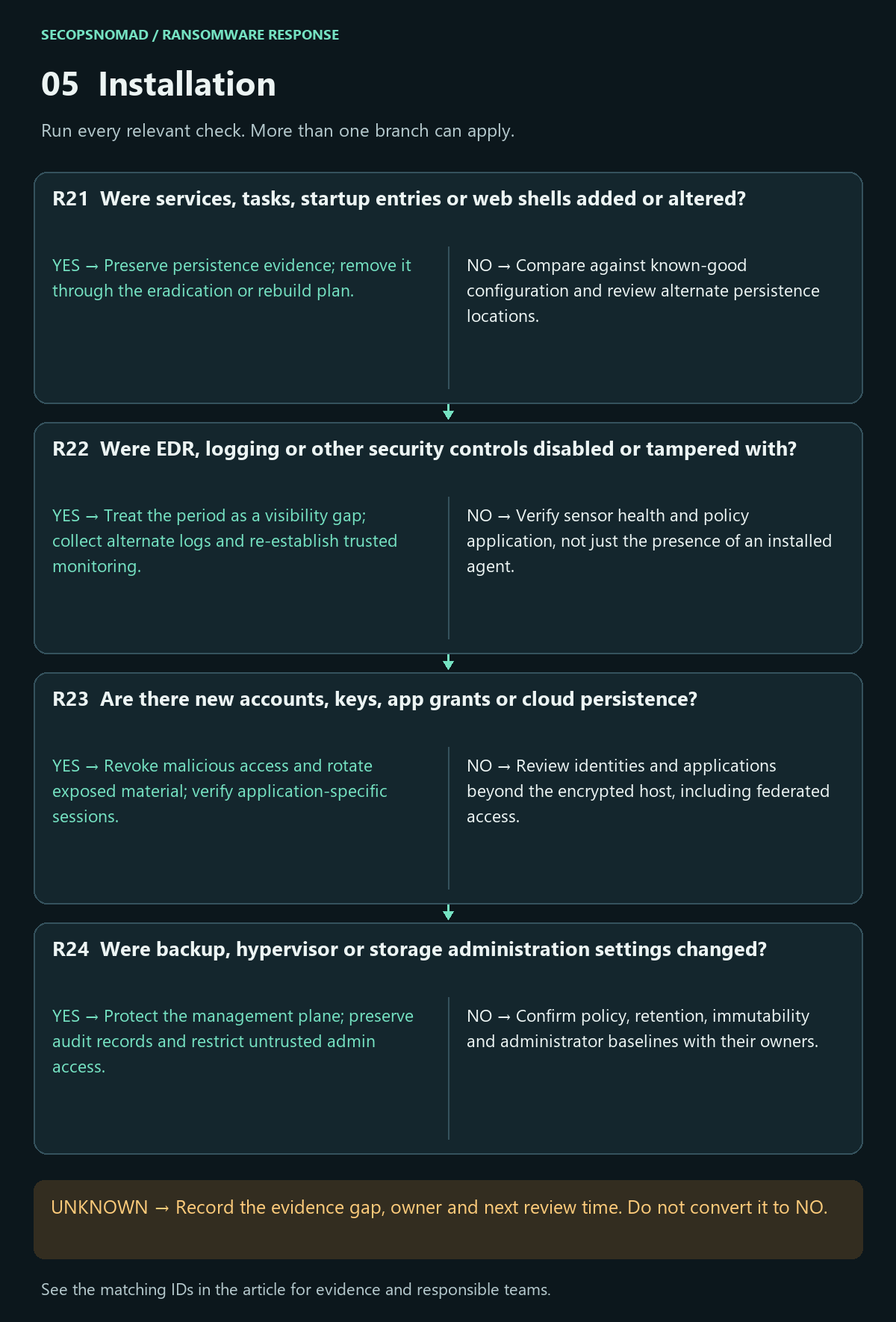
| Decision | Yes | No | Evidence / resolve unknowns | Lead owner |
|---|---|---|---|---|
| R21. Were services, tasks, startup entries or web shells added or altered? | Preserve persistence evidence; remove it through the eradication or rebuild plan. | Compare against known-good configuration and review alternate persistence locations. | Service/task definitions, startup changes, web content changes and authorized baselines. | DFIR + EDR + application owner |
| R22. Were EDR, logging or other security controls disabled or tampered with? | Treat the period as a visibility gap; collect alternate logs and re-establish trusted monitoring. | Verify sensor health and policy application, not just the presence of an installed agent. | Sensor check-ins, policy changes, exclusions, service status and log discontinuities. | EDR + SIEM + IT |
| R23. Are there new accounts, keys, app grants or cloud persistence? | Revoke malicious access and rotate exposed material; verify application-specific sessions. | Review identities and applications beyond the encrypted host, including federated access. | Account/role changes, OAuth grants, keys, federation settings and cloud activity. | IAM + Cloud + application owner |
| R24. Were backup, hypervisor or storage administration settings changed? | Protect the management plane; preserve audit records and restrict untrusted admin access. | Confirm policy, retention, immutability and administrator baselines with their owners. | Backup jobs, deletion events, hypervisor tasks, storage roles and policy changes. | Backup + Infrastructure + IAM |
How to do it: step by step
Search for typical persistence events on servers and domain controllers (from a trusted admin workstation):
$since = (Get-Date).AddDays(-14)
Get-WinEvent -ComputerName FS01 -FilterHashtable @{ LogName = 'System'; Id = 7045; StartTime = $since }    # new services
Get-WinEvent -ComputerName FS01 -FilterHashtable @{ LogName = 'Security'; Id = 4698, 4720, 4732, 1102; StartTime = $since }    # tasks, new users, admin group adds, log cleared
Check security tools: EDR and antivirus status on every machine; alerts for tampering; group policy changes that disable protection.
Check identity persistence: new domain or cloud accounts, accounts added to admin groups, new app grants or keys in Microsoft 365 and cloud consoles (see the leaked cloud keys playbook for cloud credentials).
Check backup and hypervisor admin settings: retention shortened, jobs deleted, new administrators, immutability turned off.
Decide rebuild or clean: rebuilding from known-good media is usually safer for servers the attacker controlled; record the decision per machine.
Check it worked: each persistence item found is recorded, removed or scheduled for rebuild, and security tools are confirmed running (R21–R24).
6. Command and control: disrupt and verify
- Correlate destination, process/account and time. A familiar cloud domain, TLS connection or signed remote tool is not sufficient to classify activity.
- Coordinate host, identity and network containment. Prefer evidence-based, scoped restrictions and document expected business effects.
- Verify the original channel stops and check alternatives. Lack of observed C2 does not exclude local encryption, internal control or earlier exfiltration.
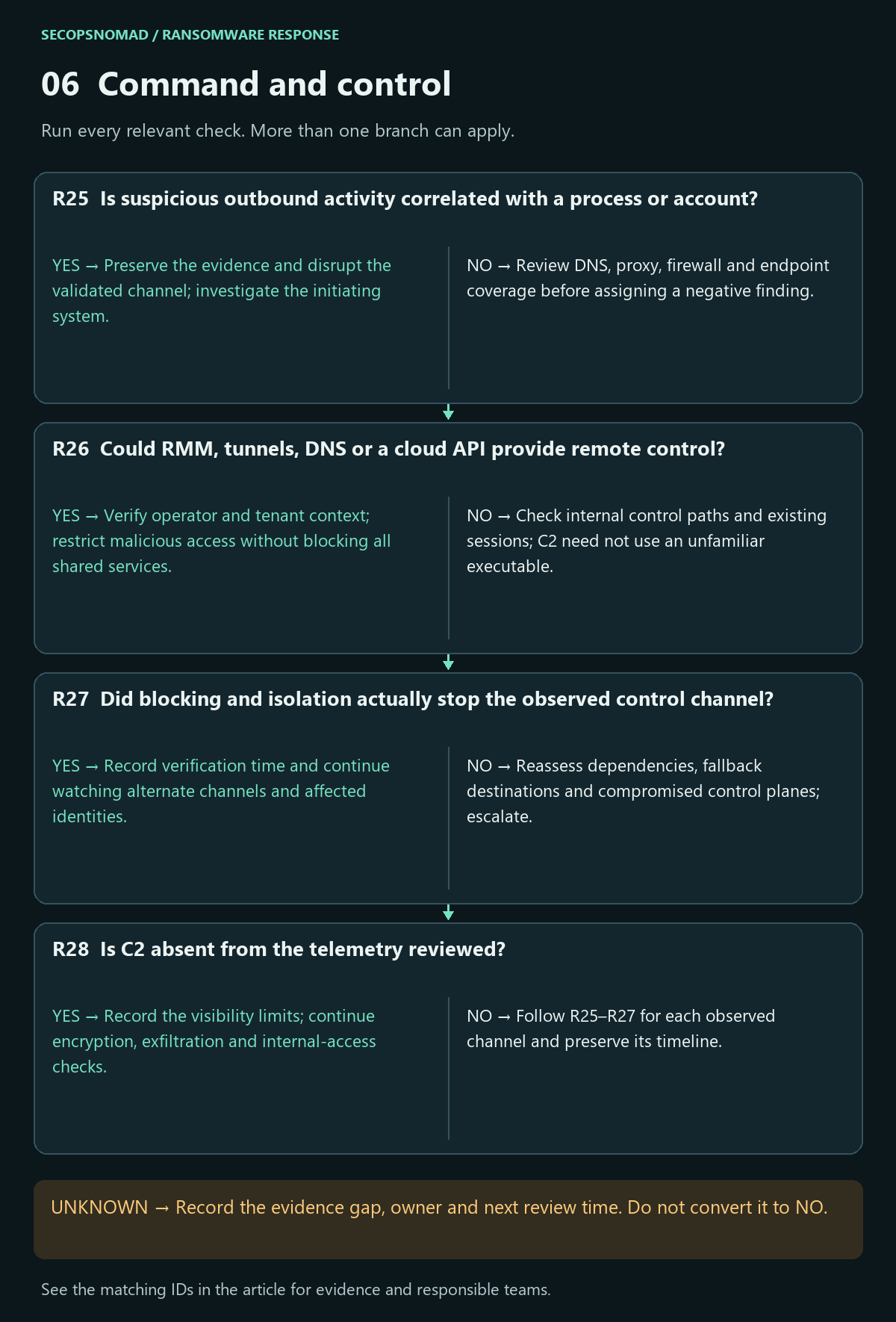
| Decision | Yes | No | Evidence / resolve unknowns | Lead owner |
|---|---|---|---|---|
| R25. Is suspicious outbound activity correlated with a process or account? | Preserve the evidence and disrupt the validated channel; investigate the initiating system. | Review DNS, proxy, firewall and endpoint coverage before assigning a negative finding. | Process-linked connections, DNS answers, destination context and time correlation. | Network + EDR + SIEM |
| R26. Could RMM, tunnels, DNS or a cloud API provide remote control? | Verify operator and tenant context; restrict malicious access without blocking all shared services. | Check internal control paths and existing sessions; C2 need not use an unfamiliar executable. | RMM operator logs, tunnels, DNS patterns, proxy sessions and cloud audit. | Network + IAM + IT |
| R27. Did blocking and isolation actually stop the observed control channel? | Record verification time and continue watching alternate channels and affected identities. | Reassess dependencies, fallback destinations and compromised control planes; escalate. | Post-action connections, session termination, action failures and alternate paths. | Incident lead + Network + EDR |
| R28. Is C2 absent from the telemetry reviewed? | Record the visibility limits; continue encryption, exfiltration and internal-access checks. | Follow R25–R27 for each observed channel and preserve its timeline. | Coverage, time range, encrypted traffic limits, offline behavior and internal sessions. | SIEM + DFIR |
How to do it: step by step
- Find outbound connections from compromised machines in firewall, proxy and DNS logs, and in EDR network events (the KQL in the hunting section correlates a confirmed IP with processes).
- Inventory remote tools: search your EDR software inventory for remote management tools; list which are approved and which appeared during the incident.
- Block and verify: block confirmed attacker addresses and domains at the firewall, uninstall unapproved remote tools, and confirm in the logs that the connections stopped.
- Restrict outbound traffic from servers to what they need while the investigation continues.
Check it worked: no further connections to known attacker infrastructure after the block time, and every remote tool is either approved or removed (R25–R28).
7. Actions on objectives: encryption, theft and extortion
- Separate availability loss, integrity loss and confidentiality risk. Track affected services and data owners even if the ransomware executable is gone.
- Protect recovery copies and keys; coordinate pausing affected synchronization or replication where it could spread corruption. Verify scope before changing shared recovery infrastructure.
- Keep extortion handling and external communications with the designated lead. Legal assesses applicable jurisdiction, contracts and reporting decisions; this playbook assigns no universal notification deadline.
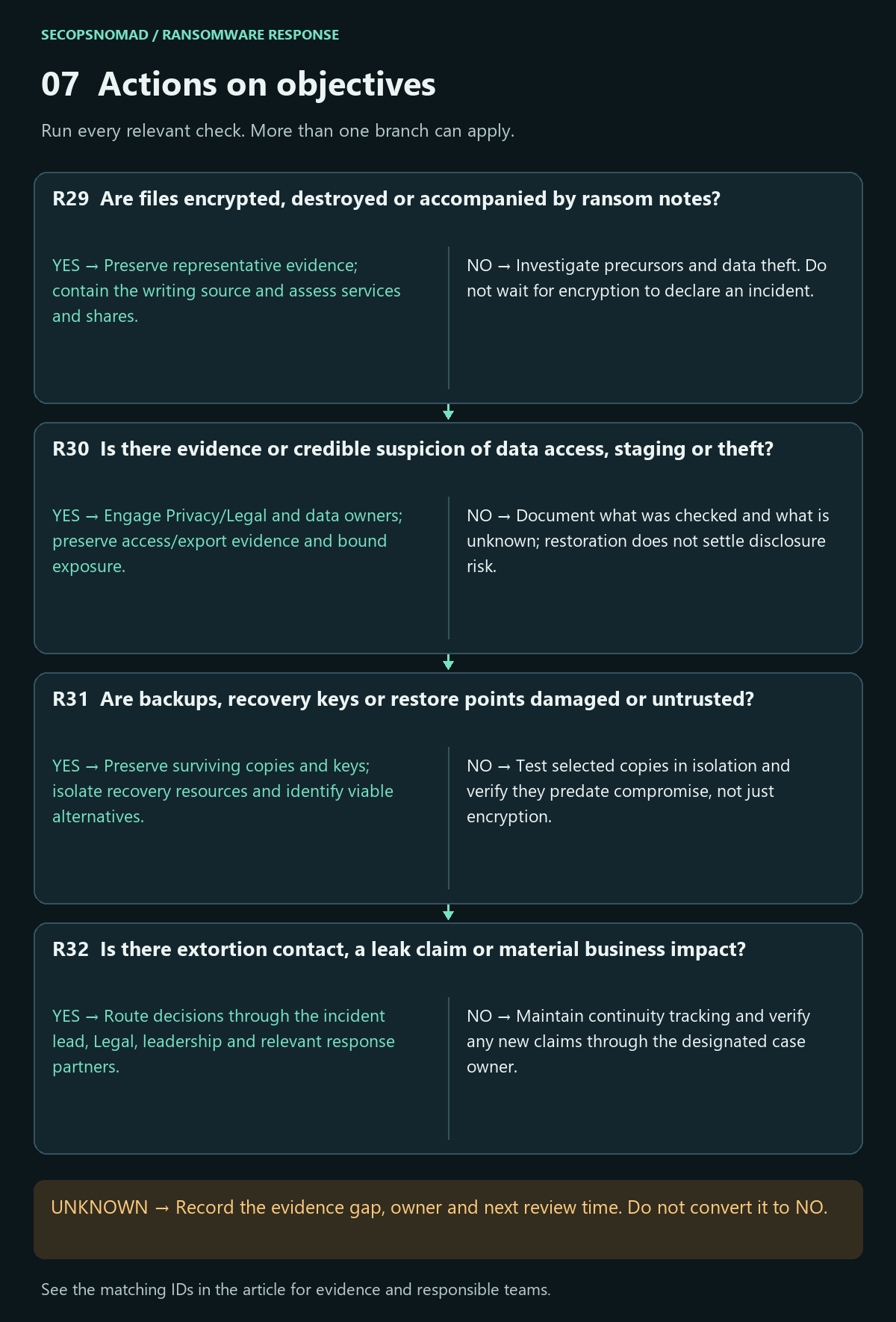
| Decision | Yes | No | Evidence / resolve unknowns | Lead owner |
|---|---|---|---|---|
| R29. Are files encrypted, destroyed or accompanied by ransom notes? | Preserve representative evidence; contain the writing source and assess services and shares. | Investigate precursors and data theft. Do not wait for encryption to declare an incident. | File samples, extensions, notes, file-server audit, writer process and service impact. | EDR + Storage + business owner |
| R30. Is there evidence or credible suspicion of data access, staging or theft? | Engage Privacy/Legal and data owners; preserve access/export evidence and bound exposure. | Document what was checked and what is unknown; restoration does not settle disclosure risk. | Sensitive datasets, access/export audit, archive staging, egress and recipient context. | DFIR + Legal / Privacy + data owner |
| R31. Are backups, recovery keys or restore points damaged or untrusted? | Preserve surviving copies and keys; isolate recovery resources and identify viable alternatives. | Test selected copies in isolation and verify they predate compromise, not just encryption. | Restore tests, earliest compromise estimate, backup audit, key access and immutability. | Backup + IAM + DFIR |
| R32. Is there extortion contact, a leak claim or material business impact? | Route decisions through the incident lead, Legal, leadership and relevant response partners. | Maintain continuity tracking and verify any new claims through the designated case owner. | Original communications, verified impact, affected jurisdictions and decision records. | Leadership + Legal / Privacy + business |
Payment does not guarantee recovery, and the FBI does not support paying a ransom. Route case-specific decisions through leadership, Legal and appropriate insurer/law-enforcement contacts. Do not run an attacker-supplied decryptor in production. FBI ransomware guidance.
How to do it: step by step
- Build an impact table: system, encrypted or not, data owner, business impact, and recovery priority.
- Look for data theft: large outbound transfers in firewall logs before encryption, and tools such as rclone, WinSCP or cloud-storage clients in EDR data. A copy of your data may exist even if no tool is found.
- Protect recovery: keep backup systems disconnected, change backup administrator passwords from a clean device, verify multi-factor authentication on cloud backup consoles, and pause file synchronisation that could spread encrypted files.
- Extortion: the lead, Legal and the insurer decide together about any contact with the attacker; nobody replies to the note on their own. Legal checks reporting duties: in Japan, a report to the police and, where personal data may have been affected by an attack, a report to the PPC; contractual notices to customers.
- Watch for a leak claim through your IR firm or threat intelligence provider, and prepare a holding statement.
Check it worked: a current impact table, a written decision on data theft (confirmed, suspected or not observed), and dated decisions on reports and communication (R29–R32).
8. Recovery: pass the gates before reconnecting
- Treat R33–R36 as release gates. Recover in a clean isolated environment after entry paths and persistence are addressed; identify identity, DNS, key and application dependencies.
- Use a restore point supported by the intrusion timeline, then test integrity and business functions. Record recovery time and recovery point objectives with service owners.
- Reconnect in stages with a rollback plan. Assign enhanced monitoring and its end criteria; close only after business acceptance and explicit treatment of remaining uncertainty.
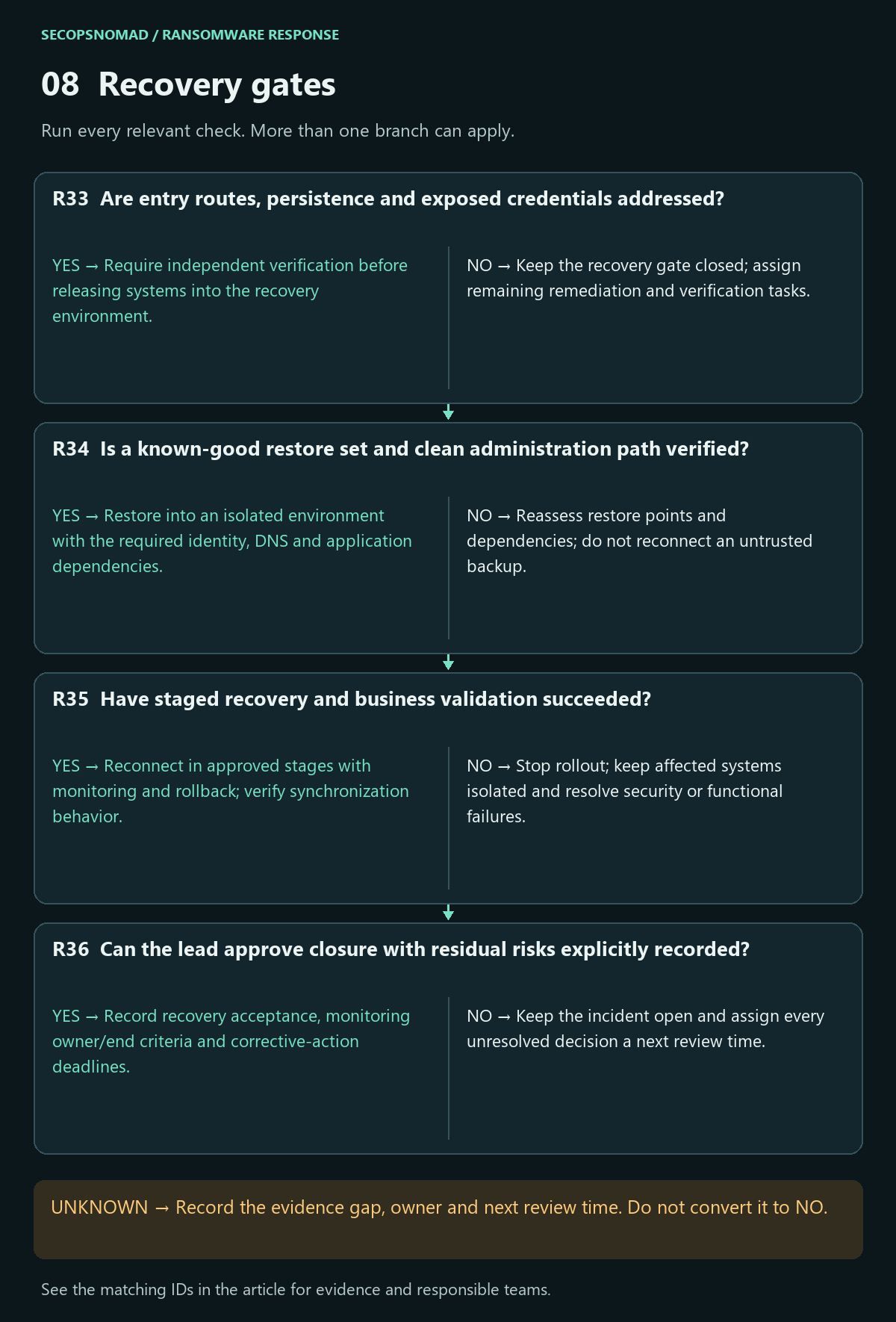
| Decision | Yes | No | Evidence / resolve unknowns | Lead owner |
|---|---|---|---|---|
| R33. Are entry routes, persistence and exposed credentials addressed? | Require independent verification before releasing systems into the recovery environment. | Keep the recovery gate closed; assign remaining remediation and verification tasks. | Rebuild evidence, patched entry paths, persistence review, secret/session remediation. | DFIR + IAM + IT + incident lead |
| R34. Is a known-good restore set and clean administration path verified? | Restore into an isolated environment with the required identity, DNS and application dependencies. | Reassess restore points and dependencies; do not reconnect an untrusted backup. | Restore-point timeline, integrity checks, admin trust, recovery objectives and key availability. | Backup + IT + application owner |
| R35. Have staged recovery and business validation succeeded? | Reconnect in approved stages with monitoring and rollback; verify synchronization behavior. | Stop rollout; keep affected systems isolated and resolve security or functional failures. | Functional tests, data consistency, security telemetry, rollback and owner acceptance. | IT + business owner + SOC |
| R36. Can the lead approve closure with residual risks explicitly recorded? | Record recovery acceptance, monitoring owner/end criteria and corrective-action deadlines. | Keep the incident open and assign every unresolved decision a next review time. | Containment verification, impact assessment, evidence retention and lessons-learned actions. | Incident lead + business + Legal / Privacy |
How to do it: step by step
- Recover in an isolated network first: no connection to the old environment until the entry path is closed and persistence is removed.
- Rebuild identity: restore or rebuild domain controllers following Microsoft's forest recovery guidance; reset the krbtgt password twice, waiting at least the maximum ticket lifetime (10 hours by default) between resets unless your specialist uses Microsoft's scripted rapid reset; reset all administrator and service account passwords. Microsoft: reset the krbtgt password.
- Choose the restore point from before the attacker's first activity where possible, scan restored data with updated tools, and test with the business owner. For files in OneDrive or SharePoint, version history and the restore features can roll back to before the encryption.
- Reconnect in stages with a rollback plan, starting with the most critical services, and watch closely for at least two weeks.
- Fix the cause: MFA on all remote access, patched internet-facing systems, offline or immutable backups, and fewer standing administrator accounts.
Check it worked: each release gate (R33–R36) is signed by its owner: entry path closed, clean restore set verified, business tests passed, and residual risks accepted in writing.
Hunting: four bounded starting points
No incident-specific IOC is supplied in this generic playbook. Use only indicators tied to your case with an attributable source and observation period. These read-only examples are documentation/schema-reviewed, not executed against a live tenant or Splunk deployment. They are hunting aids, not automatic containment or a complete ransomware detector.
For KQL, use Microsoft Defender XDR Advanced Hunting, with Defender for Endpoint telemetry populated for the selected device and appropriate hunting/data permissions. These are not generic Log Analytics queries. Replace every uppercase placeholder using verified case values; do not paste untrusted strings into query syntax. Confirm the in-product schema, event types, retention and sensor health first. Windows tool names make the process queries Windows-specific; Linux, hypervisor and cloud activity needs its own telemetry and investigation.
The process query returns recent candidate recovery/log tampering events and their parent context. Review maintenance tickets: legitimate administrators use these tools too. The command patterns are deliberately limited and miss renamed tools, alternate APIs and absent command-line logging. Microsoft describes these ransomware hunting behaviors; the examples here are original scoped triage queries.
The IP query returns network events for one host and one case-confirmed address. Inspect ActionType: a connection attempt is not proof of a successful C2 session. Shared IPs, proxies, address changes, IPv6 formatting and older activity can change interpretation or cause misses. The file query ranks five-minute groups by file-event volume, with up to ten example names; neither the count nor the approximate distinct-name count establishes encryption. Renames, sync, backup and software deployment can be benign. Validate event types in your portal and pivot into raw records for suspicious groups.
The Splunk query expects process events with CIM-style field extractions available in the selected raw index/sourcetype: _time, dest, user, process_name, process (command line), and parent_process_name. It does not invoke an accelerated data model or install those extractions. Confirm your search role can read the index and verify mappings with the data owner. Missing or truncated fields can hide events; the name may differ from the executable. See Splunk Endpoint field definitions.
All searches have a time window and output cap. A cap limits the displayed results, not necessarily the underlying scan cost. Narrow time and host scope before running; if a cap is reached, split into smaller windows and preserve exports. For a historical case, replace relative times with explicit UTC bounds. Empty results mean only that this query found no matching visible records.
KQL: recovery and log tampering candidates
Download ransomware-recovery-tampering.kql
// Microsoft Defender XDR Advanced Hunting. Read-only; not live-tested.
// Replace DeviceId with one affected device. Review change tickets for matches.
let TargetDevice = "REPLACE_WITH_DEVICE_ID";
DeviceProcessEvents
| where Timestamp between (ago(24h) .. now())
| where DeviceId == TargetDevice
| where (FileName =~ "vssadmin.exe" and ProcessCommandLine has_all ("delete", "shadows"))
    or (FileName =~ "wmic.exe" and ProcessCommandLine has_all ("shadowcopy", "delete"))
    or (FileName =~ "wbadmin.exe" and ProcessCommandLine has "delete")
    or (FileName =~ "bcdedit.exe" and ProcessCommandLine has "recoveryenabled")
    or (FileName =~ "wevtutil.exe" and ProcessCommandLine has_any ("cl", "clear-log"))
| project Timestamp, DeviceId, DeviceName, AccountName, FileName,
    ProcessCommandLine, InitiatingProcessFileName, InitiatingProcessCommandLine, ReportId
| order by Timestamp desc
| take 500
KQL: correlate a case-confirmed remote IP
Download ransomware-confirmed-ip.kql
// Microsoft Defender XDR Advanced Hunting. Read-only; not live-tested.
// Replace both values with case evidence. No live IOC is supplied here.
let TargetDevice = "REPLACE_WITH_DEVICE_ID";
let ConfirmedIP = "REPLACE_WITH_CONFIRMED_REMOTE_IP";
DeviceNetworkEvents
| where Timestamp between (ago(24h) .. now())
| where DeviceId == TargetDevice and RemoteIP == ConfirmedIP
| project Timestamp, DeviceId, DeviceName, ActionType, RemoteIP, RemotePort,
    RemoteUrl, InitiatingProcessFileName, InitiatingProcessCommandLine, ReportId
| order by Timestamp desc
| take 500
KQL: rank file-change activity on one device
Download ransomware-file-activity.kql
// Microsoft Defender XDR Advanced Hunting. Read-only; not live-tested.
// Triage ranking only: file-event counts do not prove encryption.
let TargetDevice = "REPLACE_WITH_DEVICE_ID";
DeviceFileEvents
| where Timestamp between (ago(1h) .. now())
| where DeviceId == TargetDevice
| where ActionType in ("FileModified", "FileRenamed", "FileDeleted")
| summarize EventCount=count(), DistinctNames=dcount(FileName),
    ExampleNames=make_set(FileName, 10)
    by DeviceId, DeviceName, bin(Timestamp, 5m), ActionType, InitiatingProcessFileName
| order by EventCount desc, Timestamp desc
| take 200
Splunk: recovery and log tampering candidates
Download ransomware-recovery-tampering.spl
index="REPLACE_WITH_ENDPOINT_INDEX" sourcetype="REPLACE_WITH_PROCESS_SOURCETYPE" dest="REPLACE_WITH_HOST" earliest=-24h latest=now
| eval exe=lower(process_name), cmd=lower(process)
| where (exe="vssadmin.exe" AND like(cmd,"%delete%") AND like(cmd,"%shadows%"))
    OR (exe="wmic.exe" AND like(cmd,"%shadowcopy%") AND like(cmd,"%delete%"))
    OR (exe="wbadmin.exe" AND like(cmd,"%delete%"))
    OR (exe="bcdedit.exe" AND like(cmd,"%recoveryenabled%"))
    OR (exe="wevtutil.exe" AND match(cmd,"(^|[^a-z])(cl|clear-log)([^a-z]|$)"))
| sort 500 - _time
| table _time dest user process_name process parent_process_name
Copy-paste templates
Replace everything in [square brackets]. Do not include passwords or the attacker's contact details in internal messages. Have Legal review anything that goes outside the company.
Instruction to all staff
Send in the first hour, by text message or phone tree if email is down.
IMPORTANT – IT security incident – [time]

We are dealing with a cyber attack affecting [systems]. Please do the following now:
1. If your screen shows a ransom message or your files have strange names, unplug the network cable or turn off Wi-Fi. Do NOT switch the computer off.
2. Do not open, rename or delete affected files. Do not plug in USB drives.
3. Do not contact the attackers or post about this on social media.
4. Use [phone number / chat group] for updates and to report anything unusual. Ignore any message asking for passwords, even if it seems to come from IT.
5. Customers asking questions: "We are dealing with a technical issue and will update you as soon as possible." Refer press to [name].
Next update: [time].
Incident fact sheet for the insurer, police or response firm
Organisation: [name, address, contact person, phone]
Policy / reference: [insurance policy number, case number if any]
Discovered: [date and time, local and UTC], by [how]
What is affected: [number] servers, [number] PCs; systems: [list]; sites: [list]
Ransom note: [file name, wording summary, contact method – no links clicked]; encrypted file extension: [.xxx]
Data theft: [suspected / confirmed / unknown]; leak claim: [none seen / URL reported by IR provider]
Containment so far: [isolated hosts, internet cut at time, accounts disabled]
Backups: [type, last known good date, offline/immutable copy available yes/no]
Likely entry: [unknown / VPN account without MFA / phishing / supplier tool]
Security tools: [EDR product, logging available, retention]
Decisions pending: [e.g. engage forensic firm, notify customers]
Notice to customers and partners (draft for Legal review)
Subject: Service disruption at [company] – update [number]

Dear [customer / partner],
On [date], we detected a cyber attack that has affected some of our systems. We immediately isolated the affected systems and are working with external specialists.
Current impact: [e.g. orders are processed manually; deliveries may be delayed by X days].
Your data: [we are investigating whether information about you was affected and will contact you directly if it was / we have confirmed that ... ].
Please be careful with emails or calls that claim to be from us and ask for payments, bank detail changes or passwords. Confirm such requests with your usual contact by phone.
We will provide the next update by [date]. Contact: [name, phone].
We apologise for the inconvenience.
[Company]
Management briefing (five lines)
1. What happened: ransomware encrypted [systems] on [date/time]; [data theft suspected / confirmed / not seen yet].
2. Current state: spread [stopped at time / under control]; [N] systems isolated; backups [intact – date / damaged].
3. Business impact: [services down, estimated duration, customers affected].
4. Decisions needed: [e.g. approve IR firm; police and PPC reports; customer notice; restore priority order].
5. Next update: [time]. Lead: [name].
Worked example: encryption on a Monday morning
Fictional scenario. The company, people, times and numbers are invented to show how the decisions connect.
The situation: a 200-person manufacturer with two sites, a VPN for remote staff and a NAS for backups, plus a weekly immutable copy in a cloud backup service.
- Mon 06:40 – discovery. The first shift cannot open drawings; file servers show a ransom note and a new file extension (R01, R29).
- 06:55 – containment. The IT manager isolates 14 servers in Defender for Endpoint, cuts internet access at the firewall with the managing director's approval, and leaves everything powered on (R02).
- 07:20 – command. The managing director leads from a phone group; the insurer's hotline assigns an incident response firm (R04).
- 08:00 – backups. The NAS is encrypted and its backup jobs deleted, but the cloud backup holds an immutable copy from six days earlier. Its admin password is changed from a clean laptop and MFA is confirmed (R24, R31).
- 10:00 – entry. VPN logs show a sales employee's account signing in without MFA on Thursday at 23:12 from a hosting provider. The password had been stolen by malware on the employee's home PC (R14, R19).
- Monday afternoon – persistence and theft. EDR shows a remote management tool installed on three servers on Friday (R11, R26), a new domain administrator account created early Saturday (R23), Defender disabled through a group policy change (R22), and 38 GB uploaded to a cloud storage service on Saturday night (R30).
- Tuesday – reports. The company reports to the police. HR folders with employee data were among the uploaded files, so Legal files a PPC prompt report. A leak claim appears on Thursday; nobody contacts the attackers (R32).
- Days 2–6 – recovery. Domain controllers are rebuilt in an isolated network, krbtgt is reset twice following the guidance, and all privileged and service passwords are changed. The VPN is patched and MFA enforced (R33). Data is restored from the six-day-old copy, scanned and checked by each department (R34, R35). Sites reconnect one at a time.
- Day 30 – closure. The lead closes the case with the residual risk recorded: the exact contents of the 38 GB copy are only partly known (R36).
What made the difference: isolating instead of switching off kept the evidence; the immutable cloud copy survived when the NAS did not; and the remote tool and new admin account were found and removed before anything was restored.
Unknowns and reference checks
A generic workflow cannot establish your initial compromise time, backup trust, exfiltration scope, legal obligations or complete eradication. Track missing logs, unmanaged assets, baseline uncertainty, supplier responses and restore tests as case-specific open items. Windows-oriented queries cannot clear other operating systems or cloud platforms.
Microsoft references used for the schema review:
Revision history: 2026-10-02 — First edition. English and Japanese share decision IDs and identical query blocks. Adapt this playbook to your environment and review procedures with the responsible teams.
2026-10-06: expanded for first-time responders. Added a first-hour checklist, a glossary, a small-team role map, step-by-step how-tos for every section, copy-paste templates and a worked example. Decision IDs, tables and queries are unchanged.